

You set Word to English UK, and a few minutes later the status bar says English US again. Correct words get red lines, or your real typos get none. Every fix you try fades by the next paste.
I would stop resetting the document and fix where the language comes from. In Word, the language travels with the text itself.
A 2020 Microsoft Q&A thread about Word changing the language has 80+ same-question clicks, and a long guide on it by Charles Kenyon was updated in December 2025. Super User's question on a document's spelling language has 173,706 views.
The language is formatting, like bold
Microsoft MVP Stefan Blom put it simply on Microsoft Q&A: "In Word, language formatting behaves much the same as bold or italic or underline". It applies to stretches of text, even single characters.
So each pasted paragraph, each style and even your keyboard can bring its own language.
Microsoft says it too, in a spelling troubleshooting page: if the checker "marks words in a different language that are spelled correctly as misspelled, the words might be identified with the wrong language".
Ours: in a hidden Word on this laptop, we typed one sentence with three misspellings and changed only its language. Marked English US or English UK, Word found 3. Marked French, it found 4.
Marked German, a language with no spelling dictionary installed here, it flagged nothing at all. Ticking Do not check spelling or grammar also dropped the count to 0.
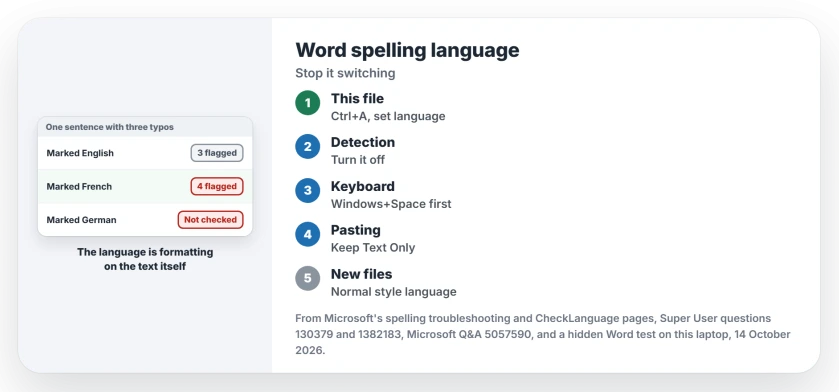
Status: in a hidden Word on 14 October 2026 (build 16.0.20430), pasted text still kept its own language, and Detect language automatically was switched on.
1. Fix this document first
- Press Ctrl+A to select everything.
- Click the language name in the status bar, or go to Review, Language, Set Proofing Language.
- Pick your language, clear Do not check spelling or grammar, and select OK.
Then press F7 to run the check again. Ctrl+A leaves out headers, footers and footnotes, so click into each of those and repeat.
One Super User owner did exactly this, also pressing Default, and wrote that it solved the problem for them. That covers the text you have. The next three steps stop it coming back.
2. Turn off Detect language automatically
In the same Language box, clear Detect language automatically. Microsoft's reference describes the setting as Word detecting "the language you are using as you type".
Ours: the box was ticked here. Owners report the switch matters: one Super User commenter said turning it off was what finally did it for them.
Microsoft also warns that words spelled the same in two languages can fool the detection, and that it may need several sentences before it can tell.
3. Match your keyboard language
This is the cause that surprises people. Charles Kenyon wrote in December 2025 that what overrides Word's setting for new documents "is not the Operating System Display language, but the Keyboard Input language".
Another owner on Super User saw the same, noting that new text seemed to "default to the language selected in the Windows task bar".
So if Windows has an English US keyboard selected, your new text starts as English US. Check the taskbar's language button first.
Press Windows+Space and pick your own language's keyboard before you open Word. Remove keyboards you never use in Settings, Time and language, Language and region.
Shortcuts can also switch layouts behind your back, as we covered in the hotkeys that swap your keyboard layout.
4. Check pasted text and your styles
Pasted text brings its language with it. Charles Kenyon puts it this way: "This attribute can be introduced into a document with pasted text".
Ours: we pasted a French-marked sentence into an English UK paragraph. It stayed French, with 4 red flags instead of the 1 real typo. Marking it English UK cut that to 1.
To avoid it, paste with Keep Text Only from the Paste Options button. Then the text takes your paragraph's language. I would make that a habit for anything copied from the web.
Styles can carry a language too. The owner on one Super User thread found it set inside the style their text pasted into, and fixed it under Modify Style, Format, Language.
Do the same for Normal if new documents start wrong. Styles hide other surprises as well, such as heading numbers that turn into black boxes.
Still reverting? A 2025 owner fixed the default in File, Options, Language by setting the right language as preferred, then restarting Word.
The Short Version
- Word stores the language on the text itself, like bold or italic.
- Ctrl+A, then set the proofing language and clear Do not check spelling or grammar.
- Turn off Detect language automatically.
- Pick your own keyboard language with Windows+Space before you open Word.
- Paste with Keep Text Only, and check the language in your styles.
Where to Next
Which pair does Word keep flipping between on your PC, such as UK and US? Leave the two languages in a comment. I am keeping a tally of the pairs.

Isaac Smith is the founder and editor of PC Glance, a website that covers computers, laptops, and technology. He is a tech enthusiast and a computer geek who loves to share his insights and help his readers make smart choices when buying tech gadgets or laptops. He is always curious and updated about the latest tech trends.