
Your Mac keeps showing Exchange Password Required, pointing you to Internet Accounts for your work account's password. You close it. Minutes later it is back.
I would decide first whether you want the account working or just quiet. The fixes differ. The quiet one is a single row of switches in System Settings.
On Ask Different, two questions about this notice have 11,810 and 8,513 views, and one asker only reached the server over a work VPN.
Where the notice comes from
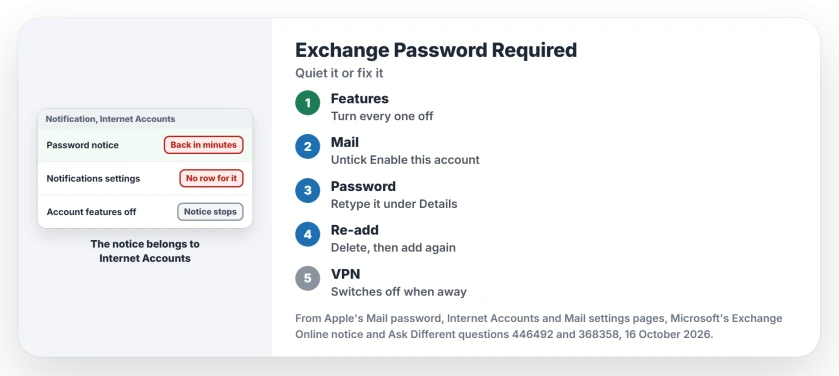
The notice is not from Mail. It points you to Internet Accounts, which lends one account to Mail, Contacts, Calendar and more.
That is why one reader said the usual route fails: Notifications settings "only lists apps that generate notifications". Another found that taking every account offline in Mail did not stop it either.
Apple says Mail asks for a password when it reaches your provider but the provider will not accept the password. Off the VPN or on bad Wi-Fi, the sign-in keeps failing. So the notice keeps returning.
Ours: none. This page was written without an Exchange account on any Mac, so each fix names the owner or Apple page behind it.
Status: built on 16 October 2026 from Apple's Internet Accounts, Mail and password pages, Microsoft's Exchange Online notice and owner answers on Ask Different, 2019 to 2025.
Turn off every feature of the account
Open System Settings, then Internet Accounts, and click the Exchange account in the list on the right. Turn off every feature, not only Mail.
An owner posted exactly that in 2021. Their words: "This will stop all notifications temporarily". An earlier answer gave the same advice, unticking everything the account is used with.
Apple warns that turning features off "can remove data stored in your apps". It adds that the data may come back when you turn them on again, so this suits an account you will reconnect.
Or take the account offline in Mail
If Mail is the only app using the account, there is a narrower switch. In Mail, open Settings, then Accounts, then Account Information, and untick Enable this account.
Apple says the account "is disabled and taken offline" when you do. An owner suggested it in 2024. No reply says it held, so I rank it second.
Check the password once
If you do want the account working, fix the password where macOS keeps it, not inside Mail's own settings. Quit Mail first. Then open Internet Accounts, click the account, and click Details if you see it.
Delete the password and type your current one. If Mail still asks, Apple says "the password is probably incorrect". I would try this before deleting anything.
If your Mac also keeps asking for its own keychain password, that has a separate fix.
Delete the account, then add it again
Two owners ended it this way, and it is your best step if the account has to work. One deleted the account and added it back, which "worked for me", though mail took a while to download again.
Another, who never used the Mail app, just removed it, and the notice went "away instantly". Apple lists one cause that only this fixes: a provider that "changed its authentication method".
Microsoft did exactly that for Exchange Online. Its notice says, "Basic authentication is now disabled in all tenants". If your account was set up years ago, it may need adding again to sign in the new way.
Why can't Notifications settings silence it?
Because the notice comes from the system, not an app, so you will not find a row for it in the Notifications list. Two readers offered Do Not Disturb, now part of Focus, and one called it "a temporary remedy".
What if it only appears off the VPN?
That was the 2019 asker's case. If your server is only reachable on the work network, every check made away from it fails and asks for the password.
The feature switches in Internet Accounts suit that pattern: off when you leave the VPN, on again when you connect, which takes a few seconds each way. On Windows, Outlook's missing password box is a different problem.
The Short Version
- Exchange Password Required comes from Internet Accounts, so Notifications settings cannot mute it.
- To quiet it, turn off every feature of the account in Internet Accounts, the fix an owner posted in 2021.
- If only Mail uses the account, untick Enable this account in Mail's Account Information settings.
- To keep it working, quit Mail and retype the password in Internet Accounts, under Details.
- Still asking? Delete the account and add it again; Microsoft has switched off the old sign-in method.
Where to Next
VPN, bad Wi-Fi, or a changed password? Your comment with the setup you have shows me which case this page still lacks.

Isaac Smith is the founder and editor of PC Glance, a website that covers computers, laptops, and technology. He is a tech enthusiast and a computer geek who loves to share his insights and help his readers make smart choices when buying tech gadgets or laptops. He is always curious and updated about the latest tech trends.