
You open your MacBook in the morning and the menu bar still shows last night's time. The clock runs from the minute you closed the lid, and catches up later, sometimes hours later.
I would not reset anything big for this. The clock is set by a small background process, and when it skips its check after waking, the fixes are a switch, one Terminal command, or one settings file.
Asked in July 2025, the Ask Different question about it has 5,969 views. Another, about a clock wrong by months, has 12,150.
Why the clock sticks at the time you closed the lid
The 2025 asker, on a 2020 Intel MacBook Pro running Sonoma, saw it on roughly 70 percent of wakes. In their words, the Mac "will count the time from the time when I put it to sleep".
It fixes itself, but slowly: "anything from 5 minutes to a couple of hours". The asker found the same reports going back through 2023 to 2025, on several macOS versions, so I would not wait for one update to cure it.
Ours: none. No test Mac was at hand, so the steps lean on Apple's Date and Time pages and two Ask Different threads.
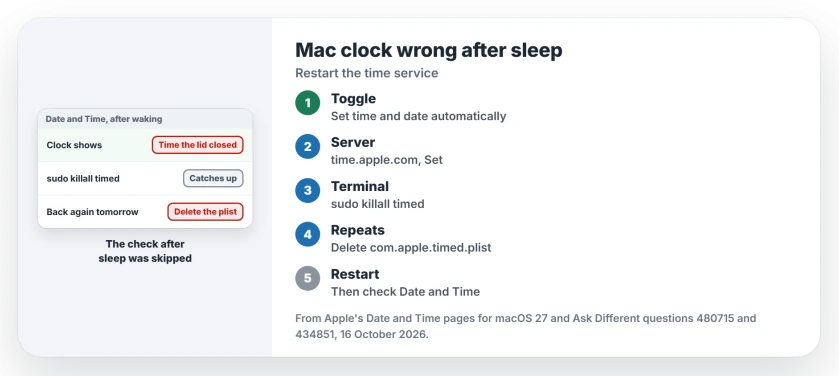
Status: Apple's Date and Time pages for macOS 27, read again on 16 October 2026; the Terminal steps are owner fixes from 2022 and 2025, not Apple's.
Flip the automatic switch
In System Settings, choose General, then Date & Time. Turn off Set time and date automatically, then turn it on again.
That was the asker's quick fix. It forced the clock to catch up, but they had to repeat it several times a day, and some days more than once.
Then check the time server. Apple's page on setting the date and time has you click Set next to the switch and "Enter a network time server for your region". The usual entry is time.apple.com.
Restart the time service from Terminal
macOS keeps time with a process called timed. An owner who had lived with this for years restarts it after each wake:
sudo killall timedThey said it "seems to fix it, and without a reboot". It asks for your password first. I would try this before the next step, because it changes nothing on disk.
Still coming back? Delete timed's settings file
If your clock keeps slipping, the accepted 2022 answer goes one step further. The owner deleted timed's saved settings file, then restarted the Mac:
sudo rm /var/db/timed/com.apple.timed.plistA commenter called it the one answer that worked for them. Another tried it, restarted, and still had the same issue. The 2025 asker quotes the same file fix from Apple's forum and says the fault returned there too.
That owner also deleted /etc/ntp.conf, timed's other config file. I would start with the plist alone and restart your Mac. Then open Date & Time again and check that the server still reads time.apple.com.
Wrong by months, not minutes?
That is the 2022 case. It may be yours if the battery ran flat. A MacBook Pro 14 ran its battery flat, and on the next start the date sat months in the past, about 105 days behind.
If you run sudo sntp -sS time.apple.com, it sets the clock right, but in the asker's words it "resets back to the massive offset" a day later. The file deletion fixed it for the answerer, who had the same fault, and for one commenter.
Could my battery be the cause?
Maybe, but it is unproven. One owner thinks it is, because the fault "only impacts Macs with batteries" and shows up on machines two or three years old. I have seen no Apple statement on it. If your Mac also shuts down early, or Battery settings say Service Recommended, have the battery checked anyway.
Does a wrong clock break anything?
Yes. Apple says to keep it right "so time stamps on emails, messages, and files are correct". A clock far off also makes websites look insecure, as in Chrome's DATE_INVALID warning, and can stop a macOS update installing. If the hour is wrong by exactly one, our time zone page fits better.
The Short Version
- After a wake, the clock can resume from the minute you closed the lid.
- Toggle Set time and date automatically in Date & Time settings.
- Run sudo killall timed in Terminal; one owner does it after every wake.
- Keeps returning? Delete com.apple.timed.plist and restart.
- Wrong by months after a flat battery? The file fix worked for the answerer and a commenter.
Where to Next
Did killall timed hold for a whole day on your Mac? Your model and macOS version in a comment would help me.

Isaac Smith is the founder and editor of PC Glance, a website that covers computers, laptops, and technology. He is a tech enthusiast and a computer geek who loves to share his insights and help his readers make smart choices when buying tech gadgets or laptops. He is always curious and updated about the latest tech trends.