
Your Mac shows the wrong time zone, maybe an hour off after a daylight saving change your country never makes. The Closest City menu only offers places in that wrong zone, so you seem stuck.
I would switch off the automatic setting and type a city name. The menu looks like a fixed list. It is not.
Mac owners have viewed the two Ask Different questions on it 29,017 and 17,478 times. The fix that worked is easy to miss.
Why the city list looks locked
One 2023 asker put the trap simply: "So the clocks switched, but my country doesn't use DST". Their Mac thought they were in CDT, while they were really in CST.
The Closest City field is what fools you. A reader on the 2022 question worked it out: "If you scroll that field (without typing) you only get cities in the current TZ / Country".
They added that there is "no indication you can type another". System Settings has no time zone map to click either, as an owner on Sequoia noted: "The timezone map is nowhere to be found now".
Ours: there was no Mac here to try this on, so the steps come from Apple and from owners who reported the outcome.
Status: from Apple's macOS 27 Date and Time page and its time zone article, published 15 July 2026, plus owner fixes from Monterey to Sequoia. Collected 15 October 2026; nothing was run on a Mac.
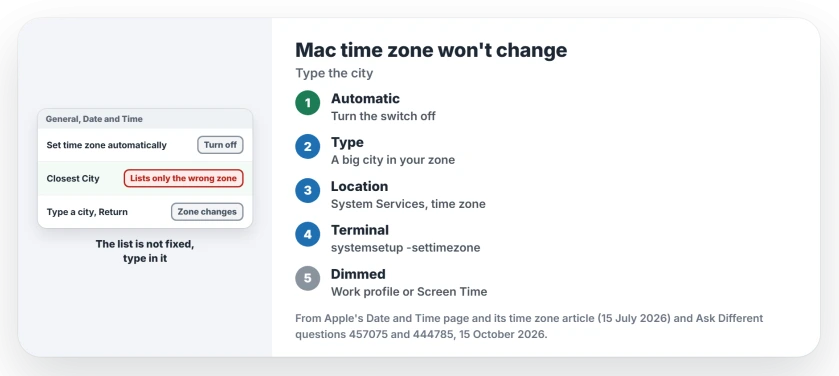
1. Turn off the automatic switch, then type your city
Open System Settings, click General, then Date and Time. Turn off the setting that picks the zone from your location.
Apple's Date and Time page gives the next move: "enter a city in the bottom text field, then press Return". Apple says Closest City is "A major city in your desired time zone".
Nothing on screen says the field takes typing. The answer that fixed it for several readers was "just typing the city name directly". One replied that "The dropdown box didn't suggest you could type anything".
Your own town may not be listed. In one reader's words, "It's just the drop down that doesn't have a city in their timezone". Type any large city in your time zone.
An empty settings search is a separate fault. Use the System Settings sidebar to reach Date & Time while checking that symptom.
2. Let Location Services set it again
Want the Mac in charge again? Apple's time zone article has a short list. Turn on Location Services, then open the Details button for System Services at the bottom.
"Make sure that the settings for time zone and system customization are turned on", Apple says. Then turn both automatic options back on in Date and Time, and restart your Mac.
An owner on Ethernet found another way: they switched to Wi-Fi and toggled both settings. In their words, "The time zone was corrected automatically".
3. Set it from Terminal
The top-voted answer on the 2023 question skipped the menu entirely, and its author wrote "This answer from Apple Support is what worked for me". It lists the zones, sets one and reads it back:
sudo systemsetup -listtimezones | more
sudo systemsetup -settimezone Europe/Berlin
sudo systemsetup -gettimezone
Swap Europe/Berlin for your own zone. I would try the typed city first. It needs no Terminal at all.
Setting dimmed and unclickable?
Apple names two causes for a dimmed setting: a work profile that restricts the device, or a passcode set in Screen Time.
A work Mac may have the zone locked on purpose, so raise it with IT before you touch it.
Does a wrong zone break anything else?
It can. Apple's iMessage sign-in article lists the date, time and time zone among its checks. A wrong zone can stop Messages signing in on your Mac.
Your iPhone keeps its own time zone switch. The iPhone wrong time page covers that one. A PC that refuses to change has its own Windows time zone page.
Zone correct, but the clock still lags after the lid opens? The clock-after-sleep page has the Terminal fix owners used.
The Short Version
- The Closest City menu only lists your current zone, but you can type in it.
- Turn off the automatic time zone setting, type a big city in your zone, press Return.
- Back to automatic? Turn on the time zone item under Location Services, System Services.
- Terminal can set it with sudo systemsetup -settimezone.
- A work profile, or a passcode set in Screen Time, can dim the setting.
Where to Next
Ventura, Sonoma, Sequoia or newer: which macOS showed you the wrong zone? I am tracking where the menu still misleads, and your comment adds to that list.

Isaac Smith is the founder and editor of PC Glance, a website that covers computers, laptops, and technology. He is a tech enthusiast and a computer geek who loves to share his insights and help his readers make smart choices when buying tech gadgets or laptops. He is always curious and updated about the latest tech trends.