
You click Update Now and macOS stops with Installation failed: "In order to continue installing, you need to be an owner". You bought the Mac and you are an administrator, so the wording seems wrong at first.
I read owner here the way Apple means it, in a technical sense. On an Apple silicon Mac, only certain accounts can approve a macOS update, and yours is not one of them yet. Another account almost certainly is.
Since July 2022, the thread about this error on Ask Different has drawn 10,858 views.
What owner means on your Mac
Apple calls it volume ownership. Its deployment guide describes an owner as "the user who first claimed a Mac by configuring it for their own use, along with any additional users".
An owner is needed to "authorize the installation of macOS software updates and upgrades".
Your admin rights do not decide it. Apple says software updates need ownership only, so a standard account that is an owner can install them, while an admin that is not an owner cannot.
Ours: none. I could not test on a Mac, so this follows Apple's deployment guide and one Ask Different thread with two owners.
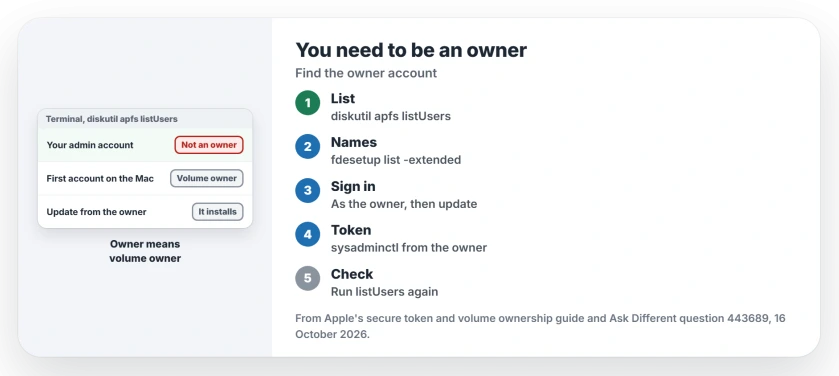
Status: from Apple's secure token and volume ownership guide, current for macOS 27 on Apple silicon, checked 16 October 2026 against owner reports from 2022 and 2023.
How your account lost out
In both reports, it began with setup. The 2022 asker stopped Migration Assistant partway to switch from Wi-Fi to Ethernet.
Restarting the migration, in their words, "created two users at some point", and the account they kept using was not the owner.
A 2023 owner made a Test account on a new iMac, then migrated two accounts from a Time Machine backup. One became an owner; one did not. They called it "a little unclear as to why some accounts get ownership while others do not".
If your setup was interrupted, or you made a throwaway account first, that first account is the one to look for. A stuck Migration Assistant has its own page.
See which accounts are owners
Apple gives the command for it. Open Terminal and run:
sudo diskutil apfs listUsers /It lists users by long ID, not by name. Apple's second command shows names and IDs together:
sudo fdesetup list -extendedMatch the IDs between the two lists. The first list holds the owners.
Install the update from the owner account
This route worked for the 2023 owner. They signed in to the Test account they had made first, ran the update from there, and it installed.
Log out, sign in to the owner account, and open System Settings, General, Software Update. Then return to your usual account. I would try this first, because it changes nothing about your accounts.
Make your account an owner too
To stop doing this every update, give your own account a secure token from the owner account.
Apple says the sysadminctl tool changes secure token status and always needs the name and password of an admin that already has one, which in this case is your owner account. Tokens and ownership "should generally align", it adds.
In Terminal, put your two account names in place of the examples:
sudo sysadminctl -secureTokenOn yourname -password - -adminUser ownername -adminPassword -The dashes make it ask you for both passwords instead of showing them.
I would run it only with both passwords at hand. Then run listUsers again. No owner in these threads has confirmed this route yet, so check the list before the next update.
No owner password?
Apple says System Settings and sysadminctl both block deleting the last secure token account, so an owner still exists on your Mac. The hard case is a forgotten password.
If your migration was interrupted, the 2023 owner's advice is blunt: "I would almost always find it better to erase the disk and start over from scratch".
Erase All Content and Settings itself needs an owner, Apple notes, so that may mean erasing from recovery.
Does this happen on Intel Macs?
No. Apple ties ownership to Apple silicon. If your Mac has an Intel chip and refuses an update, the cause lies elsewhere, and our page on failed macOS installs works through those.
Can a standard account be an owner?
Yes. Apple says it is possible to be a volume owner without being an administrator, and that updates need only ownership, so your standard account can install them if it is an owner. Changing startup security settings needs both.
The Short Version
- Owner means volume owner on Apple silicon, not the person who paid.
- Run sudo diskutil apfs listUsers / to see which accounts are owners.
- Sign in to an owner account, often the first one made, and update from there.
- To fix it for good, grant your account a secure token with sysadminctl.
- Both reports began with an interrupted or two-step setup.
Where to Next
Was your first account a leftover from setup, or from a migration? Tell me in a comment; I want to know how often the migration route causes it.

Isaac Smith is the founder and editor of PC Glance, a website that covers computers, laptops, and technology. He is a tech enthusiast and a computer geek who loves to share his insights and help his readers make smart choices when buying tech gadgets or laptops. He is always curious and updated about the latest tech trends.