
You double-click an app and macOS refuses, saying you lack "permission to open the application", even on an administrator account.
I would leave your user permissions alone. On a Mac this message usually points at the app's own files, its processor type or its signature.
Asked in December 2020, that exact message has 86,178 views on Ask Different, and another asker put a bounty on it.
Why an administrator gets told no
The message covers several different failures. One owner dug up the error behind theirs, kLSNoLaunchPermissionErr, with the line "Launched process exited during launch". The app started and died at once.
Apple's Gatekeeper page explains part of it. Before your app runs, macOS checks its Developer ID signature to confirm who made it and that it is unchanged since signing.
Ours: none. No Mac sits on my desk, so this page leans on Apple's Gatekeeper and Rosetta pages and on owners who got their apps opening again.
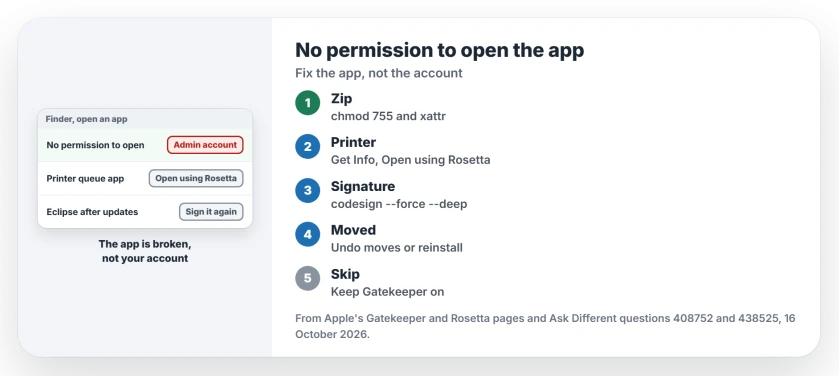
Status: owner fixes from Big Sur onward, plus Apple's Gatekeeper and Rosetta pages, checked 16 October 2026.
Unzipped it yourself? Restore the run bits
The accepted answer found two faults in a downloaded app: "When decompressing the .zip, the application contents didn't retain the execute bits." The browser had also quarantined every file.
Two commands repair both. Type each one with a space at the end, then drag the app onto the Terminal window to fill in its path.
sudo chmod -R 755 /path/to/app
sudo xattr -dr com.apple.quarantine /path/to/app
One reader confirmed it worked. Keep this for apps you trust, because Apple warns that unsigned software "may expose your computer and personal information to malware".
A printer queue or older helper? Open it using Rosetta
On an M1 Mac, one owner could not open the printer queue apps that macOS keeps in the Printers folder of their Library. Turning on Open using Rosetta for them "immediately solved the issue".
Select the app in the Finder, choose File, Get Info, and tick Open using Rosetta. Three other readers said it fixed theirs too.
Apple's Rosetta page says the box shows only on Universal apps whose developer added it. Rosetta itself ends for most apps with macOS 28, and the macOS 27 printer page covers that deadline for printers.
Did the app change itself? Sign it again
Some apps rewrite their own files after installing. That breaks the signature macOS checks. Apple says that when software "has been modified or damaged, your Mac notifies you that the app can't be opened".
For Eclipse, one owner replaced the signature with an ad hoc one:
codesign --force --deep --sign - /Applications/Eclipse.appSwap in your own app's path. A reader whose app was affected the same way answered, "This was the solution". Another fixed DBeaver this way.
Moved the app around?
A 2022 owner hit the message after replacing an alias in Applications with the original app. The accepted answer found the app was really sitting on a backup drive and advised, "I would undo the moves you made or reinstall the application".
Location matters too. The 2020 answerer also suggested moving an app into Applications or the Shared folder in Users, outside the protected folders.
Steps I would skip
One answer unpacks the app's program with a Homebrew tool called upx. A reader said it worked. But it alters the program itself, and I would rather get a fresh copy from the developer.
I would not switch Gatekeeper off for this either; it checks every app you open. If your Mac instead says it could not check the app or its developer, our Open Anyway page covers that route.
What about iPhone apps on a Mac?
They have no Rosetta box. The owner behind the printer fix saw the same message with sideloaded iPhone apps on an Apple silicon Mac in 2021. They found no fix.
The Short Version
- The message hides different faults; an admin account does not prevent it.
- App from a zip: chmod 755 and remove quarantine with xattr.
- Printer queue or helper app: Get Info, tick Open using Rosetta.
- App that changed itself: re-sign it with codesign.
- Moved copies or aliases: undo the moves or reinstall the app.
Where to Next
Execute bits, Rosetta or a fresh signature: which one got your app open? Post the app's name in the comments for me, and I'll file it under the right fix.

Isaac Smith is the founder and editor of PC Glance, a website that covers computers, laptops, and technology. He is a tech enthusiast and a computer geek who loves to share his insights and help his readers make smart choices when buying tech gadgets or laptops. He is always curious and updated about the latest tech trends.