
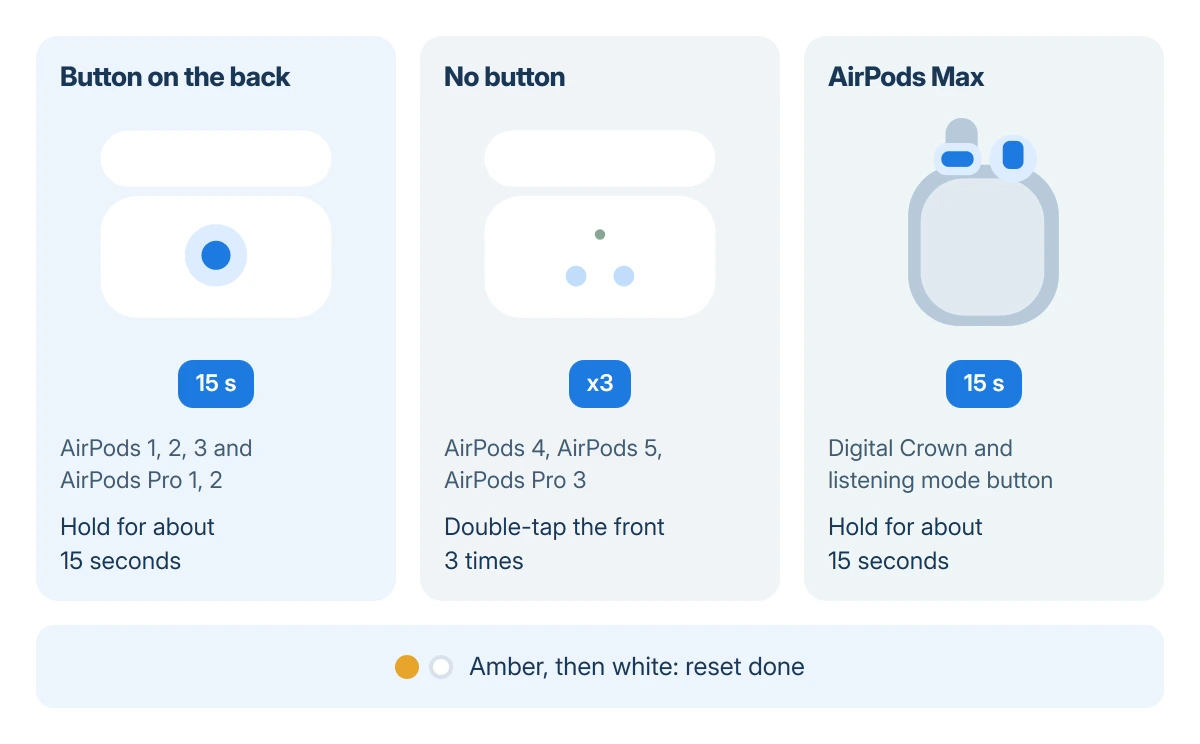
AirPods cases with a round button on the back reset with a 15-second press. AirPods Pro 3, AirPods 4 and AirPods 5 have no button and reset with three double-taps on the case front; AirPods Max use two controls.
For the in-ear models, the reset starts with both earbuds inside and the lid shut for 30 seconds. On every model, a light that flashes amber and then white is the sign it took.
Try a restart and Forget This Device first
A reset wipes the pairing, the name and the settings, so try the lighter steps first. Apple's restart for AirPods and AirPods Pro is simple: earbuds in, lid closed, at least 10 seconds.
If that does not help, remove them from your iPhone. Open Settings, tap your AirPods' name just under your Apple Account banner, then Forget This Device. Apple notes that this also drops them from your other devices on that Apple Account.
Status: Apple's reset and charging pages checked 18 October 2026, AirPods Pro 3 and AirPods 5 included. The steps are Apple's; no AirPods were reset for this guide.
On older iOS versions the same option sits under Settings > Bluetooth: tap the More Info (i) icon beside the AirPods, then Forget This Device, and confirm. AirPods missing from that list can go straight to the reset.
Reset AirPods with a button on the case
This covers AirPods (1st, 2nd and 3rd generation) and AirPods Pro (1st and 2nd generation).
- Put both earbuds in the case, shut the lid and wait 30 seconds.
- Open the lid.
- Hold the case's back button for about 15 seconds.
- Let go once the light flashes amber and then white.
On AirPods 1 and 2 with the original Lightning case, Apple documents the light inside the case between the earbuds, not on the front. A Wireless Charging Case for those models has it on the outside.
The white flashing light means the AirPods are now in pairing mode and have forgotten every device. Keep the lid open and go straight to the pairing section.
Reset AirPods 4, 5 or Pro 3 with taps
These cases have no button, so Apple replaced it with double-taps on the front. Timing matters more than force: each double-tap waits for the light to change.
- Earbuds in, lid shut, 30 seconds.
- Open the lid.
- Light on: double-tap the case front.
- Light flashing white: double-tap again.
- Flashing faster: double-tap once more.
- Amber, then white: done.
Keep the lid open throughout and tap near the light. If you lose count, shut the lid, wait, and start again from step 1.
Reset AirPods Max
AirPods Max have two controls on the right ear cup: the Digital Crown and the listening mode button. The restart and the reset use the same pair, and only the length of the hold differs.
To reset, hold both together until the light beside the charging port goes from flashing amber to flashing white, about 15 seconds. Apple's guide warns that letting go at about 10 seconds gives a restart instead.
Pair them again on an iPhone or iPad
With the case open and the light flashing white, hold the AirPods next to the unlocked iPhone. A setup card appears on the screen; tap Connect and follow the steps.
Apple says forgotten AirPods have to be paired again with a device on your Apple Account before you use them. Once the iPhone has them, your Mac and iPad on that account see them too.
Pair them with a Mac
Open the case near the Mac with the light flashing white, then open System Settings > Bluetooth. Your AirPods appear among the nearby devices; click Connect next to them.
If the Mac already lists them from your iPhone, choose them from Control Center > Sound instead. Apple's AirPods reset page gives one rule for every device: earbuds close to it, lid open, then follow the screen.
Pair them with an Android phone or a Windows PC
On Android, open Settings, then the Bluetooth or Connected devices page, and look for the AirPods under available devices while the light flashes white. Tap them to pair. Features such as automatic ear detection stay Apple-only.
On Windows 11, Microsoft asks for the accessory to be discoverable first, which a white flashing case light is. Then open Settings > Bluetooth & devices > Add device > Bluetooth and pick the AirPods.
If the PC does not show them, the AirPods on a Windows laptop guide covers the button timing and the duplicate entries Windows can leave behind.
When the light will not flash white
Apple's answer is to return the earbuds, shut the lid for 20 seconds, open it and run the reset again. On the buttonless cases, wait for each light change before the next double-tap.
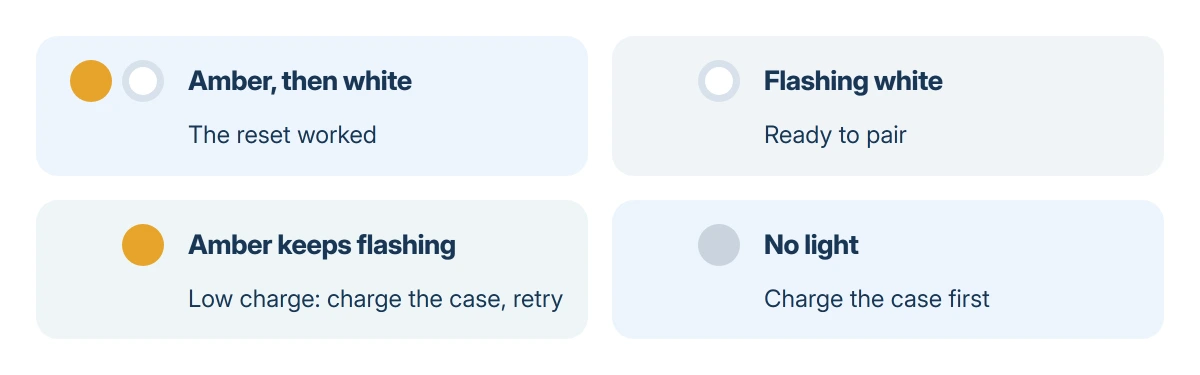
An amber light that flashes and never turns white can simply be a low battery. Apple states that on the newest models the case gives a brief amber flash when the earbuds are under 95 percent and the case under 25 percent.
Charge the case for half an hour and try once more. A case that shows no light whatsoever needs charging before any reset can work.
Our AirPod not charging guide checks each earbud and the case separately, which matters when one bud never shows up after a reset.
One owner on Ask Different described a case that flashed orange with both earbuds in, turned green with one taken out, and ignored the button. That suggests one earbud is not charging or not making contact, a job for Apple support.
When nothing works
Book a repair through Apple Support or the Apple Store app. AirPods that never reach amber and white after a full charge and two careful resets need a technician, and one bud or the case can be replaced on its own.
Bring the case and both earbuds. The one-year warranty and AppleCare+ cover manufacturing faults; a lost earbud is a paid replacement.
The Short Version
Close the lid for 30 seconds, open it, then hold the back button for 15 seconds or, on AirPods 4, 5 and Pro 3, double-tap the front three times as the light changes. Wait for amber, then white, and pair again.
Where to Next
If your case shows a light color or pattern not covered here, write down which model you have and what the light does during the reset, and leave it in the comments. I can tell you from that whether it is charging, pairing or a fault.

Isaac Smith is the founder and editor of PC Glance, a website that covers computers, laptops, and technology. He is a tech enthusiast and a computer geek who loves to share his insights and help his readers make smart choices when buying tech gadgets or laptops. He is always curious and updated about the latest tech trends.