

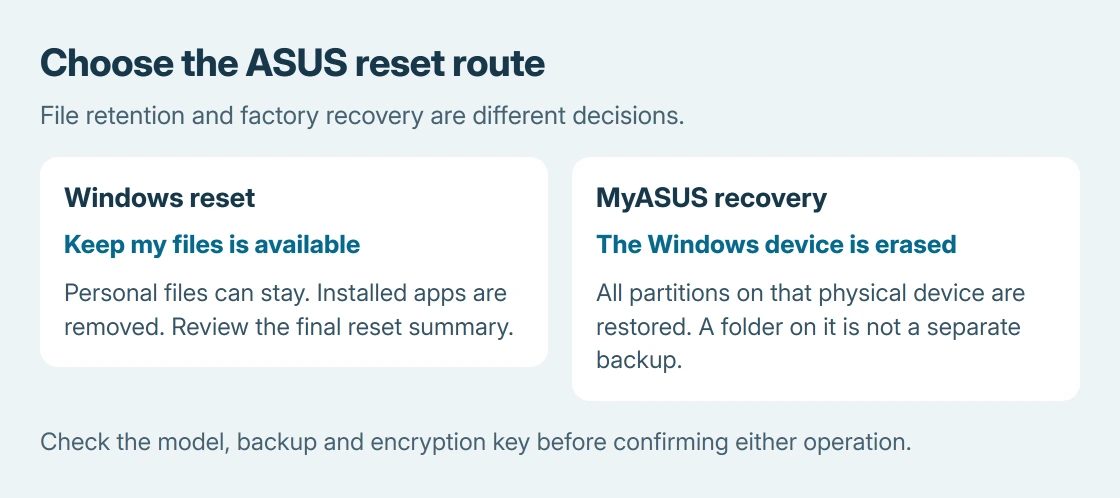
Resetting an ASUS laptop starts with choosing between Reset this PC in Windows and ASUS Cloud Recovery on supported models. The Windows option can preserve personal files.
ASUS Cloud Recovery erases the storage device containing Windows, including its other partitions.
Start from Windows when it still opens. Use the ASUS recovery environment when a factory restoration is needed and the model supports it. These instructions apply to Windows laptops, not ASUS Chromebooks.
Choose the reset that matches the job
ASUS documents both file-preserving and complete resets in its Windows reinstallation instructions. Make a separate backup before either operation, and have the BitLocker recovery key available if encryption is enabled.
For a software fault on a laptop being kept, Keep my files is the less destructive choice. Installed programs still need attention afterward. A complete manufacturer restoration is a different decision with a larger deletion scope.
Status: ASUS reset and MyASUS Cloud Recovery instructions checked October 25, 2026. Recovery availability depends on the model. No laptop was reset.
Confirm that the backup contains the files needed before proceeding. A folder on another partition of the same SSD is not a separate backup for ASUS Cloud Recovery.
Open Reset this PC while Windows works
Search Start for Reset this PC and open the result. On Windows 11, select Reset PC. The Windows 10 interface uses Get started.
Choose Keep my files or Remove everything, then choose Local reinstall or Cloud download. ASUS says Cloud download is an alternative when the local installation files cannot complete the reset; it requires internet access.
Inspect Change settings before confirming. If Restore apps and settings which came with this PC appears, it controls the ASUS software and settings supplied with Windows. Choose deliberately rather than assuming every reset restores them.
Read View apps that will be removed, when offered, and retain the installers or account details needed afterward. Keep the power adapter connected until Windows finishes the operation.
Enter recovery when Windows will not open
At startup, ASUS specifies repeatedly pressing F12; some models use F9. At Choose an option, select Troubleshoot. The available entries decide the next step.
If Windows still runs, holding Shift while selecting Restart from the Power menu also opens recovery. The advanced startup guide explains other supported ways to reach that environment.
Reset this PC is the Windows reset route. MyASUS in WinRE, when present, opens the manufacturer tools. Its absence means that particular recovery feature is unavailable on the computer; repeatedly trying the key does not add it.
For encrypted files, identify the correct BitLocker recovery key before attempting a backup or reset from recovery. A Windows sign-in PIN is a different credential.
Use MyASUS Cloud Recovery only after checking the disk scope
ASUS's MyASUS in WinRE guide lists supported models originally supplied with Windows 11 22H2 or later, excluding S mode. A newer Windows installation alone does not establish compatibility.
In MyASUS, use Update, then open Cloud Recovery. Connect to a working network and follow the backup prompts. If Windows cannot open and important files have no backup, ASUS directs the owner to its service center first.
Before the final confirmation, understand the deletion: all partitions on the Windows storage device are restored to the factory arrangement. A second physical drive is different from a second partition on that SSD.
ASUS publishes an approximate 1-3 hours for this process, depending on the network and hardware. Automatic restarts and temporary black screens are expected. Leave its power and network connected.
After recovery, check Windows and the original fault
Complete Windows setup, check for updates and reinstall needed applications. If Cloud Recovery reports that its service period expired, ASUS says it can still restore factory versions; update Windows and drivers afterward.
Then repeat the task that originally failed. That verification is ours: reaching the desktop confirms the reset finished, but the original fault still needs checking.
For an incomplete Cloud Recovery or a missing recovery feature, contact ASUS with the model, selected route and exact error. Do not erase the SSD manually to make the recovery entry appear.
The Short Version
Windows Reset this PC offers file retention. Supported MyASUS Cloud Recovery restores the whole Windows storage device. Check the backup and encryption key, then verify the original fault afterward.

Isaac Smith is the founder and editor of PC Glance, a website that covers computers, laptops, and technology. He is a tech enthusiast and a computer geek who loves to share his insights and help his readers make smart choices when buying tech gadgets or laptops. He is always curious and updated about the latest tech trends.