A disabled MacBook needs its lock identified before a password reset. A timed login message, a startup padlock and an Activation Lock request use different credentials. Erasing the disk does not remove every kind of lock.
Read the complete message and note when it appears. A Find My lock starts with the owner's Apple Account. A forgotten firmware password needs Apple service and proof of purchase.
In this guide
Identify the screen before entering another password
Apple's startup-screen guide separates a normal login window, a firmware padlock, and an Activation Lock or system-lock PIN screen. The picture and the requested credential matter more than the general word disabled.
A named user account with a password box points toward macOS login. A padlock reached while trying Recovery points toward firmware protection on an Intel Mac. An Apple Account request or a lost-device message needs the account-owner route.
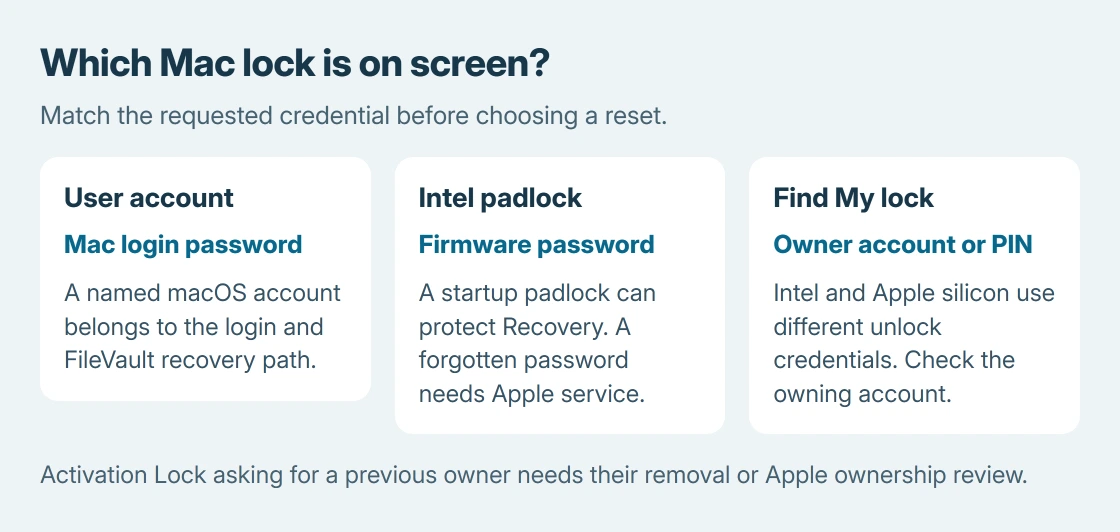
Status: Apple's startup, Find My, firmware-password and Activation Lock guidance checked October 25, 2026. Intel and Apple silicon differ. No lock was changed or bypass tested.
If a countdown is displayed, allow the stated interval before another attempt. Stop guessing when it finishes; a correct login password cannot replace an unrelated system-lock PIN.
Recover a Find My lock through the owner's account
On another device, open icloud.com/find and sign in to the Apple Account that owns the Mac. Select the Mac from the device list.
For a locked Intel Mac, Apple's Lost Mode instructions give Unlock, identity verification, and recovery of the numerical passcode. Enter that code on the Mac when its prompt permits entry.
On Apple silicon, Apple says to unlock with the owner's Apple Account identifier (email or phone number) and its password. The Intel PIN instructions do not apply to that model.
If the Mac is absent from that account, confirm which account originally enabled Find My. On a work or school laptop, ask the administrator whether it was remotely locked through device management.
Treat an Intel firmware padlock as a separate password
A firmware password protects startup from Recovery or another disk. Apple states that this feature applies to Intel Macs, so an Apple silicon account-recovery screen should not be diagnosed as the same firmware feature.
Enter the firmware password if it is known. The firmware-password instructions say a forgotten password requires an in-person appointment at an Apple Store or Apple Authorized Service Provider, with the original receipt or invoice.
Changing the ordinary macOS account password does not supply that credential. Repeatedly pressing Command + R also does not remove a password protecting entry into Recovery.
If the screen is actually a named user's login rejection after an update, use the Mac login-password checks. Keyboard layout and FileVault belong to that separate path.
Ask the previous owner to remove Activation Lock
An Activation Lock screen requesting another person's Apple Account needs that person's cooperation. Apple documents that erasing a Mac can leave Activation Lock in place.
The previous owner can follow Apple's Activation Lock removal instructions. For an offline Mac, these include signing into Find Devices, selecting the Mac and choosing Remove.
The owner should complete that operation in their own account. There is no need to send their password to the buyer. If ownership can be documented but removal is unavailable, Apple's page provides an Activation Lock support request.
For a Mac already accessible and being handed over, follow the MacBook factory-reset preparation. Preparing a transfer while access works is different from recovering a locked secondhand machine.
Give Apple the exact message if access remains blocked
Record the Mac model, the complete message, the credential requested and whether the screen appears before login or only when entering Recovery. Bring purchase documentation when arranging service.
Matching those details before choosing a reset is ours. It prevents treating all disabled screens as one password problem, and avoids deleting files without resolving the lock that stopped startup.
If the correct Find My credential is unavailable or the firmware password is forgotten, use Apple's ownership-verification and service routes. A generic reinstall is not a documented replacement for them.
The Short Version
Identify the lock first. Find My recovery uses the owning account, Intel firmware protection uses its separate password, and Activation Lock may require the previous owner. Keep timed login problems on the ordinary account-recovery path.