
An Acer laptop can reset from Windows Settings or, when Windows will not open, from recovery reached with Alt + F10. The next choices decide what stays and how Windows reinstalls.
Back up first, connect the power adapter and obtain the BitLocker recovery key if encryption is enabled. These steps apply to Acer Windows laptops. An Acer Chromebook needs ChromeOS recovery.
Open the Windows reset controls if the desktop works
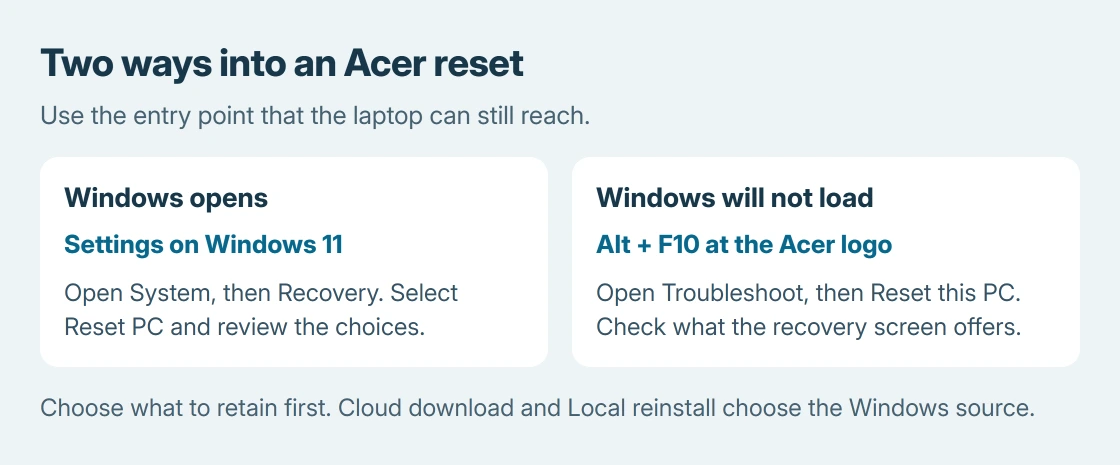
In Windows 11, open Settings, choose System, then Recovery and Reset PC. Acer gives that route in its factory-reset instructions.
In Windows 10, the direct Windows route is Settings > Update & Security > Recovery, then Get started under Reset this PC. Microsoft documents both versions on its PC reset page.
Status: Acer and Microsoft recovery instructions checked October 25, 2026. Settings paths differ between Windows versions. No Acer computer was erased or tested.
Check that the next screen offers the file-retention choices before continuing. Opening Recovery or Reset PC alone has not yet reinstalled Windows.
Use Alt + F10 when Windows cannot load
Shut down the laptop first. If it is stuck, Acer's startup recovery procedure specifies holding Power for 5 seconds to turn it off.
Switch it on, then press Alt + F10 together as the Acer logo appears. The documented result is a waiting message followed by Choose an option. Select Troubleshoot, then Reset this PC.
This is a startup shortcut, not a key combination to press after the Windows desktop appears. If it boots normally, use the Settings route instead of restarting repeatedly to catch the logo.
If the shortcut does not open recovery, Windows also supports holding Shift while selecting Restart from an available Power menu. The advanced startup options provide other entry routes.
Some Acer factory recovery arrangements differ. Its switching-OS manual describes a manufacturer restore screen on designated commercial models with a recovery partition.
That factory-image workflow has different consequences. Read its deletion notice before treating it as a file-preserving reset.
Decide what to keep before choosing the installation source
Keep my files reinstalls Windows and preserves personal documents, while removing apps and settings. Remove everything includes personal files in the deletion. Check the separate backup before choosing either.
Next, choose the installation source. Cloud download obtains Windows over the internet. Local reinstall reuses files on the laptop and suits a limited connection, provided those files are usable.
Microsoft says Cloud download can replace damaged or missing installation files. That makes it an alternative after a local-reinstall failure; it is not a different level of file retention.
For a laptop going to another person, read the pre-sale reset checks before confirming the deletion settings. File removal and drive cleaning are separate choices.
Read the final summary and let the reset finish
Review what will be removed, then select Reset only when those effects match the intention. Leave the power connected. Windows can restart automatically and show a black screen during the reset.
Do not force another shutdown because the screen went dark. Microsoft's instructions warn that manually restarting during the operation can make it fail.
After completion, finish setup if keeping the laptop. Reinstall needed programs, check for updates and restore only the files required from the backup. Then try the original failing task again.
That final check is ours: a completed reset establishes that Windows reinstalled, but it does not demonstrate that a failing SSD, damaged keyboard or charging problem was repaired.
If recovery fails before Windows is restored
Save the exact error and whether the failure followed Alt + F10, Local reinstall or Cloud download. Contact Acer with the model and that sequence if recovery remains unavailable.
If valuable files have not been backed up, arrange recovery help before agreeing to an erase or installation from USB. Repeating a destructive restore is not a substitute for recovering those files.
The Short Version
Use Settings when Windows opens, or Alt + F10 at the Acer logo when it does not. Select file retention first and the installation source second. Review the deletion summary, keep power connected and verify the original fault after setup.

Isaac Smith is the founder and editor of PC Glance, a website that covers computers, laptops, and technology. He is a tech enthusiast and a computer geek who loves to share his insights and help his readers make smart choices when buying tech gadgets or laptops. He is always curious and updated about the latest tech trends.