
Playing iMessage games starts inside a Messages conversation. Tap +, choose Store, and install an iMessage game. Then return to that conversation and open the game from the same app menu.
GamePigeon is one example: it contains games such as 8-Ball, Word Hunt and Chess. Its App Store listing identifies it as an iMessage app, so opening it through Messages is the intended route.
Install the game from the conversation
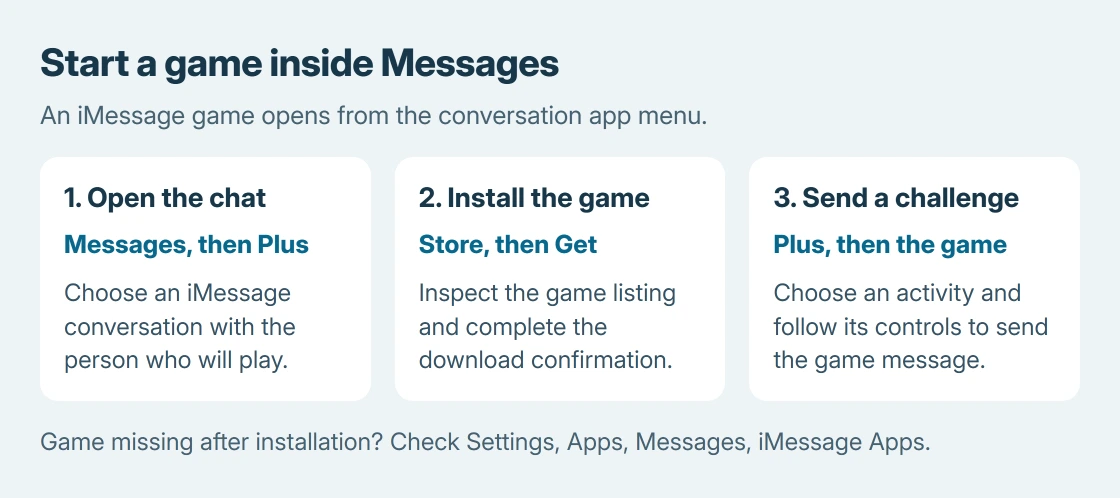
Open Messages and select the person to play with. Tap the + button beside the message field, then choose Store. Swipe up in the app menu if the entry is not immediately visible.
Apple documents this installation path in its iMessage app instructions. Search the store for the game, inspect its listing, and tap Get or the displayed price. Complete the download confirmation.
Status: Apple's iMessage app controls and GamePigeon's US listing checked October 25, 2026. Availability and purchases can vary. No game or in-app purchase was tested.
The current GamePigeon listing offers a free download with optional in-app purchases. Free installation does not mean every extra inside the app is free.
Open the installed game and send a challenge
Return to the conversation. Tap + again, find the installed game and open it. For GamePigeon, select an activity such as 8-Ball, follow its setup controls and send the game message when prompted.
The other player opens the received game message in Messages. If installation is requested, they need the same game app before continuing. Follow the game's turn and send controls rather than sending a screenshot of the board.
Apple's GamePigeon feature explains that 8-Ball replays the opponent's previous shots at the start of a turn. That makes it a useful first choice when the players are replying at different times.
Not every activity follows that rhythm. The same Apple feature describes Crazy 8 as real-time play. Finish the chosen game's actual turn instead of assuming every game waits indefinitely for a text reply.
Check that the conversation uses iMessage
iMessage games need an iMessage conversation. Ordinary messages reaching an Android phone through SMS or RCS do not make an iMessage-only app playable there.
Check the message field before trying another installation. iMessage is the relevant service; a green conversation can use RCS or SMS/MMS instead. The bubble color alone does not identify which green-message service is active.
Apple says iMessage uses Wi-Fi or cellular data in its message-type explanation. If the expected Apple-device conversation cannot use iMessage, resolve that connection or activation problem first.
The iMessage activation guide covers a phone number that will not activate. A game installed correctly cannot repair that account or carrier setup.
Bring back a game missing from the Plus menu
Open Settings > Apps > Messages > iMessage Apps and check that the installed game is enabled. Apple gives that control for turning iMessage apps on or off.
Then return to Messages and swipe up in the Plus menu to check its remaining entries. Once found, touch and hold the game's icon and drag it earlier in the menu if easier access is wanted.
For a child who cannot install it, check the app's age rating and the family's existing purchase permissions. The parental-controls guide explains where those controls now sit.
Separate a game fault from a messaging fault
Send an ordinary iMessage in that conversation. If it also fails, deal with the messaging connection first. If text works but one game does not open or advance, give the game developer its name and the exact failure.
That comparison is ours. It helps choose the appropriate support route without promising that reinstalling a game will repair iMessage itself. A failed App Store download belongs with Apple's download support.
The Short Version
Install an iMessage game through Messages > + > Store. Open it again from the Plus menu in an iMessage conversation and send the game's challenge. Check iMessage Apps in Settings if an installed game is missing.

Isaac Smith is the founder and editor of PC Glance, a website that covers computers, laptops, and technology. He is a tech enthusiast and a computer geek who loves to share his insights and help his readers make smart choices when buying tech gadgets or laptops. He is always curious and updated about the latest tech trends.