
An Outlook calendar not syncing with iPhone needs an account check first. Confirm which calendar holds the event, then enable that account in the app. An IMAP mailbox can receive email while providing no calendar sync.
The account lists inside Apple Calendar and Outlook for iPhone are separate. Connect the same Microsoft mailbox in the app whose calendar is missing.
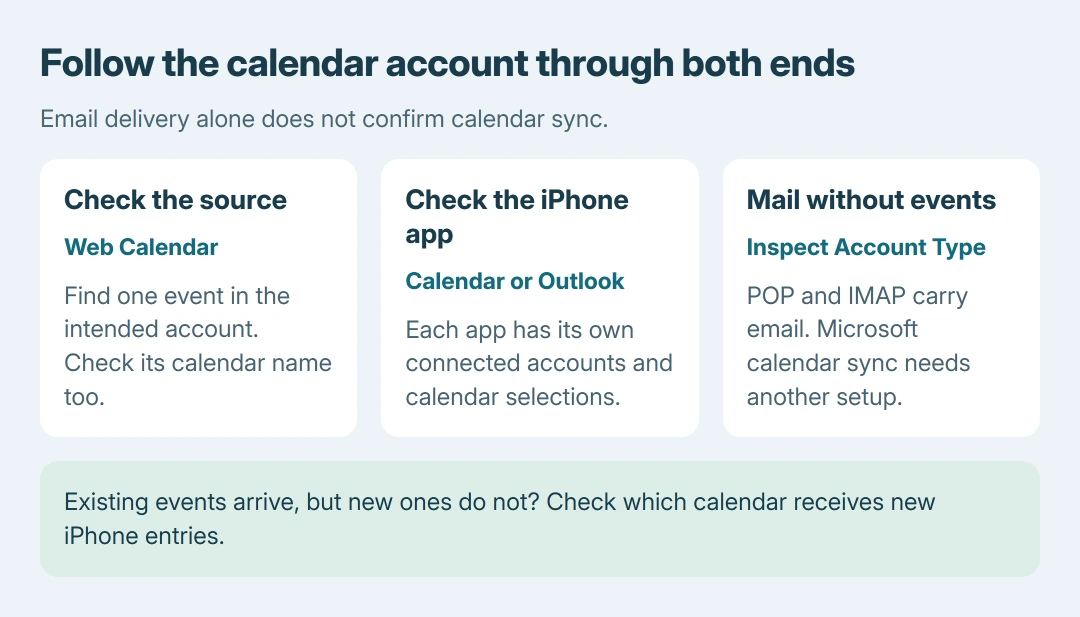
Compare the same account and event first
Open the affected mailbox's calendar in a browser and locate one recent event. For personal Outlook.com, Hotmail or Live accounts, use Outlook.com. For work or school, use the organization's Outlook web access.
Check the calendar name as well as the email address. An event in iCloud or a calendar stored only in a desktop Outlook data file is not automatically an event in the Microsoft mailbox being checked.
Status: iPhone and Outlook calendar routes checked October 26, 2026. Apple Calendar and Outlook for iOS use different account controls. No account was reset or calendar edited.
Microsoft documents the limitation in its mobile calendar sync guidance: IMAP and POP handle email rather than calendars or contacts. Working mail therefore does not prove that calendar sync was configured.
If the event is absent from the web calendar, changing the iPhone's refresh settings cannot download it from that account. Check the calendar containing the original event and which account the desktop app uses.
Our comparison is to follow one identifiable event through the same account at each end. Avoid changing several account configurations while comparing different events.
Enable the Microsoft calendar in Apple's app
For the built-in Calendar app, open Settings > Apps > Calendar > Calendar Accounts. Select the intended account and enable Calendars if the switch is offered. Complete any sign-in request for that account.
Open Calendar and tap Calendars to select the Microsoft calendar. A connected account can have its calendar hidden. The missing events guide covers visibility and old-event windows separately.
Without a calendar switch, check how the account was added. Microsoft says an IMAP setup can explain this. Use Outlook.com for personal Microsoft mail or Microsoft Exchange for a Microsoft 365/Exchange work account.
Before removing an account, verify its important mail, events and other synced information on the provider's service. Preserve anything stored only locally, and confirm access to its password and verification method.
Then remove that account from its iPhone account screen and add it again with the correct provider. Apple's Calendar account instructions start from Calendar Accounts > Add Account. Re-enable its calendars after sign-in.
A managed work account may require administrator approval or a company-approved app. Give an approval or policy message to IT instead of entering guessed server names.
Put newly created events on the Outlook calendar
When existing Outlook meetings arrive but new iPhone entries never reach Outlook, open one of those new entries and inspect its Calendar field. It may have been saved to iCloud or another account.
Apple says the chosen Default Calendar receives new entries automatically. Open Settings > Apps > Calendar > Default Calendar and choose the intended Microsoft calendar for future events.
That choice does not move events already saved elsewhere. Inspect an existing event before changing its calendar; for an organized meeting, preserve its invitation and attendee arrangement rather than making an independent copy.
For invitations created in Outlook, start with the correct calendar and attendees. An invitation saved under another account will not test the calendar connection being repaired.
Reset the account inside Outlook for iOS
In the Outlook app, open Calendar and its account/calendar list using the calendar control or avatar near the top left. Select the relevant calendar. This selection is separate from Apple's Calendar app.
If it remains stale, open Outlook settings > Accounts, select the affected account and inspect its type. Microsoft states that Reset Account is the next repair for a supported account that is neither POP nor IMAP.
Tap Reset Account, then reopen the calendar and check the same event used at the start. This resets Outlook's account connection; it is not the iPhone's factory-reset command.
If that fails, Microsoft's next step is removing the account from this Outlook app and adding it again. Confirm the web copies and sign-in access first, then choose Delete Account > Delete From This Device in the account settings.
Handle delayed updates and continuing failures
For an Apple Calendar account without Push support, use Calendar Accounts > Fetch New Data to choose a schedule. Apple's Automatically option downloads while charging on Wi-Fi; it does not promise immediate updates.
A calendar that previously worked and then stopped needs a service check too. Microsoft's mobile troubleshooting page links Outlook.com status and its existing-sync repair guidance. Check that status without assuming an outage exists today.
If both apps fail for a work account, contact its Microsoft 365 administrator. For Outlook.com or the Outlook app, contact Microsoft Support; for a working web calendar failing only in Apple's app, contact Apple Support.
Include the affected account type, app, iOS version and whether the same event appears on the web. State whether the problem affects incoming events, newly created events or both. Those results decide which connection still needs repair.
The Short Version
Track one event in the same account, enable its calendar and check for IMAP setup. Repair Apple Calendar through its account controls, or use Reset Account inside Outlook for iOS. Check where new events are saved.

Isaac Smith is the founder and editor of PC Glance, a website that covers computers, laptops, and technology. He is a tech enthusiast and a computer geek who loves to share his insights and help his readers make smart choices when buying tech gadgets or laptops. He is always curious and updated about the latest tech trends.