
Safari can say the address is invalid when a link tries to open an app. If it started after canceling an Open prompt, retry the original link in a new tab before clearing any browsing data.
A link to an app and a normal website address need different checks. An app that was removed, a broken sign-in return link, or one affected Safari tab can produce this message even while ordinary websites load.
Retry the original link in a new tab
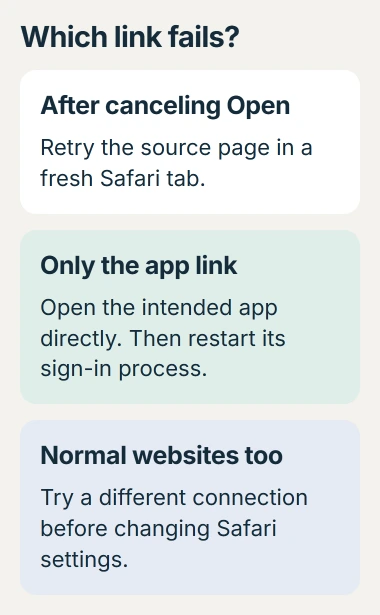
Return to the page containing the link. Open that page in a fresh Safari tab, then tap the link again. If the expected app-opening prompt returns, choose Open only when it names the app intended.
Use the original page or request a fresh sign-in email. Copying only the address left after a failed redirect can repeat the broken part of the journey.
Status: Apple guidance and complete developer discussions checked October 30, 2026. The new-tab workaround has older owner confirmations; it is not a verified fix for every current iOS release.
The canceled-prompt discussion contains a user-reported recovery: a new tab restored the link. A later reply says reopening the old tab can keep the failure.
That difference matters: closing Safari and restoring the same page is not always the same test. Try a fresh tab. These reports describe earlier iOS versions, so treat the result as a quick check, not a promised repair.
Check whether the address needs another app
Apple documents special URL formats that launch apps. A supported destination app handles these addresses; Safari cannot display every link as a webpage.
For example, an address beginning with myapp:// is an illustrative app-specific link. Adding https:// cannot convert that app address into a working website. Leave sign-in addresses intact.
Open the intended app directly and confirm that it is installed and usable. If it was deleted, use its official App Store listing to install it again, then begin the service's sign-in process afresh.
Our recommendation is to start from the service's known homepage or its own app. Do not install an unfamiliar app merely because a pop-up says the link needs it.
When a link opens a working app but the browser was preferred, use the separate Safari link-opening options. That behavior differs from an address that fails to open anywhere.
Check ordinary websites before resetting Safari
Type a known website address directly into Safari. If it loads and only one service's link fails, concentrate on that service's app, invitation or sign-in process.
If ordinary sites fail too, Apple says to try cellular data or another Wi-Fi network. A page that loads on the other connection points toward the original network or its filtering.
Apple's same instructions include checking an active VPN and restarting the device. For pages that open but remain empty, the Safari blank-page checks address that separate symptom.
Do not erase browsing history as the first response to one rejected app link. That removes useful data without establishing whether the destination app can handle the address.
Send a broken return link to the app's support team
A failure immediately after signing in can occur while the website is trying to return to its app. The service may need to correct that link; a phone setting cannot repair its configuration.
Give support the app name, iOS version and the step that triggers the message. Say whether the same process works from a fresh tab and whether the app opens directly.
Keep passwords, one-time codes and complete sign-in links out of public posts. An authentication link can contain private access information. Send requested details through the service's official support channel.
The Short Version
Retry the source page in a new tab, then check the intended app. Compare with an ordinary website before changing Safari settings. If only one service's return link fails, report that specific step to its support team.

Isaac Smith is the founder and editor of PC Glance, a website that covers computers, laptops, and technology. He is a tech enthusiast and a computer geek who loves to share his insights and help his readers make smart choices when buying tech gadgets or laptops. He is always curious and updated about the latest tech trends.