
Windows Update error 0x800f0983 can persist after scans and cache resets. On Windows 11, try Fix problems using Windows Update when those checks have failed. This repair reinstalls Windows while retaining apps and files.
Owners with this exact error have reported success with that option, but others still failed. Record the affected update and Windows build first, so a failed repair leaves a clear support case instead of another unexplained retry.
Note the update that fails before repairing Windows
Open Settings > Windows Update > Update history and note the failed update's KB number. Run winver from Start search and record the Windows version and OS build shown there.
Keep the error code with those details. 0x800f0983 and 0x800f0991 are different codes, even though both can appear during updates. The Windows update error index covers other common failures.
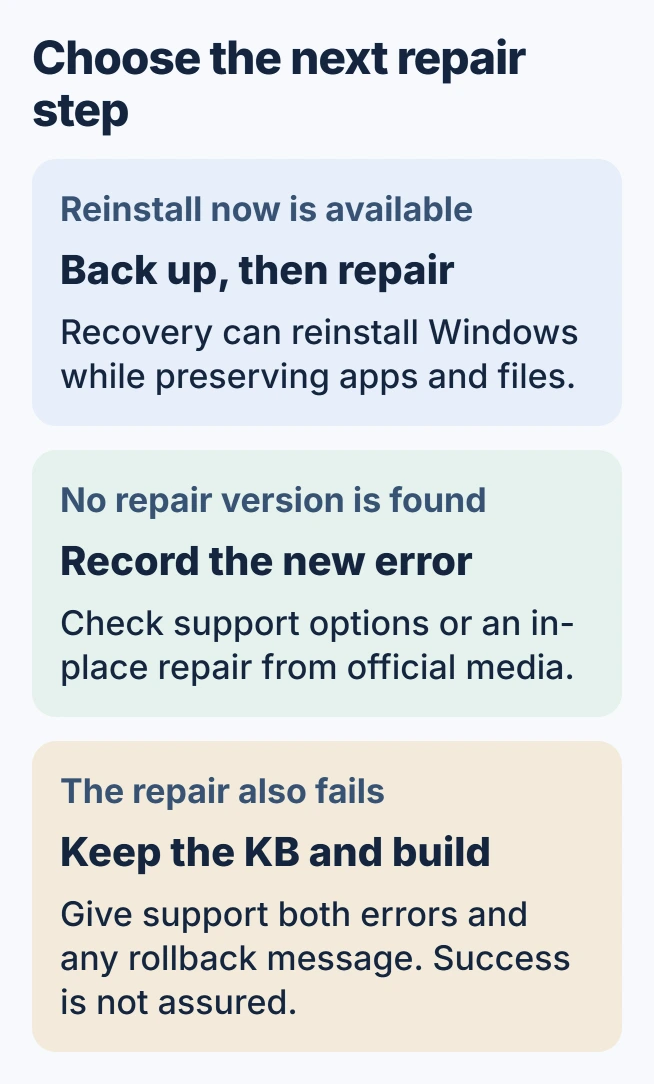
Status: checked October 30, 2026. Owners reported both successful and failed repairs for 0x800f0983. Microsoft documents the Windows 11 reinstall option; this is not a guaranteed fix.
An owner with KB5066835 reported that SFC, DISM and a reset of update services and caches had not helped. Those failed attempts matter: another run of that command list cannot guarantee a successful update.
Use the Windows 11 repair that retains applications
Before repairing the system, preserve important files in a backup and connect the laptop to power. Keep internet access available throughout. Microsoft's current-version reinstall guide documents the process.
Go to Settings > System > Recovery. Choose Reinstall now beside the Windows Update repair option. Review the restart choice, then select OK when ready for the repair to begin.
Microsoft says this reinstalls the current Windows version and preserves apps, files and settings. It downloads a repair version of the last successfully installed operating-system update. This is separate from Reset this PC.
Wait for installation to finish and complete the requested restart. Return to Windows Update, check for updates and review the new result. Success means the applicable update installs, rather than merely that the repair window closes.
The repair was confirmed by an owner whose earlier ISO attempt had rolled back with a Secure Boot error. After using the recovery reinstall, they reported that KB5070773 and a preview update installed successfully.
When Reinstall now is missing or cannot find a repair
Microsoft states that work-managed updates can make this recovery option unavailable. It also requires an adequately updated Windows 11 installation. Ask IT about a managed computer before attempting to change update policies.
The original asker encountered A repair version of Windows cannot be found. That is a separate failure during repair preparation. Record it as well as 0x800f0983; the original update code alone leaves out the new obstacle.
A possible alternative is an in-place repair using official installation media. Microsoft's installation-media instructions start setup.exe while Windows is running.
Continue only when Keep personal files and apps is available and selected. Booting from the media follows a different installation route. The Windows repair-install walkthrough explains the preparation and retention choices.
Stop repeating a repair that still fails
One owner explicitly reported that Reinstall now did not resolve the error. The original asker later said the problem was solved without naming the successful step. That later reply cannot prove which method fixed their machine.
Our recommendation after another failure is to give Microsoft Support the KB number, build, original error and repair outcome. Include any rollback message. Keep the backups until updates install and normal applications open correctly.
Avoid treating this code alone as a reason to remove language packs, delete servicing registry keys or change firmware security settings. The owner reports used here do not establish those changes as a repair for this case.
The Short Version
For persistent 0x800f0983 on Windows 11, record the failed update and try the documented recovery reinstall after backing up. Some owners succeeded and others did not. A missing repair copy or another rollback needs its own support details.

Isaac Smith is the founder and editor of PC Glance, a website that covers computers, laptops, and technology. He is a tech enthusiast and a computer geek who loves to share his insights and help his readers make smart choices when buying tech gadgets or laptops. He is always curious and updated about the latest tech trends.