
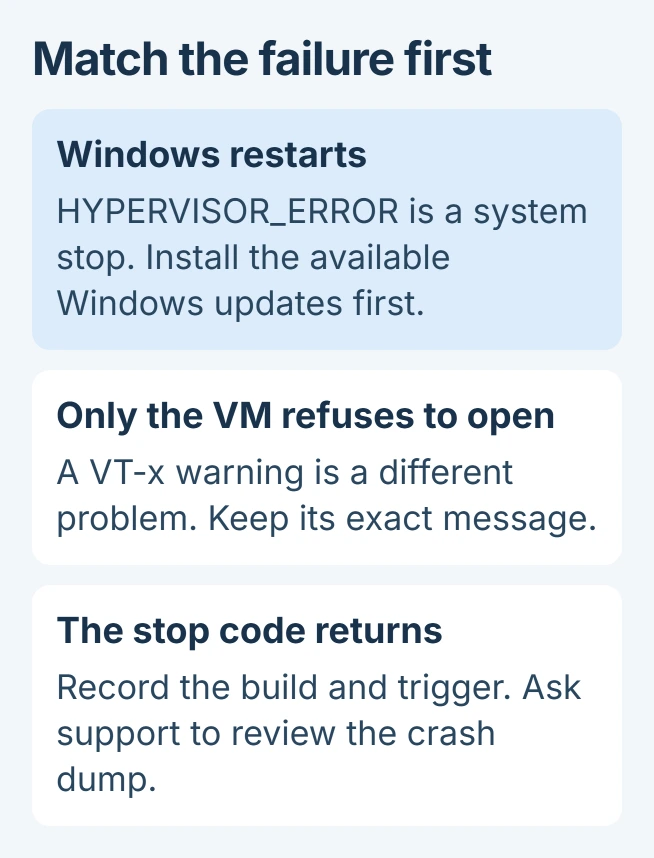
HYPERVISOR_ERROR in Windows 11 means the virtualization layer stopped with a fatal error. Check Windows Update first: Microsoft fixed one confirmed cause introduced by KB5089573, but the same stop code can have other causes.
The code is 0x20001, sometimes printed as 0x00020001. It identifies the failed subsystem, not a particular bad processor, driver or BIOS setting.
Install the fix for the documented update problem
Open Settings > Windows Update and select Check for updates. Install the available cumulative update for the installed Windows release, save work and complete any requested restart.
Microsoft documents the specific repair in KB5094126, released June 9, 2026. It applies to Windows 11 24H2 and 25H2.
Status: Microsoft's hypervisor definition and June 2026 repair checked November 1, 2026. The update fixes a specific regression; no PC crash or recovery was reproduced here.
The affected update could produce HYPERVISOR_ERROR or KMODE_EXCEPTION_NOT_HANDLED during restarts, virtual-machine operations or some games. Microsoft's release note explicitly identifies KB5089573 as the preceding trigger.
Check Windows Update > Update history for the installed updates, and run winver from Start to read the Windows version. A currently updated system should not need a June package installed over a newer cumulative release.
Microsoft says support for version 24H2 in its Home and Pro editions ended on October 13, 2026. If that is the installed edition, take the supported feature update offered by Windows Update as well.
After restarting, repeat the action that caused the crash. If it returns, record whether a game, VM startup, waking or ordinary desktop use triggers it. The June regression does not explain every later crash.
Distinguish the stop code from a VM configuration warning
A restart with HYPERVISOR_ERROR differs from a running Windows desktop where VirtualBox refuses to launch a guest. For VERR_VMX_NO_VMX, use the VT-x availability checks for that application message.
Likewise, a WSL launch failure with 0x80370114 follows the missing virtualization-feature procedure. It is not evidence that Windows has suffered this fatal stop.
Microsoft states in its bug-check reference that the error's four parameters are reserved. A copied parameter value alone is not a published diagnosis.
The reference directs technical troubleshooting toward a crash dump and the debugger's !analyze extension. That provides more context than the stop-code name displayed during restart.
Avoid treating virtualization switches as a universal repair
One owner experiencing HYPERVISOR_ERROR reported that driver and BIOS updates did not help. Turning the hypervisor off at boot also failed; disabling firmware virtualization appeared to stop the crashes at that time.
That workaround does not establish a defective CPU or justify disabling virtualization on every PC. Other owners in the June discussions recovered through update rollback or reported improvement after the repair update.
Early workarounds circulated before Microsoft published the repair. Start with the supported update instead of removing security updates or copying firmware changes from a different machine.
Memory integrity, virtual machines and other Windows features can depend on virtualization. Before changing it for diagnosis, ask manufacturer support or the IT administrator about the effects and how to restore the current configuration.
Send repeat crashes for dump analysis
Keep the exact stop code, Windows edition and build, PC model, recent update history and triggering action. If Windows creates files in C:\Windows\Minidump, retain the files matching the latest crashes for support.
Use Microsoft or the manufacturer's private support-upload method if they request a dump. Crash files can contain system information; there is no need to post them publicly just to ask for help.
Ask support to interpret the dump before changing processor power settings, voltage or registry driver settings. A module name in a stack needs context, particularly when the same machine crashes during unrelated tasks.
If Windows cannot remain running long enough to update, use Microsoft's recovery support or the PC maker's recovery assistance. Avoid repeated resets without a diagnosis and a verified copy of important files.
The Short Version
Update Windows for the KB5089573 regression, then check whether the crash recurs. Separate VM launch warnings from a system stop. Persistent HYPERVISOR_ERROR needs crash analysis before further system changes.

Isaac Smith is the founder and editor of PC Glance, a website that covers computers, laptops, and technology. He is a tech enthusiast and a computer geek who loves to share his insights and help his readers make smart choices when buying tech gadgets or laptops. He is always curious and updated about the latest tech trends.