
Leaving a group chat on Android depends on its message type. RCS can offer an exit or member removal. SMS/MMS has no such membership control; ask for a new thread without your number and silence the old one.
The instructions here use Google Messages. On a Samsung phone, check which messaging app is open before looking for the same controls.
Open the group details and check the available exit
Open the conversation in Google Messages, tap its three-dot menu and choose Group details. If Leave group is offered, select it and follow the confirmation. Check that the conversation shows that you have left.
Do not assume every group has that button. Google's current group instructions document participant removal for RCS, while explicitly excluding SMS and MMS groups from that feature.
Status: Google Messages group controls and notification options reviewed November 2, 2026. Leave-button availability is conditional; no conversation was joined, exited or deleted.
Check the compose field: Google states that RCS message identifies RCS, while Text message means SMS/MMS in its messaging reference. This checks the conversation, not just the phone's capabilities.
An iPhone member does not automatically make a group MMS. Google says contacts using RCS on iPhone can join RCS conversations too.
Ask another RCS participant to remove you
If an RCS group offers no direct exit, ask a participant who uses Google Messages to open that conversation. The member-removal procedure documented by Google is:
- Open the three-dot menu and choose Group details.
- Find your name or number in the participant list.
- Open the menu beside that entry and choose Remove from group.
Ask them to confirm that your entry is gone. Removing other participants yourself would change their access; it is unnecessary when the purpose is to remove your own membership.
If member removal is unavailable too, confirm the conversation's message type with the other participant. A phone supporting RCS does not make every existing group an RCS conversation.
For SMS or MMS, request a new conversation without you
The people continuing an SMS/MMS conversation need to start a fresh message addressed only to the remaining recipients. Ask them to use that new thread instead of replying to the original recipient list.
Deleting the old thread on your phone does not change their copy. One owner reported that a later reply brought the deleted conversation back. Removing local history had not removed their number from the recipients.
For an unwanted spam group, Google's notification and blocking controls include Block & report spam. Review the confirmation before blocking, especially if familiar people share the conversation.
Stop the alerts while the messages remain
Google says a conversation can be snoozed from the main message list. Touch and hold the group, tap Snooze, choose Always or a temporary duration, then confirm with Snooze.
If that control is unavailable in the installed version, open the group's Group details > Notifications and select Silent. This stops sound alerts while keeping the conversation available.
Snoozing or silencing does not remove membership. Use the Android notification controls if alerts are coming from another app rather than this Google Messages thread.
Reading status is separate too. The Android read-receipt setting controls whether RCS contacts see that messages were read; it does not leave a group.
Keep important messages before tidying the list
Google states that deleting a conversation is permanent. Archive an inactive thread when its history should remain available outside the main list.
For an RCS group whose removal controls fail, report the Messages version, phone model and exact behavior through the app's help or feedback option. For SMS/MMS, phone settings cannot rewrite the other participants' recipient lists.
The Short Version
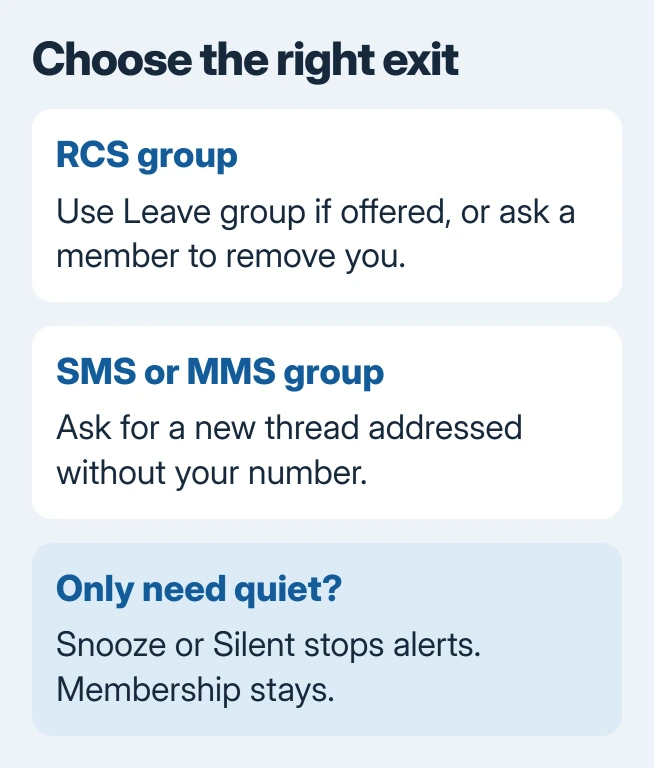
Use Leave group when the RCS conversation offers it, or request removal by another RCS participant. For SMS/MMS, ask the remaining people to start a new thread. Snooze or Silent manages interruptions without claiming to end membership.

Isaac Smith is the founder and editor of PC Glance, a website that covers computers, laptops, and technology. He is a tech enthusiast and a computer geek who loves to share his insights and help his readers make smart choices when buying tech gadgets or laptops. He is always curious and updated about the latest tech trends.