
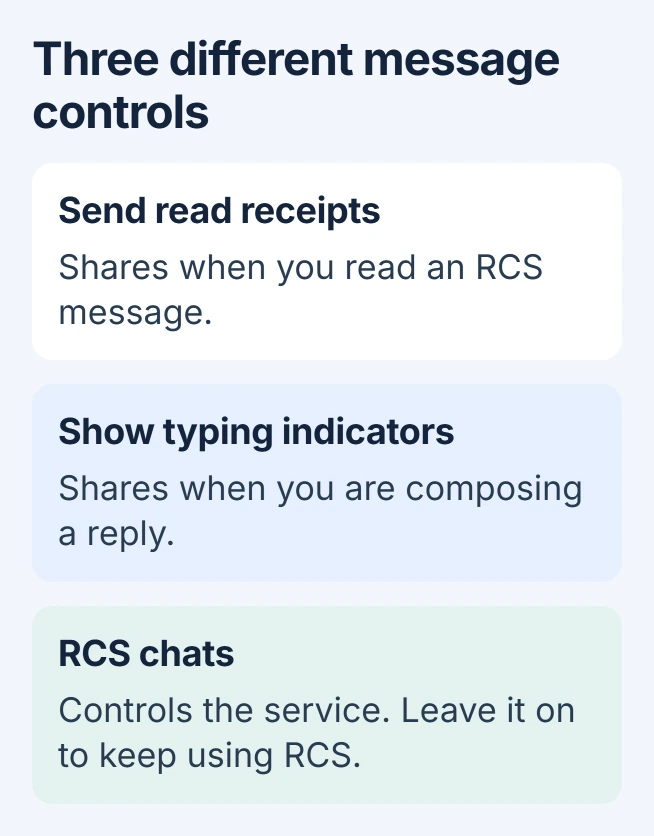
To turn off read receipts on Android, open Google Messages' Messages settings > RCS chats and disable Send read receipts. Messages still arrive, but this stops sharing when you read them through RCS.
A Galaxy phone may also use Google Messages. Check the app name before following Samsung Messages instructions, because the two apps have different menus.
Switch off the receipt in Google Messages
Open Google Messages, select your profile icon, then choose Messages settings. Open RCS chats and disable Send read receipts. Older versions may call that section Chat features.
Google says this switch controls whether other people can see that their messages were read in its RCS feature instructions. Leave the main RCS switch enabled if receipts are the only feature being changed.
Status: Android receipt settings checked against Google and Samsung guidance on November 1, 2026. Google Messages and older Samsung Messages use different controls.
Ask a trusted contact to send a fresh RCS message, then open it after changing the setting. Check the result on their phone. This checks outgoing reading information; the delivery indicator answers a different question.
Decide about typing indicators separately
In the same Google Messages section, switch off Show typing indicators if the other person should also stop seeing when a reply is being composed. Disabling read receipts alone leaves this separate preference unchanged.
Do not disable the whole RCS service merely to hide reading status. Google warns that repeatedly switching RCS off and on can remove you from group chats. Use the individual feature controls for this task.
Silencing notifications has another effect entirely. The Android app-alert settings govern interruptions on your phone, rather than the reading information sent to another person.
On an older Galaxy using Samsung Messages
Open Samsung Messages, tap its three-dot More options menu, then choose Settings > More settings > Multimedia messages. Switch Show when read off if that option is present.
Samsung documents this control in its messaging settings guide. It belongs to the multimedia-message settings and does not configure every chat app.
Samsung says its U.S. guide now applies to Android 11 or earlier. It lists discontinuation of Samsung Messages on Android 12 and newer beginning July 6, 2026. On a phone using Google Messages, follow that app's controls instead.
Check the app and message type when the switch is missing
Google states that an RCS message compose label identifies RCS, while Text message identifies SMS or MMS in its messaging security guide. Check this before comparing status indicators.
A WhatsApp or other app conversation has its own privacy settings. Changing Google Messages does not configure another application's receipts, and it cannot force the recipient to disclose their own reading status.
For an iPhone contact, a missing read indicator does not establish blocking. The recipient's settings and the messaging service matter before drawing that conclusion.
If the documented control is absent, check the app name and version, then contact its support team. Include whether the conversation uses RCS or SMS/MMS. A phone reset is unnecessary for locating a privacy preference.
The Short Version
Disable Send read receipts inside Google Messages' RCS settings. Review typing indicators separately. Older Samsung Messages installations use Show when read under Multimedia messages; match the route to the app installed.

Isaac Smith is the founder and editor of PC Glance, a website that covers computers, laptops, and technology. He is a tech enthusiast and a computer geek who loves to share his insights and help his readers make smart choices when buying tech gadgets or laptops. He is always curious and updated about the latest tech trends.