
Gmail not working on an iPhone needs two checks: whether the mailbox works online and whether its app can refresh it. In Gmail, swipe down to refresh the inbox, then compare that account's messages with its web inbox.
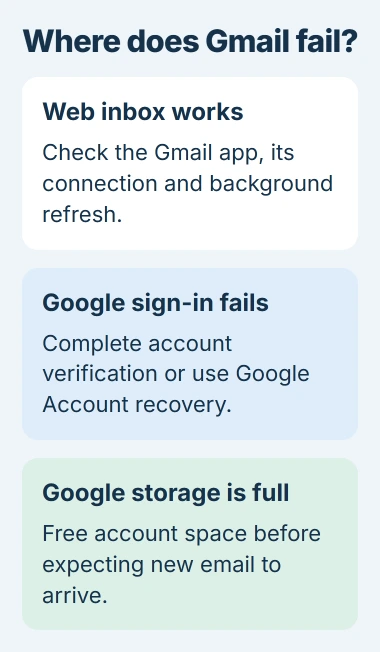
A working browser inbox points toward the app or its connection. A storage warning or failed Google sign-in needs an account fix. These steps focus on Google's Gmail app; Apple's Mail app has separate account controls.
Refresh the right inbox and compare it online
Tap the profile picture in Gmail and check the selected address. Return to that account's inbox and swipe downward from the top. Wait for the refresh symbol to disappear, then look for the expected message.
This refresh is documented by Google. Try opening a normal website in Safari too. If it fails, restore the phone's internet connection before changing Gmail settings.
Status: Gmail's iPhone sync, sign-in and storage guidance checked November 2, 2026. Apple Mail has separate controls. No personal mailbox was opened.
Visit Gmail's website from a computer and use the affected address to sign in. A message missing there too is not evidence of an iPhone-only fault. Check the account warnings before reinstalling an app.
For a Gmail address used inside Apple Mail, follow the iPhone Cannot Get Mail checks. Changing Gmail app settings does not repair Apple's separate mail connection.
Update Gmail, then check background delivery
Install an offered Gmail update through the App Store, then restart the iPhone. Open the app again and check the inbox before trying a more disruptive change.
When refreshing manually works but mail waits until the app opens, check Settings > General > Background App Refresh. Enable Gmail there so it can fetch content while unused, as Google's iPhone instructions recommend.
Messages already arriving without an alert are a notification problem. The iPhone email notification guide separates missing alerts from mail that never downloaded.
For older messages, Google's current app instructions list Gmail > Menu > Settings > General > Data usage > Sync settings. Check the number of days being synced. This controls the sync range; it is not an account-recovery tool.
Check Google storage when mail fails everywhere
Google says full account storage prevents Gmail from sending and receiving. The space is shared with Drive and Google Photos. Free space on the iPhone itself does not increase this account allowance.
Use Google's storage manager while signed in to the affected account. Review large messages and files. Save a separate copy of anything needed before deleting it from Google storage.
Items retained in Gmail's Trash or Spam still consume space. Empty only items intended for permanent deletion. After a large cleanup, Google's guide allows up to 48 to 72 hours for the storage total to update.
Once the account has room, ask the sender to resend missing mail. Messages rejected while storage was full were returned to their senders; refreshing the iPhone cannot download mail that Gmail never accepted.
Complete Google's sign-in when the account is absent
If Gmail opens without the needed account, tap profile picture > Add another account > Google. Complete Google's sign-in and any second verification step. Google states that two-step verification can require a prompt on another device.
The Gmail sign-in instructions link to account recovery when access fails. A forgotten password, unavailable verification method or rejected login belongs to that recovery process.
Do not remove a working account merely because one email is missing. First establish whether the website has that message and whether Gmail is displaying the intended address.
Keep a working mail route while reporting the failure
One owner reported in September 2026 that Gmail's app still received mail while Apple Mail stopped after a password change. Re-adding the account and reinstalling Mail did not fix their case. Repeated removal is not a guaranteed repair.
For a continuing Gmail-app failure, use the Gmail Help community linked from Google's sync page. Include the app version, the failed action, any error and whether webmail works. A managed work account may also need its administrator.
Keep using the working web inbox while the fault is assessed. That preserves access without assuming a phone reset will repair the account.
The Short Version
Compare the correct Gmail inbox with its web version. Fix app refresh and background delivery when webmail works; address storage or sign-in warnings when it does not. Treat Apple Mail as a separate connection.

Isaac Smith is the founder and editor of PC Glance, a website that covers computers, laptops, and technology. He is a tech enthusiast and a computer geek who loves to share his insights and help his readers make smart choices when buying tech gadgets or laptops. He is always curious and updated about the latest tech trends.