
Attachments not showing in Outlook can belong to an earlier message in the conversation, or be absent because the sender replied without attaching them again. Open the original email first and inspect both its header and message body.
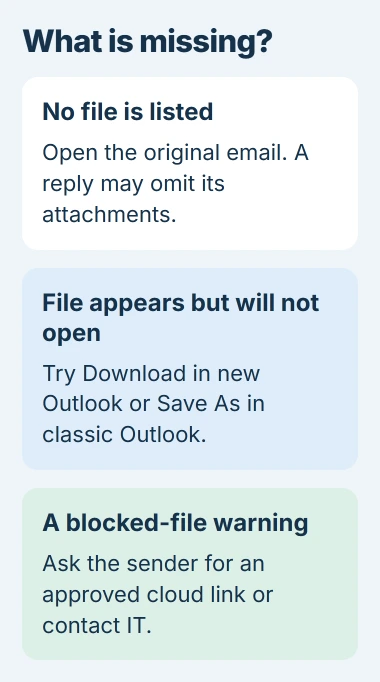
A file that is listed but will not preview needs a different fix from a file that was never attached. A security warning or a OneDrive link also changes the next step.
Inspect the individual email that carried the attachment
Open the sender's original message instead of only the latest reply. Microsoft says attachments usually appear near the subject in the Reading Pane, while classic Outlook can also place them within the message body.
The Outlook attachment guide distinguishes the file itself from its preview. Check the sender, date and filename before deciding the attachment disappeared.
Status: Microsoft's current Outlook attachment controls checked November 2, 2026. New Outlook and classic Outlook have different save commands. No mailbox was tested.
If the original email has no file either, ask the sender to inspect their sent message. A paperclip in a conversation list does not establish that every reply contains the attachment.
For voicemail recordings missing specifically in classic Outlook, use the voicemail attachment repair. That documented fault has a separate Office build fix.
Replies do not automatically send the original files
Microsoft states that Reply and Reply All leave out the incoming attachments. Forward normally includes them. This is explained in its reply and forwarding instructions.
To send a file back with a reply, attach it deliberately. In new Outlook, use Message > Attach File in the Insert group. In classic Outlook, the same command is in the Include group on the Message tab.
Check the filename in the draft before sending. If the document was edited, attach the saved revision instead of assuming the original incoming attachment changed with it.
An email that never left the sender's Outbox is another delivery problem. The Outlook sending checks cover messages held by attachments and connection failures.
Download a visible attachment when its preview fails
Open the menu beside the attachment. Choose Download in new Outlook, or Save As in classic Outlook. Save a trusted file into a known folder and open it from there with the appropriate application.
If that works, the file reached the mailbox. The remaining failure concerns Outlook's preview or opening behavior. Repeatedly asking the sender to resend the same file will not change its previewer.
In classic Outlook, check File > Options > Trust Center > Trust Center Settings > Attachment Handling. Clear Turn off Attachment Preview if previews were disabled, then inspect Attachment and Document Previewers for that file type.
These controls do not belong to new Outlook. Microsoft documents that classic Outlook's Office previewers also require compatible installed Office versions. An unsupported type may need to be downloaded and opened in its own app.
One owner in an October 2026 report could still preview or download attachments while opening them directly in a desktop app failed. That is a usable temporary route, not proof that every missing-file complaint has the same cause.
Read a blocked-file warning before changing security
Outlook blocks certain attachment types, including executable files. Microsoft's blocked attachment guidance recommends a supported cloud-sharing route when a legitimate file must be delivered.
Ask the known sender to upload the file to OneDrive or an approved SharePoint location and send a link. Verify the sender through an established channel when the message or file is unexpected.
A work account's administrator can confirm whether an organization rule removed or blocked the file. Provide the message time and file extension. Disabling general protection does not reconstruct an attachment removed before delivery.
A cloud link needs permission, not an attachment repair
A OneDrive or SharePoint item can be sent as a link instead of a separate file copy. Microsoft's file-attachment instructions explain both delivery choices.
If the link says access is denied, ask its owner to grant access to the receiving account or send an authorized copy. Signing into a different Microsoft account can also explain why another recipient opens the same link successfully.
For continued app-only failure, compare the exact message on the provider's website. Report the Outlook version, file type and comparison result to Microsoft or your mail administrator. Preserve the original email while they check it.
The Short Version
Locate the original message, then separate an absent file from a failed preview. Attach files manually to replies, download visible files when needed, and resolve blocked types or cloud permissions with the sender or administrator.

Isaac Smith is the founder and editor of PC Glance, a website that covers computers, laptops, and technology. He is a tech enthusiast and a computer geek who loves to share his insights and help his readers make smart choices when buying tech gadgets or laptops. He is always curious and updated about the latest tech trends.