
A voicemail lands in your classic Outlook inbox with a paperclip on it, which is annoying when you open it and find no audio file. Outlook on the web shows the same message with the recording attached, so the file exists.
I would update Office before anything else. Microsoft lists the fault as fixed in build 20430, which reached the Current Channel as Version 2609 in late September.
The main Microsoft Q&A thread on it has 50+ people asking the same question since August.
What Microsoft says broke
Microsoft's known-issue note says your voicemail messages "are delivered successfully, but the associated audio attachment" is "not displayed within the message".
It "primarily affects voicemail messages generated by integrated voicemail systems and delivered directly to the mailbox". Owners on the thread saw it with Teams voicemail and with an Avaya phone system.
One of them traced it to the message itself: "The voicemail email carries a Content-Class: voice header". Classic Outlook hands that to its voicemail player. In their words, "It fails silently, with no error and no banner".
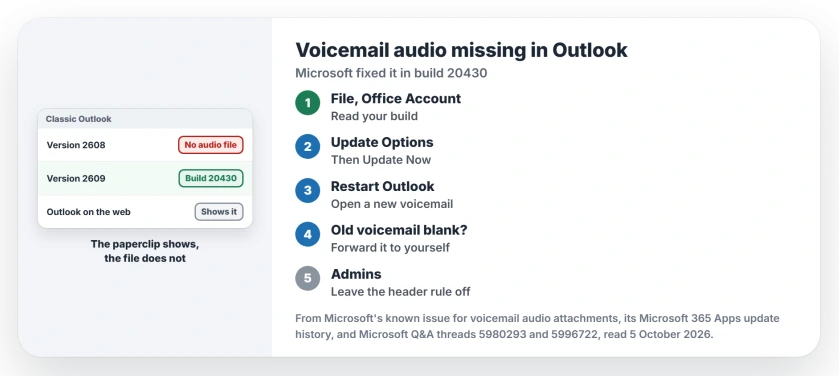
Status: checked 5 October 2026. Microsoft says build 20430 and later fix it, and Version 2609 carries that build. Forwarding a voicemail to yourself shows the file meanwhile.
1. Update Office to Version 2609
Microsoft's note is short: "This issue is resolved in build 16.0.20430.2000 and higher". Its update history lists Version 2609 builds 20430.20092 on 22 September and 20430.20118 on 30 September.
Both went to the Current Channel, and in classic Outlook you get them through File, Office Account, Update Options, Update Now.
Microsoft's update page adds: "You may need to click Enable Updates first if you don't see the Update Now option right away". Restart Outlook when it finishes, then open a voicemail that arrived after the update. I would do this first.
Check your version first
The same Office Account page shows your version and build next to About Outlook. Owners tied the fault to Version 2608.
A report relayed on the thread from Reddit quoted Microsoft support calling it "a bug introduced in Outlook (classic) Build 2608 (16.0.20326.x)".
Work PCs on the Monthly Enterprise Channel were still on Version 2608 in Microsoft's table, dated 8 September. Ours: if that is you, lean on the workarounds until your next monthly release.
2. Forward old voicemails to yourself
Microsoft lists this as a workaround. An owner found it first: "It shows up fine in the inbox after you receive it from yourself".
Another owner noticed the file is already in the draft: "forward the email and in the email composition, the file is avaialble". Ours: save it from the draft, then discard the draft unsent.
Microsoft's note does not say whether voicemails from before the update come back. If an old one stays blank, forward it.
3. Or open it where the file shows
Microsoft says the new Outlook plays the recording, and so does Outlook on the web. In classic Outlook you can also double-click the message and use File, Save Attachments to put the file on your desktop.
The header rule that backfired
An admin on the thread removed the voice header with an Exchange mail flow rule. A second owner reported "That's seems to have worked!" and then lost Teams voicemail.
Their words: "no voice mails received after we created a transport rule to remove the header show up in Teams". Another admin wrote: "Our Poly and Yealink Teams Phone were unable to detect new voicemails after the rule was enabled".
The first owner turned the rule off again. Ours: with the fixed build out, you have little reason left to touch mail flow for this. I would not copy it now.
Already tried on the thread
The first poster listed eleven steps that changed nothing for them, from Safe Mode and cached mode off to an Office repair. Repairing Office fixes plenty, but not this.
One of their steps was updating Office. That was August, before build 20430 existed.
The AllowVoicemailForm registry value from an older Microsoft note did not help either. They found it "only produces a play button, but it does not display the attachment".
Is it the old voicemail form fault?
No. Microsoft's older note covers the reverse: "Users no longer see the Unified Voicemail form in Outlook Desktop. Instead, they see a raw MP3 attachment". Its fix does nothing for your missing file.
Does new Outlook have this problem?
No. Microsoft names new Outlook as a workaround because it shows the attachment. The same Microsoft list tracks other classic Outlook faults, such as Copilot buttons missing in classic Outlook.
Why does Update Now not appear?
Microsoft's page says that without Update Options, you either have a volume license install or your company manages Office updates through Group Policy. Ask your IT team which channel you use.
The Short Version
- Classic Outlook hides voicemail audio files on Version 2608.
- Microsoft says build 20430 and later fix it.
- File, Office Account, Update Options, Update Now.
- Forward old voicemails to yourself to see the file.
- Outlook on the web and new Outlook show it today.
- The header rule broke Teams voicemail for owners.
Where to Next
Open File, Office Account and read your build before you change anything. If it is lower than 20430, update and test the next voicemail that comes in.
Did the update bring your recordings back, or are you waiting on the Monthly Enterprise Channel? Say which in the comments.

Isaac Smith is the founder and editor of PC Glance, a website that covers computers, laptops, and technology. He is a tech enthusiast and a computer geek who loves to share his insights and help his readers make smart choices when buying tech gadgets or laptops. He is always curious and updated about the latest tech trends.