

Count unique values in Excel with =ROWS(UNIQUE(A2:A7)) for a filled single column. Each different entry contributes once, regardless of repetitions, and the source data stays intact.
The word unique can also mean entries that appear exactly once. Decide which count is needed before adding that option, because the two answers can differ.
Count each different entry once
Put the formula in an empty cell outside the source range, then press Enter. Replace A2:A7 with the actual data cells and exclude the heading.
Microsoft documents UNIQUE for Microsoft 365, Excel 2021, Excel 2024 and Excel for the web. Its function reference explains how it returns distinct rows or columns.
Status: Microsoft's UNIQUE, FILTER, ROWS and Advanced Filter documentation checked November 2, 2026. Formula examples are illustrative; no workbook was opened or altered.
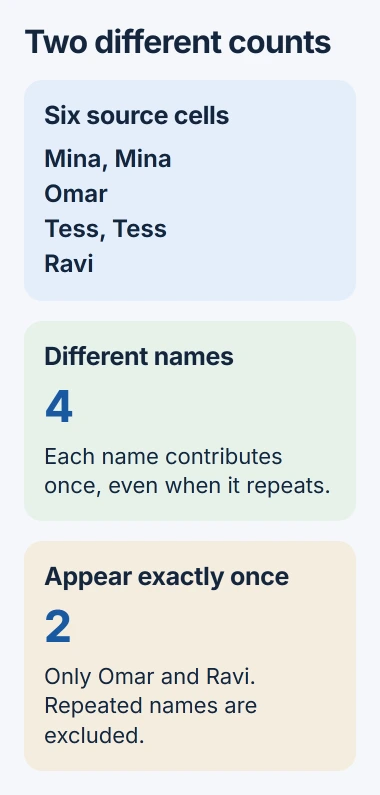
For example, six cells containing Mina, Mina, Omar, Tess, Tess, Ravi contain four different names. UNIQUE produces those four names; ROWS counts the returned rows.
Microsoft says ROWS accepts an array. Wrapping UNIQUE inside it produces a single total rather than displaying the whole list.
This count leaves the repeated records intact. Use Remove Duplicates with a preserved copy only when the task actually requires deleting repeated records.
Exclude empty cells from the count
An empty cell must not become an extra entry in a list of customers or products. For a range that may contain blanks, use this formula in modern Excel:
=SUM(--(UNIQUE(FILTER(A2:A100,A2:A100<>"",""))<>""))Microsoft states that FILTER can keep cells matching a condition. Here the condition keeps nonempty cells, and UNIQUE reduces them to distinct entries.
The final comparison ignores the empty fallback when every source cell is blank. The double minus turns the comparisons into ones and zeros; SUM adds those numbers. An entirely empty range therefore returns zero.
A numeric zero remains a value and is counted. A space typed into a cell is text, not an empty cell. Correct unwanted spaces in the source when apparently identical entries produce a larger count than expected.
These formulas examine the referenced cells, including rows hidden by an ordinary filter. They are not counts of visible rows only.
Count entries that appear exactly once
For a filled range, use =ROWS(UNIQUE(A2:A7,,TRUE)) when repeated entries must be excluded altogether. The omitted middle argument keeps row comparison; the final TRUE enables exactly_once.
In the six-name example, this returns two: Omar and Ravi. Mina and Tess each appear twice, so neither contributes to that total.
Use this version only for the exactly-once question. If every entry repeats, UNIQUE has no result to return and can produce #CALC!. That empty-result error does not mean there is one qualifying value.
Use Advanced Filter in an older Excel version
Excel 2016 and 2019 do not have UNIQUE. Microsoft's older-version counting procedure copies distinct entries into a separate area before counting them.
- Select the source column, including its heading.
- Open Data > Advanced in Sort & Filter.
- Select Copy to another location and choose an unused destination in Copy to.
- Enable Unique records only, then select OK.
- Count the returned data cells with ROWS, leaving the copied heading out.
For three returned entries in D2:D4, enter =ROWS(D2:D4). Inspect the extracted list and exclude any blank entry. Repeat the extraction after source edits; the copied list is not a live UNIQUE formula.
Check the range when the result is unexpected
Start with a small list whose distinct entries can be counted by eye. Confirm the formula excludes its heading and includes the intended last row. A fixed A2:A100 reference will not include a new value in A101.
If Excel displays the formula itself, use the formula-as-text checks. For an unexplained calculation error, give Microsoft Support a small anonymized example and the installed Excel version.
The Short Version
ROWS and UNIQUE count distinct entries in a filled column. Exclude blanks as needed; exactly_once drops every repeated entry. Older desktop Excel can extract distinct values with Advanced Filter for a separate count.

Isaac Smith is the founder and editor of PC Glance, a website that covers computers, laptops, and technology. He is a tech enthusiast and a computer geek who loves to share his insights and help his readers make smart choices when buying tech gadgets or laptops. He is always curious and updated about the latest tech trends.