
The Robinhood error Unable to log in with provided credentials can persist after a password reset. Reopen the app, enter the account email and new password carefully, then use I need help if the same error returns.
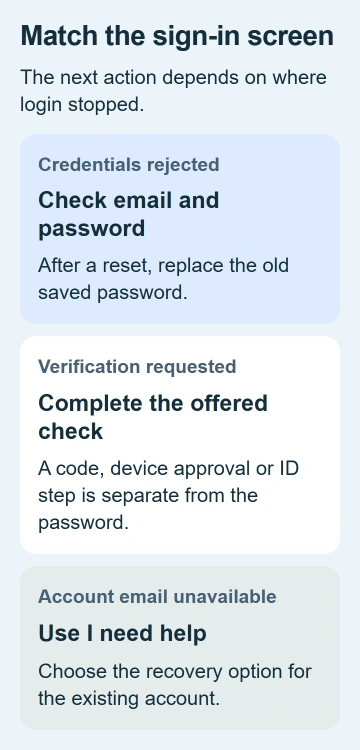
A rejected password and an identity check need different steps. Follow the steps for the screen you're seeing, rather than creating another account or resetting your password every time the screen changes.
1. Reopen the app and check the account details
Choose Log in, rather than Sign up, on the opening screen. Enter the email for your existing account. Another address saved on your iPhone may work elsewhere but belong to a different account here.
Check what Password AutoFill entered before trying again. After a reset, it can fill in your old saved password. Replace that entry with your new password for this attempt.
Close and reopen the app if it keeps showing the same error. With Face ID, swipe from the lowest edge toward the center and pause. Find the Robinhood preview, then flick it up to close it.
On Home-button models, press Home twice to see the app previews. Open Robinhood again from its icon. Apple's app-closing steps show the two iPhone routes.
If the form accepts your password and asks for another check, go to the verification section instead of resetting your password again.
2. Finish one fresh password reset
From the login screen, choose Forgot password? and enter the account email. Open the reset email and create a password you haven't used before. Return to Log in with that new password.
Robinhood's password recovery instructions say reset links expire after one hour. Request another link if the one you're opening has expired.
Search the account's mailbox for Robinhood or password reset, including Spam and Junk. Check the address you entered before requesting another message. A typo can send the request to the wrong address.
If you've just reset your password and still see the same credentials error, wait 10 to 15 minutes before trying again. The password troubleshooting steps include that pause for this error.
I'd complete one reset carefully and note its result. Repeated requests make it harder to track which reset email and new password you're using.
3. Follow the verification screen when the password is accepted
After accepting your password, the app may ask you to approve the device, enter a text-message (SMS) code, provide ID or take a selfie. The verification guide explains these extra checks.
Follow the method on your screen. If the SMS code can't reach your current phone, choose I need help to look for another way to verify it's you or recover your account.
If codes aren't arriving from several services, try the iPhone verification-code checks. If only Robinhood approval fails, continue through its account recovery process.
If the selfie check fails, try an evenly lit room without glasses or a face covering. For an ID photo, use the requested type of ID and avoid glare. That helps the system read your face or ID.
Send identity documents only through the official recovery process you opened yourself. Don't share your password, code or recovery link with someone who messages you offering to approve the account.
4. Check the app version and connection
Open the App Store, tap your account picture and select App Updates. Install the Robinhood update if offered, then reopen it. The iPhone app-update procedure covers this store screen.
If you use a VPN or proxy to route your internet traffic, disconnect it and try signing in on a trusted connection. This is part of the password troubleshooting. Restore your usual setup if it makes no difference.
If one connection fails, try both Wi-Fi and cellular data. Use the same account details at the same recovery step so you can tell whether switching connections helped.
If the app closes before you get a login result, use the iPhone app crash checks. A crash needs different checks from a rejected password.
iPhone settings don't have an Android-style Clear data button. Before reinstalling, check that you can still recover your account, especially when the account still uses an old email address or phone number.
5. Try the website when only the app refuses access
In Safari, type robinhood.com/login/ yourself. Check that the address belongs to Robinhood before entering anything. You'll use it to see whether the same account works outside the iPhone app.
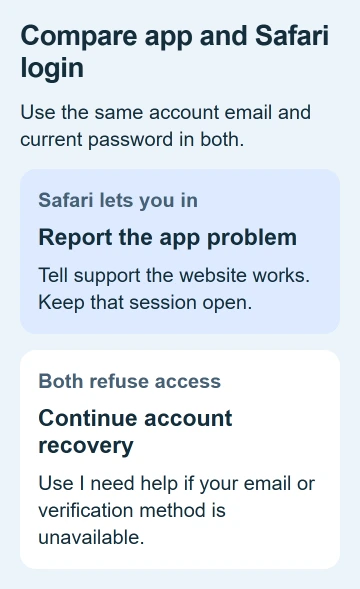
Use the same account email and current password. If the website accepts them while the app doesn't, tell support that only the app is failing. Stay signed in on the website while they help.
If both reject your details or ask for identity checks to recover the account, follow the recovery steps. Switching browsers won't give you access to an old email address or verification method you no longer control.
The old status.robinhood.com page says it's retired. The banner still saying it's operational can't tell you whether a login outage is happening now. Ask official support about a service problem instead.
6. Recover a lost email address or get account help
Choose I need help or Help on the login screen, then I forgot my email if that's the problem. Follow the identity checks for your existing account rather than starting a new application.
The login recovery page helps with missing login details and reaching support. Depending on the step, you may need to provide account identity details, a government ID or a live selfie.
If recovery still fails, contact support through that official process. Give them the error, app and iOS versions, reset result and whether Safari accepted the same details. Keep your password and verification code private.
The Short Version
Check the account email and finish a fresh password reset. Complete verification when requested, then compare the updated app with Safari. Use I need help for missing account details or failed recovery.
Checked November 5, 2026.

Isaac Smith is the founder and editor of PC Glance, a website that covers computers, laptops, and technology. He is a tech enthusiast and a computer geek who loves to share his insights and help his readers make smart choices when buying tech gadgets or laptops. He is always curious and updated about the latest tech trends.