
Yes, FaceTime uses internet data for both audio and video calls. Calls use your Wi-Fi connection when it's available; without Wi-Fi, they can use your iPhone's cellular data allowance if you've allowed FaceTime to use it.
To keep it off your mobile plan, turn off FaceTime's switch in Settings > Cellular. The app can then use Wi-Fi for calls. Your carrier's usage record and the iPhone's per-app counter help you check what has already been used.
Separate internet data from ordinary phone minutes
A FaceTime audio call still needs an internet connection even though it has no video. Choosing someone's phone number as the recipient doesn't turn the call into a regular carrier voice call.
Apple's FaceTime calling instructions explain how to allow or block cellular access for the app. Calling and data charges can apply, so check your plan when you use cellular.

An unlimited calling allowance doesn't automatically include unlimited cellular data. Read the data part of your plan, including any roaming rules, rather than assuming a FaceTime audio call is covered by ordinary voice minutes.
Wi-Fi still needs an internet connection. Home broadband may have a data allowance, and a phone's Personal Hotspot uses that phone's mobile connection. Even if your iPhone shows Wi-Fi, you're still using the hotspot owner's data.
Check how much cellular data FaceTime has used
Open Settings > Cellular and find the apps. Tap Show All if necessary, then read the cellular usage listed for FaceTime. The cellular settings page can have a different name in some regions.
That number shows FaceTime's cellular usage, not its total Wi-Fi usage. A long call over home Wi-Fi can leave it unchanged. The counter also doesn't show which particular call used the cellular data.
The cellular usage instructions cover the app counters and Reset Statistics control. Check which dates the counter covers before comparing it with your bill. Resetting it starts a new measurement period.
To track a new billing period, save the old reading and reset the statistics when that period starts. This resets the phone's counters; it doesn't change charges your carrier has already recorded.
With Dual SIM, check which of your two numbers is selected for cellular data. The usage shown is for that number, so make sure you're comparing it with the matching plan.
Use your carrier's app or account statement for the billed total. If the amount looks wrong, ask the carrier which line and dates it covers. Reinstalling FaceTime won't change a completed data charge.
Make FaceTime use Wi-Fi only on this iPhone
Stay on Settings > Cellular, find FaceTime, and switch it off. FaceTime can no longer use cellular data, but other apps you've allowed can still use it.
Connect to working Wi-Fi before your next FaceTime call. Away from Wi-Fi, a call may fail because you've blocked the app from using your mobile allowance. That's the tradeoff when you limit FaceTime to Wi-Fi.
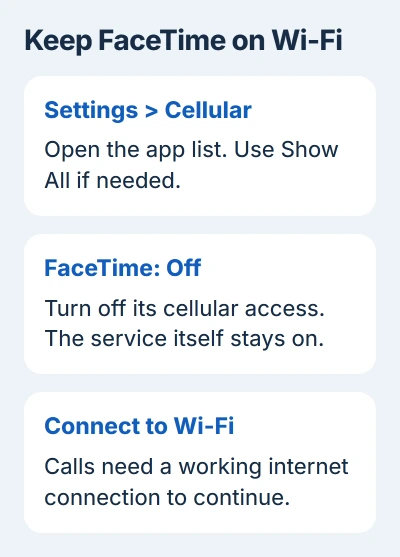
Don't confuse the cellular switch with Settings > Apps > FaceTime > FaceTime. The first controls the connection the app can use. The second turns the FaceTime service itself on or off.
If FaceTime won't work even when your Wi-Fi internet connection works, use the iPhone FaceTime connection checks. Check account activation, recipient addresses and whether the connection is blocked.
On a child's phone or a managed work phone, restrictions may stop you changing this setting. Ask the person managing it to check access rather than resetting the phone to reach the switch.
Check the Wi-Fi fallback control on your iOS version
Your phone can be connected to Wi-Fi even when its internet service is weak or unusable. Current software offers Connectivity Assist, which can add cellular data to improve the connection. Find it under Settings > Wi-Fi.
The Connectivity Assist instructions explain that it replaces Wi-Fi Assist. If you're trying to reduce cellular usage across the phone, review this switch as well as the FaceTime-specific permission.
On older iOS versions, look for Wi-Fi Assist near the bottom of Settings > Cellular. A missing old label on a newer version doesn't mean your phone lacks the replacement feature.
These switches do different jobs. FaceTime's cellular permission controls that app's access. Connection assistance controls whether the phone can use cellular data to help a poor Wi-Fi connection.
I'd use the app-specific switch when the aim is simply to keep FaceTime on Wi-Fi. That leaves you free to decide whether other apps should still have mobile access.
Reduce usage without guessing a fixed amount per hour
FaceTime calls don't all use the same amount of data. Video quality, the connection and the kind of call all vary. Check usage on your own phone and plan instead of relying on a fixed estimate.
For a limited plan, start calls on reliable Wi-Fi and review your cellular counter afterward. If you need mobile access but want to reduce it, Low Data Mode can lower FaceTime video quality rather than blocking the app completely.
For 5G, open Settings > Cellular > Cellular Data Options > Data Mode and choose Low Data Mode. With multiple SIMs, choose the relevant line first. Other plans can put Low Data Mode directly in Cellular Data Options.
The Low Data Mode guide gives the menu paths for each connection type. The mode also reduces other background activity, so app downloads and syncing may wait.
Turning the camera off doesn't block cellular data; the call still needs a connection for audio. End the call or turn off FaceTime's cellular permission when you need it to stop using your allowance.
iPad, Mac and billing questions
A Wi-Fi-only iPad makes FaceTime calls through its available internet connection. A cellular iPad can also use its mobile plan when allowed. The iPad FaceTime setup covers its separate calling controls.
A Mac connected to a phone hotspot uses that phone's connection. For a mobile-data bill, check the phone or carrier supplying the hotspot. The Mac doesn't have the iPhone's Cellular menu.
For unexplained charges, take the date, line and carrier usage record to your mobile provider. For FaceTime calls that fail on working Wi-Fi, take the message and device details to Apple Support.
The Short Version
FaceTime uses internet data for audio and video. Turn off its cellular permission to keep calls on Wi-Fi, check the per-app counter for mobile usage, and use the carrier's record for billing. A phone hotspot still uses cellular data.
Checked November 5, 2026.

Isaac Smith is the founder and editor of PC Glance, a website that covers computers, laptops, and technology. He is a tech enthusiast and a computer geek who loves to share his insights and help his readers make smart choices when buying tech gadgets or laptops. He is always curious and updated about the latest tech trends.