
An iPhone can find a lost Android through Google's Find Hub website in Safari. Use the missing phone's existing Google Account to sign in.
For someone else's location, ask them to share it through Google Maps instead; that works between Android and iPhone without exchanging passwords.
Find Hub gives the owner recovery controls, including ringing and locking the phone. A Maps share lets the sender choose who sees their location and for how long.
Find your lost Android through Safari
Open Safari on the iPhone and visit Find Hub. Enter the Google Account details used on your Android. An account used only on your iPhone won't list a phone registered to someone else.
Select the missing phone from the device list. Check its name and model before using any controls, particularly if the account contains an old handset as well as your current one. The lost device receives a notification when selected.
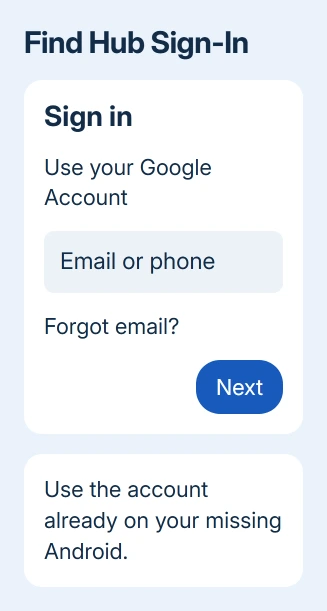
Complete any verification steps shown. You may also need the Android's screen-lock PIN. For Android 9 or later, that can be part of confirming access to the phone's location; older devices may ask for the Google password instead.
Check the time shown with the location before treating the pin as the phone's current position. A last-known position tells you where the device was seen. It doesn't tell you that it remains there now.
Google's lost-device instructions explain that you can still see a saved location when the phone's current location isn't available. The circle around the pin shows how precise that position is.
If sign-in is blocked because the missing phone holds your verification codes, use a backup verification method already set up for that account. A borrowed iPhone changes where you sign in; it doesn't remove the account's security checks.
Ring the phone or mark it as lost
For a nearby handset, choose Play sound. Find Hub rings it at full volume for five minutes, including when it's set to silent or vibrate. Listen in the room, car or bag suggested by the location.
I'd try ringing before traveling to a map pin. A phone under a cushion can look as though it's in a neighboring building, especially indoors. The sound is often more useful than trying to interpret the map at room level.
Use Mark as lost when it isn't within reach. Follow Next, add contact information and a message for the lock screen, then confirm. Give a number you can answer now, such as the borrowed iPhone's number with its owner's permission.
That action locks the phone using its PIN, pattern or password. The controls and extra protection can differ by Android version and model, so follow the prompts on your phone.
To secure or erase the phone, it needs power, a mobile-data or Wi-Fi connection, and its Google Account signed in. Find Hub must be on, and the phone must be visible on Google Play.
A remembered location doesn't mean remote commands can reach it immediately.
Choose Factory reset only when protecting the data matters more than continuing the search. It permanently deletes the phone's data, may leave files on its SD card, and ends tracking through Find Hub. Read it carefully before confirming.
Share an Android owner's location to your iPhone
For a friend or family member who still has their Android, have them open Google Maps on that phone. They should sign in to their own account, tap their profile picture, then choose Location sharing > New share.
Choose how long to share. For direct sharing, save the recipient as a Google contact using their Gmail address. Choose their profile, then tap Share. The recipient should use that same account when viewing the invitation on the iPhone.
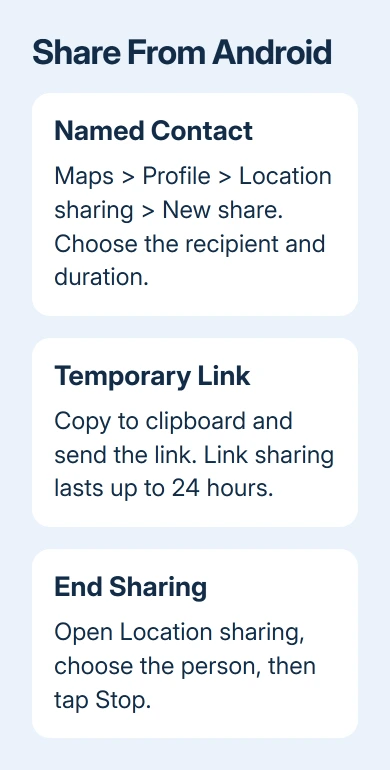
For a recipient without a Google Account, use Copy to clipboard in the sharing controls and send the resulting link in a message. Link sharing can last up to 24 hours.
Anyone with that link can view the shared location during its active period.
On the iPhone, open Google Maps > profile picture > Location sharing and select the sender. For a temporary link, open the message's link instead.
Keep the original invitation until the share works, and check the recipient account if a direct share doesn't appear.
The shared information can include the person's name, photo, recent device location and battery status. It isn't limited to showing a dot.
Choose the sharing duration with that in mind, especially when sending a link into a group conversation.
To end sharing, the Android owner returns to Maps > profile picture > Location sharing, selects the person and taps Stop.
For a journey, Share trip progress is another option; it ends when navigation stops or the destination is reached.
When the device or person doesn't appear
If your phone isn't listed in Find Hub, check the account first. Compare the Google Account with the one used on that Android. An old phone on the list can make a wrong account look convincing, so check the actual model.
For an offline phone, check how old the displayed location is. Find Hub's offline network and saved locations depend on earlier setup and device support.
Opening Safari on an iPhone can't turn those features on remotely after the phone disappears.
For a missing Maps share, have the sender check who they sent it to and when it expires. A share that has ended needs a new invitation. Work or school account restrictions and regional availability can also affect sharing.
If the missing handset's identifier is needed by your carrier, use the Android IMEI options. Find Hub's device settings can display it, although some Wi-Fi-only devices don't have an IMEI.
For the reverse situation, an iPhone's Find My search uses the Apple account and service associated with that device.
The fact that both phones show maps doesn't make their recovery accounts interchangeable.
Protect the account when recovery stalls
Use the account-security help linked from the lost-device support page if Find Hub can't recover a stolen phone. Contact your carrier about suspending the line and provide the IMEI if requested.
Report a theft with the location and time recorded.
For a sharing problem, open Location Sharing support in Google Maps Help. Give the sender's account type, how the invitation was sent and when sharing stopped, so support can tell an expired link from a phone whose location is missing.
The Short Version
Open Find Hub in Safari for your own lost Android and sign in with its Google Account. For another person's location, have them share through Maps.
Check the location's age before acting, and use ringing or lost mode before considering an erase.
Checked November 10, 2026.

Isaac Smith is the founder and editor of PC Glance, a website that covers computers, laptops, and technology. He is a tech enthusiast and a computer geek who loves to share his insights and help his readers make smart choices when buying tech gadgets or laptops. He is always curious and updated about the latest tech trends.