
An Android phone's IMEI is usually in Settings > About phone. Open that page and look for IMEI, checking the label carefully if the phone shows two numbers. On a Galaxy, the same page also lists the model and serial number.
If your phone is missing or broken, try its entry in Find Hub or check the original box. You can get the number either way without resetting the phone or opening its case.
Read the IMEI in your phone's settings
Open Settings, scroll to About phone, and look for IMEI. Some phones place it inside Status or IMEI information. Search Settings for IMEI if the About page uses a different layout.
Google says to check About phone in its Pixel identifier instructions. The IMEI identifies your phone's cellular hardware; it isn't your phone number or the manufacturer's serial number.
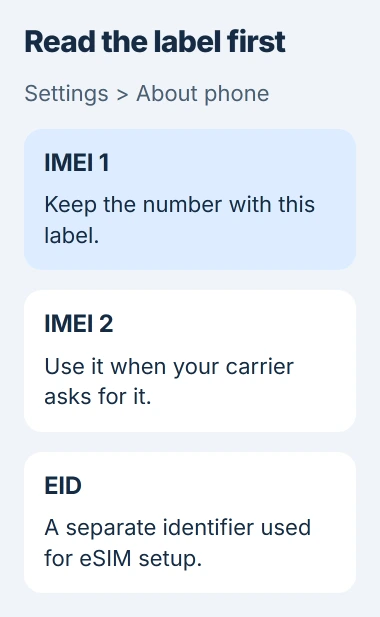
Read the label before copying the number. IMEI and EID can appear together, but a support form asking for IMEI won't accept EID. EID identifies the hardware used for an eSIM.
Try holding the entry to see whether a copy command appears. If it doesn't, write the number down and compare it with the screen before submitting it. Keep the label with each number, especially if your phone shows two IMEIs.
I'd use the phone's own entry if you can unlock it. An old box or carrier record can belong to a previous phone, even if you recognize the device name.
If a network owner asks for a password or sharing code, use the Android Wi-Fi password controls. An IMEI won't give them access to Wi-Fi.
Use the Galaxy alternatives when About phone isn't enough
On a Samsung Galaxy, open Settings > About phone. Find the IMEI label and read the number beside it. On older software, open Status if the identifier isn't on the first page.
The Galaxy identification guide also offers the Phone app's keypad: enter *#06# to display the device identifiers when your carrier supports that code.
If nothing appears, return to Settings. A carrier can block the code, so its failure alone doesn't mean your phone has lost its IMEI. Don't keep entering variations of the code.
If your Galaxy is registered in Samsung Members, you can check there too. Open Samsung Members > Support, then tap your device's name at the top. Make sure it's the phone you're asking about.
These screens can show a serial number beside the IMEI. Copy the one your carrier or repair form asks for. The two numbers identify different things, so you can't use one in place of the other.
Choose the right number on a dual-SIM phone
A phone that supports two cellular lines can show IMEI 1 and IMEI 2. Both can be valid, but your carrier may need a specific one for the line or eSIM you're activating.
On a Pixel, IMEI 1 is usually associated with the first SIM set up on the phone. For an eSIM request, check whether the carrier specifically asks for IMEI 2 or EID before copying either one.
After you enable Dual SIM Dual Standby on a Pixel, About phone shows IMEI (SIM slot 2). That feature keeps two SIMs available, with your chosen line handling each call or message.
If you can't tell which number the activation form needs, ask your carrier which label to use. Send both labeled numbers through its support channel instead of repeatedly restarting activation with a guess.
Don't remove a working eSIM just to read these numbers. You don't need to delete a line to find them, and you may need your carrier's help to restore it.
Find the number when the phone isn't in your hand
Open Find Hub on another Android device. Use the same Google Account as your missing phone, select that phone, then tap its Settings control to see its device information.
The current Find Hub instructions include an IMEI lookup. Older help pages and app versions may still call the service Find My Device.
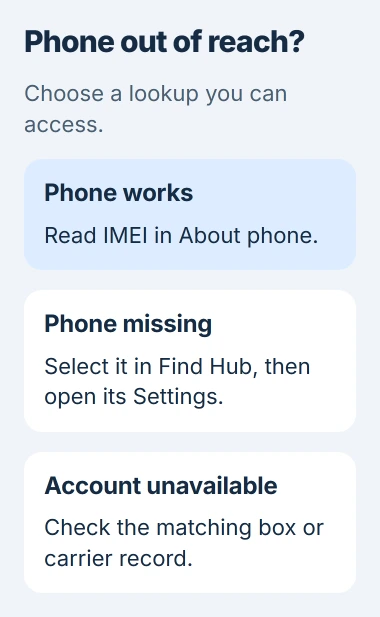
Check the model and device name before copying the number. Several phones can share your Google Account, so the first one listed may be an older phone.
If the phone isn't listed, check that you're using its usual account. If you can't access that account, try the box or carrier records. Don't erase another device while looking for the number.
Your carrier can use an IMEI to identify or block a phone's cellular hardware. Looking up the number won't locate the phone, restore its files or remove its screen lock. Tell your carrier separately if the phone was stolen.
Check packaging and records without opening the phone
Look for IMEI on the original box's barcode label. Match the model and any other phone details you know. A box from a similar phone can give you the wrong number.
For a Galaxy, check your carrier account, sales receipt or contract for the number too. If you recently upgraded or moved the SIM, ask your carrier which phone the record belongs to.
Some Pixel models have an IMEI on the SIM tray. Follow your model's instructions to remove the tray. You don't need to pry off the back cover of a phone with an internal battery to find its IMEI.
For the same task on an Apple handset, the iPhone IMEI guide covers its own Settings and account routes. Those menus differ from Android's.
If the records are missing or don't agree, contact the manufacturer or carrier with your purchase details. Tell support whether your phone is lost, won't start or won't unlock so they can suggest a way to find the number.
Share the number through the carrier or repair form that needs it. Posting an About phone screenshot publicly can also reveal your phone number and other account details.
The Short Version
Read IMEI in About phone, keep IMEI 1 and IMEI 2 labeled, and use Find Hub or matching packaging when the handset isn't available. A Galaxy can also show it through Samsung Members or the supported keypad code.
Checked November 5, 2026.

Isaac Smith is the founder and editor of PC Glance, a website that covers computers, laptops, and technology. He is a tech enthusiast and a computer geek who loves to share his insights and help his readers make smart choices when buying tech gadgets or laptops. He is always curious and updated about the latest tech trends.