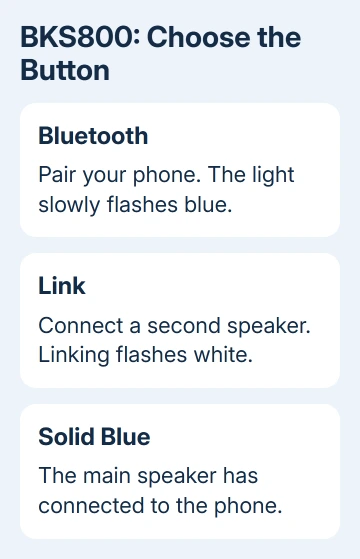
A Brookstone speaker won't connect to a new phone until you've started Bluetooth pairing on the speaker. For Big Blue Party BKS800, turn it on and press Bluetooth until the light slowly flashes blue. Select Brookstone BKS800 on the phone.
The Link button connects two speakers to each other; it doesn't pair the phone. Other Brookstone models use different names and controls, so check the model label before using the BKS800-specific steps or its reset combination.
In this guide
1. Check the model and the speaker's power
Read the model label first. Big Blue Party is a product name used across different versions. BKS800 instructions don't automatically apply to an older Big Blue Mini or another Brookstone speaker.
For BKS800, connect its supplied power adapter to the speaker's power input and a working wall outlet if the battery needs charging. The charging light is red while charging and goes off when charging finishes.
Touch and hold the BKS800's Power button for two seconds to switch it on. This button is touch sensitive, so use a gentle touch rather than pressing it hard. A speaker that's off can't appear as a new nearby Bluetooth device.
Don't use the USB charging-output port as the speaker's power input. That port supplies power to other devices. The service port is also separate from the normal power and audio connections.
For another Brookstone model, follow its label and manual for power. If it won't turn on even with the correct adapter connected, solve that power problem before repeatedly searching from the phone.
2. Start Bluetooth pairing, not speaker linking
With BKS800 powered on, press its Bluetooth button. The speaker's LED should slowly flash blue. That is the state in which a phone or computer can find and pair with it.
Open the phone's Bluetooth settings while the light is flashing. Look for Brookstone BKS800, not just a generic speaker entry. Select that name and wait for pairing to finish.
Brookstone's BKS800 user guide describes a spoken connection confirmation and a solid blue LED after pairing succeeds. Once that happens, start a track on the phone.
A flashing white light belongs to the speaker-linking process. If you've been pressing Link, return to the Bluetooth control and pair the phone first. Changing the phone's Wi-Fi settings won't correct the speaker's pairing mode.
For a different model, check its manual for the Bluetooth pairing control and the name to look for on your phone. Don't copy the BKS800 button timing simply because both speakers carry the same brand.
3. Open the correct device list on the phone or computer
For an iPhone or iPad, go into Settings > Bluetooth and leave the page open. Tap the speaker when it appears. If it was paired before, it may already be in the saved device list rather than the list for new devices.
On Android, open Settings > Connected devices > Pair new device on phones using that layout. On Samsung phones, use Settings > Connections > Bluetooth. Menu wording differs, but choose the option that searches for a new Bluetooth device.
Windows 11 uses Settings > Bluetooth & devices > Add device > Bluetooth. Windows 10 uses Settings > Devices > Bluetooth & other devices > Add Bluetooth or other device > Bluetooth.
On a Mac, open System Settings > Bluetooth and connect to the speaker in the nearby-device list. Keep the speaker near the computer while pairing so distance doesn't get in the way of pairing.
If it appears but won't finish connecting, continue with the saved-pairing check. If it never appears, check that the speaker's light still shows pairing mode, then compare another phone before changing the computer's drivers.
4. Remove a stale connection and try again
Switch Bluetooth off temporarily on nearby devices that normally use the speaker. This keeps an old phone or laptop from taking over while you connect the phone or computer you want to use.
On an iPhone, open the saved speaker's information control in Settings > Bluetooth, then select Forget This Device. Start pairing on the speaker again and choose its name when it reappears.
The Bluetooth accessory instructions explain forgetting a saved accessory and making it discoverable again. You still need to start pairing on the speaker itself. Removing that saved entry won't start the speaker's pairing mode.
On Android, open the saved speaker's settings and select Forget or Unpair. On Windows, remove it from the Bluetooth device list. Then use the new-device search described in the previous section.
I'd compare a second phone now. If it connects to the speaker, check the first phone's saved connection or Bluetooth settings. If neither phone finds the speaker while it's in pairing mode, continue to the speaker reset.
For another speaker in the house, follow its own Bluetooth speaker pairing controls rather than repeating the BKS800 reset. The linked procedure covers JBL models.
5. Reset a BKS800 that still won't pair
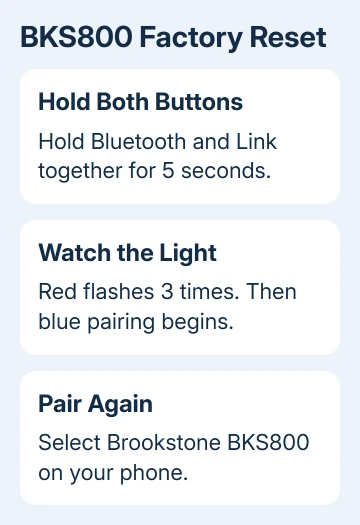
Use this combination only for BKS800. Press and hold Bluetooth and Link together for five seconds. The speaker announces that the factory reset has finished, and the Power LED flashes red three times.
The speaker then enters Bluetooth pairing mode with a flashing blue light. Remove the old saved entry from the phone if it's still there, search again, and select Brookstone BKS800.
This reset returns the speaker to its factory settings. Reconnect the device you're testing first and confirm music plays before adding a second device or another speaker.
If the buttons themselves don't respond, the BKS800 guide gives a separate restart: insert a pin into its labeled Reset hole for five seconds until it powers off. Don't put a pin into an unlabeled opening on another model.
6. Separate a connection problem from silent playback
BKS800 can connect to two devices at once. With a solid blue light and silent playback, pause playback on the other connected device, choose the speaker as the phone's audio destination, and check both volume controls.
A desktop without Bluetooth can instead feed a Vizio soundbar through a cable when their audio ports match.
When connecting two BKS800 speakers, pair only the main speaker to the phone before using Link. The guide warns that having both speakers connected to Bluetooth devices during linking can make them factory reset.
If two phones still fail after the correct reset, contact the support service in your model's manual. Include the model, what the lights do, whether it powers on, and which devices you tried. Ask for pairing or hardware service advice.
If the phone also fails with a car system, the guide to Bluetooth not connecting to a car helps check another saved connection before blaming the speaker.
The Short Version
Check the Brookstone model first. BKS800 uses Bluetooth for phone pairing and Link for another speaker. Pair during the flashing-blue state, renew the saved connection, and use its five-second Bluetooth-plus-Link reset only when needed.
Checked November 13, 2026.