Update & Security isn't a Windows 11 category. Use Windows Update for updates, or System for recovery and troubleshooters. To run a troubleshooter, open Settings > System > Troubleshoot > Other troubleshooters.
A missing Windows Update page is a different problem. Check which Windows version is installed before assuming Settings is broken because a menu has changed.
In this guide
1. Use the menu for your version of Windows
Press Windows + R, type winver, and press Enter. The window tells you whether you're running Windows 10 or Windows 11 and shows the version. Close it once you've checked the name.
On Windows 11, press Windows + I and select Windows Update in the Settings navigation. On a narrow window, open the navigation menu first. There isn't an Update & Security tile to restore.
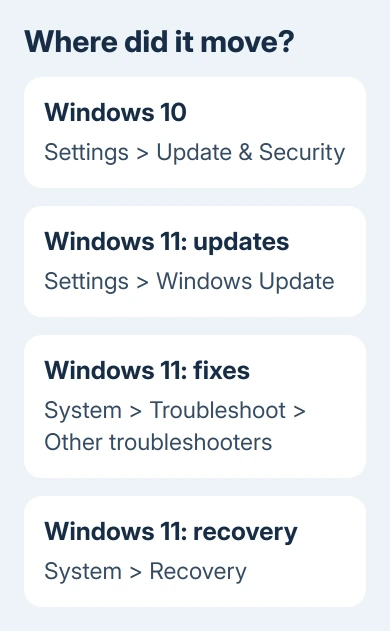
On Windows 10, press Windows + I and select Update & Security. That category contains Windows Update, Recovery, and other pages. Instructions using that category can be correct for Windows 10 while not matching Windows 11 at all.
One owner in the missing-category discussion found no relevant registry value, then acknowledged the Windows 10-versus-11 explanation. They needed the right menu.
Once the right page opens, continue with what you came to do. For updates, use the next section. For troubleshooting or recovery, go straight to the matching section instead of changing unrelated settings.
2. Open Windows Update to check for updates
In Windows 11, choose Settings > Windows Update > Check for updates. Complete the offered installations, including a restart when needed. The page also contains Update history, which lists installed updates and failed attempts.
In Windows 10, choose Settings > Update & Security > Windows Update > Check for updates. The different starting category doesn't change the purpose of the update page. Read any error code shown after the check finishes.
For a quick route on either version, press Windows + R, enter ms-settings:windowsupdate, and press Enter. This opens the update page directly when that page is available, without searching the Settings layout.
If that command opens Windows Update, the page exists. Use it normally. If updates fail there, record the error rather than continuing to search for an Update & Security category that Windows 11 doesn't have.
An installation that remains at one percentage needs the stuck Windows Update checks. That's a different fault from not knowing where the update controls moved.
Free Windows 10 support expired October 14, 2025. Continued security updates need a program that covers your PC, such as Extended Security Updates (ESU). Opening the old Settings category doesn't change that support status.
3. Find the troubleshooter you were trying to run
For Windows 11, open Settings > System > Troubleshoot > Other troubleshooters. Find Windows Update and click Run for an update problem. For a problem with another device or feature, choose its troubleshooter instead.
Microsoft says its current Windows Update troubleshooter instructions begin in Get Help with an automated tool. A Run button may take you into that app rather than opening an older troubleshooting wizard.
Answer the questions and allow the checks you want. Afterward, retry Check for updates from Windows Update. Check whether the update that failed now installs. The tool opening is only the start.
Windows 10's older route is Settings > Update & Security > Troubleshoot > Additional troubleshooters. Current instructions also offer Get Help. A screenshot of a separate wizard may look different from today's support app.
A later reply reports that clicking Run did nothing. If that happens, open Get Help directly and enter Windows Update troubleshooter in its search box.
If the tool can't fix the update, keep its error code and the tool's result. Those details help you get advice for the update that failed, instead of running the same general check again.
4. Use System for recovery and other moved controls
For recovery options in Windows 11, open Settings > System > Recovery. Its Reset this PC control is separate from Advanced startup. You don't need to use either just because you can't find the old category.
Windows 10 keeps those controls under Settings > Update & Security > Recovery. Match the full path to your Windows version before clicking a reset or restart control copied from a Windows 10 procedure.
Back up your files before using a recovery operation that changes Windows or removes apps. Simply opening the Recovery page doesn't start a reset; selecting an action and following its prompts does.
Other controls also moved. Windows 11 has Activation under System, while Windows Security is under Privacy & security. Searching Settings for the control's name is often quicker than looking for the old parent category.
I'd search for the actual task, such as activation or recovery, rather than the words Update & Security. Search can take you to a specific page even when the layout differs from the instructions in front of you.
5. Treat a missing page differently from a missing category
If Windows Update itself is missing, try the direct command in section 2. Note whether Settings opens the page, returns to its home screen, closes, or shows a message about organization policies. Those are different symptoms.
If IT manages this PC, send them that result. Settings pages can be controlled by policy. Ask whether Windows Update is intentionally hidden and how that organization expects you to receive updates.
On a personal PC, check whether a settings-customization or privacy tool hid the page. Use that tool's own option to restore its change. Don't delete registry policies simply because an old answer mentions them.
If the whole app closes or never opens, use the Windows 11 Settings opening checks. If only Windows Update fails, open Get Help, describe the missing page, and include what winver showed and what happened when you ran the direct command.
The Short Version
Windows 11 separates Windows Update from System's troubleshooting and recovery controls. Windows 10 uses Update & Security. Check winver, then find the page for your task. A missing update page needs a separate check.
Checked November 17, 2026.
 If you have any business, I can build it online