KB5044284, the October 2024 update for Windows 11 24H2, stops with 0x800736b3 when Windows can't find a component the update is built on. Retrying from Windows Update just repeats the same failure.
Two fixes worked for owners. One installed KB5043080, the September 2024 checkpoint update, by hand first, then KB5044284. Several others did an in-place upgrade from Microsoft's ISO, which reinstalls Windows but keeps apps and files.
On 24H2 Home or Pro in late 2026, the ISO route is the better pick anyway, because it lands you on a current version that still gets updates.
In this guide
What 0x800736b3 is telling you
The code is Windows error 14003, which reads "The referenced assembly is not installed on your system." In plain words, the update tried to patch a piece of Windows that, as far as the update system can tell, isn't there.
That fits how 24H2 updates are built. Starting with 24H2, Microsoft ships an occasional checkpoint update, and each monthly update after it only carries the changes since that checkpoint.
For KB5044284 the checkpoint is KB5043080, build 26100.1742. If that checkpoint's pieces are missing or damaged, the October update has nothing to build on.
A newer build number doesn't settle it. The asker had clean-installed 24H2 from a USB stick and was on build 26100.1882, past the checkpoint on paper, yet KB5044284 still failed.
Check your own build before you start: press Windows key + R, type winver and press Enter. Build 26100.2033 or higher means KB5044284's changes are already in, and the failure you saw belongs to a newer update.
1. Install KB5043080 by hand, then KB5044284
Microsoft's notes for KB5044284 say its standalone files "must be installed in order", and they list KB5043080 first. One owner fixed the error with exactly that order after four days of failed retries.
I'd start here. It's two downloads and two restarts, and it doesn't touch your apps or settings.
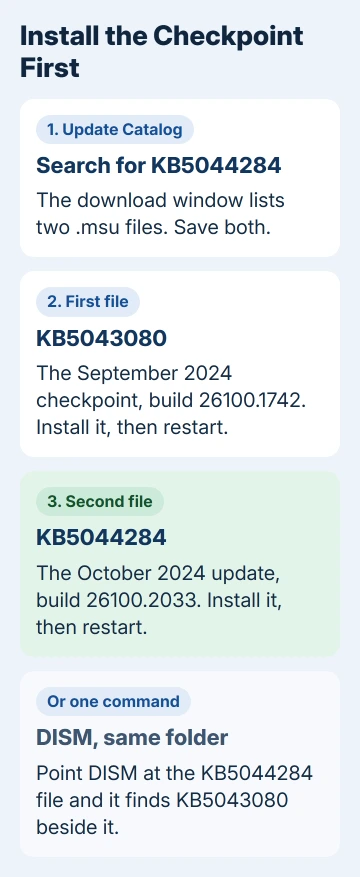
- Open the Microsoft Update Catalog in your browser and search for KB5044284.
- Pick the Windows 11 Version 24H2 entry for x64-based systems (or arm64 on a Snapdragon PC) and select Download. The window that opens lists two .msu files, KB5043080 and KB5044284; save both.
- Double-click the KB5043080 file first. The Windows Update Standalone Installer asks whether to install it; choose Yes and restart when asked. If the installer calls the update not applicable to your PC, move on to the next file.
- Run the KB5044284 file the same way and restart again.
When it's done, winver should show build 26100.2033.
Prefer a single command? Put both .msu files in one folder, such as C:\packages. Then run DISM from an administrator Command Prompt, pointing it at the KB5044284 file; DISM finds the checkpoint file in the same folder:
DISM /Online /Add-Package /PackagePath:c:\packages\Windows11.0-KB5044284-x64.msuUse the real file name you downloaded, which has a long code after x64. If KB5044284 still refuses to install either way, move on to step 2.
2. Repair Windows with an in-place upgrade
When the manual order fails too, the damage goes deeper than one missing update. An in-place upgrade reinstalls Windows over itself, rebuilding its files and update store but keeping your apps, files and settings.
Several owners said it worked, including one who'd done a clean install only days before the update and still hit the error. Another ran the in-place upgrade first and then installed KB5043080 and KB5044284 by hand without trouble.
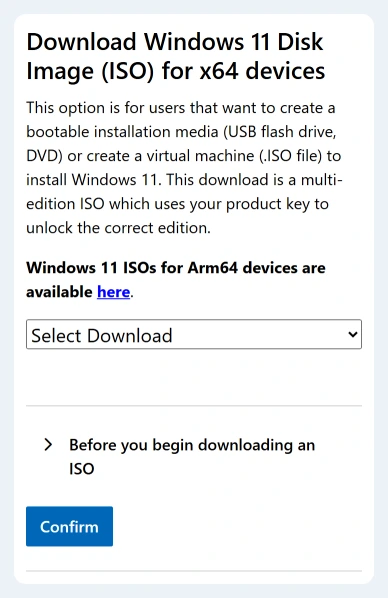
- Back up your files, then get the multi-edition ISO for x64 PCs from Microsoft's download site.
- Right-click the file, choose Mount and run setup.exe from the drive that appears.
- At the choice of what to keep, pick Keep personal files and apps.
The ISO on Microsoft's page is the current release. That matters on Home or Pro, since 24H2 stopped getting updates for those editions in October 2026, and the 24H2 end-of-updates guide lists the dates.
After setup finishes, let Windows Update fetch the current updates. They should install normally now, and you won't need KB5044284 by name.
What didn't fix it
The usual first steps failed in the thread. The Windows Update troubleshooter spun for minutes and did nothing, and restarting the Windows Update and BITS services didn't change a thing.
SFC ran, but DISM stopped with 0x800f081f, which means it couldn't find clean copies of the damaged files. Resetting the update components and installing KB5044284 on its own from the Catalog didn't help either.
One owner did every step twice with the same result.
So once DISM fails with 0x800f081f, stop repeating repairs and go straight to step 1, then step 2. For other update codes, the error code guide sorts them by what they mean.
The same error on a newer update
KB5044284 itself is long replaced. Every later cumulative update contains its fixes, so you don't need that one by name; you need any current update to install.
Enterprise and Education PCs on 24H2 still get updates until October 2027, so for them the checkpoint method in step 1 keeps 24H2 current without a version change.
If a newer update fails with 0x800736b3, open Settings > Windows Update > Update history first. Under Quality updates you'll see which update failed and with what code, and that KB number is the page you need.
Open that update's KB page and look at the Catalog section. It lists every file the update needs, oldest checkpoint first, and installing them in that order is the same fix as step 1.
When nothing works
You can reach Microsoft's support agents from the Get Help app. Give them the KB number, the error code and your build from winver, and ask for help repairing an update store that DISM can't fix.
A local repair shop can also run the reinstall for you if you'd rather not do it yourself. Either way, back up your files first.
The Short Version
- 0x800736b3 means the update can't find a component it builds on, and for KB5044284 that's the KB5043080 checkpoint.
- Install KB5043080 from the Update Catalog, restart, then install KB5044284 and restart.
- If that fails, do an in-place upgrade from the ISO, keeping files and apps. Home and Pro PCs on 24H2 end up on a current version that still gets updates.
Checked November 19, 2026.