PowerPoint 2016 for Mac can hide titles that are still in the file. For the reported 15.30 fault, choosing the default White presentation theme brought the headings back. Try that on a duplicate before recreating slides.
A title box can be empty or contain words that won't display. Check which case matches your slide to tell this old Mac display fault apart from ordinary Slide Master formatting.
In this guide
1. Try the default White theme on a copy
Save a duplicate of the presentation with a different filename. Select Design after opening the duplicate in PowerPoint. In the Themes gallery, select the default White theme used by the older version.
Inspect a slide that previously had a missing title. If the words return without retyping them, the content was still in the file. The theme change altered how PowerPoint displayed it.
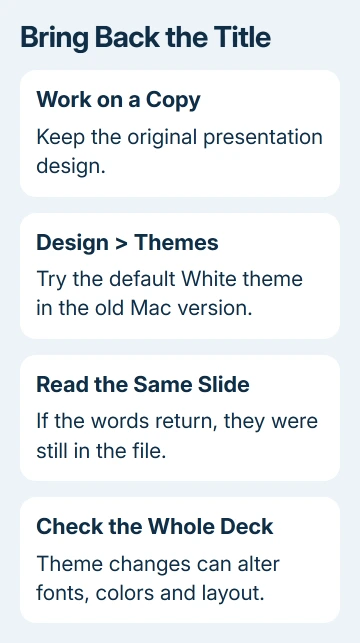
One owner said their headings returned when they chose the default White theme. They had seen the fault in Droplet, Gallery, Orbit and Parcel presentations, so it wasn't confined to one damaged theme file.
Changing a theme can also change colors, fonts and slide appearance. Compare the whole presentation before using this copy for a meeting. Keep the original design available rather than saving over it immediately.
The theme-change controls are on the Design tab. Use the presentation's theme gallery, not the application's light or dark appearance setting.
If the title returns, the plain-theme copy is a practical way to continue working while you update the app. If it remains missing, note the PowerPoint version on your Mac and check for existing text.
2. Check the Mac version, then install available updates
Choose PowerPoint > About PowerPoint from the Mac menu bar. Record the full version. The archived report identified 15.30 (170107) on macOS 10.12.2, an early Office 2016 for Mac combination.
The accepted response said the fix would arrive in 15.32. That reply announced a fix; it wasn't from an owner who had tried the released version. An accepted reply still isn't confirmation that the update fixed every affected presentation.
For apps installed from Microsoft, open an Office app and use Help > Check for Updates. Install the updates offered by Microsoft AutoUpdate, then quit and reopen PowerPoint before checking the unchanged original presentation.
For a current Office app downloaded from the Mac App Store, open the App Store, select Updates and update the app there. Use the Office update procedure that matches where you installed it from.
The old advice to join an Insider channel was about getting a forthcoming 2017 build early. That early-access advice belongs to the 2017 report. Use a supported Office version that works on your Mac instead.
If an organization manages updates, give IT the About PowerPoint version and an example file. Request a comparison using a supported build before anyone reinstalls Office on the computers that created the file.
3. Check whether the title text exists
Select an affected title area and see whether PowerPoint gives you a text box or placeholder to edit. If you can select existing text but can't see its letters, you're dealing with display or formatting rather than an empty title.
On the duplicate, use Home > Font Color to choose a color that contrasts with the slide background. Check one title first. If its words become visible, inspect the other affected titles before making a presentation-wide change.
This is a check for ordinary text color, separate from the confirmed White-theme workaround. The thread also suggested changing text fill and fonts, without a later reply confirming it solved the original case.
If the required font is absent from the list altogether, restore the missing PowerPoint font to get the original text appearance back. A font installation problem and invisible title text aren't the same fault.
I'd avoid retyping a title until you've checked for existing text. Adding another text box can leave two headings in the file, with both appearing later when the display problem is corrected.
If the title area really is empty, recover the wording from an earlier copy or the author. A theme can reveal existing content, but it can't recover text that was deleted before the file reached you.
4. Compare the slide's layout with a new title slide
Create a new presentation using a plain theme. Add a title and a short line of body text. If that title displays correctly, PowerPoint can display a simple new title; the affected presentation still needs attention.
Return to the duplicate and select an affected slide. Open Home > Layout and check whether its intended layout includes a title placeholder. A Blank layout doesn't supply one.
Choose the intended layout if the wrong one is selected, then check content positions. The right layout supplies the title placeholder you expected. The 15.30 fault was different: an existing heading wasn't being drawn correctly.
For master edits that never reach existing slides, reapply the PowerPoint layout. That guide covers inherited formatting and footers rather than the old problem where titles appeared on Windows but disappeared on the Mac.
A normal title on a fresh slide and missing titles only in imported slides is useful information for support. Keep both examples in the duplicate so someone else can compare them without recreating your presentation.
5. Does the title appear on a second computer?
Open the exact presentation in a second supported PowerPoint installation when one is available. Check the same slide number and heading, not just the thumbnail or a different copy with a similar filename.
If the title appears there, preserve that file and use the working installation for urgent presentation work. Tell support that the content exists and identify the Mac build where it disappears.
The archived replies describe files that looked correct on Windows but lost titles on the Mac. They also include mixed browser results, so don't rely on online viewing to get the titles back.
A local copy didn't fix the original case, either. Moving the file repeatedly between OneDrive and Documents won't address a theme-dependent display fault when the titles also disappear in the local copy.
For titles that remain invisible, give school or workplace IT a copy stripped of private content. Include the macOS and PowerPoint versions, theme, slide numbers and White-theme result so they can see the same problem.
The Short Version
With the Mac 15.30 missing-title fault, try the default White theme on a duplicate. Update PowerPoint, confirm the text exists and check the slide layout. Keep a working copy and send support the version and theme comparison.
Checked November 21, 2026.
 If you have any business, I can build it online