
You open Find My to walk the last few feet to your AirPods, but no arrow appears. Just the map and a Play Sound button, and no distance to guide you.
Under that one complaint sit two very different problems, and they need different fixes. Either it never finished setting up, and a re-register in Find My fixes that.
Or it worked for a while and then quit, which is an iOS 26 bug that only a restart touches for now.
So let me settle which one you have first, and then you use the fix that fits.
First, check your AirPods can do it at all
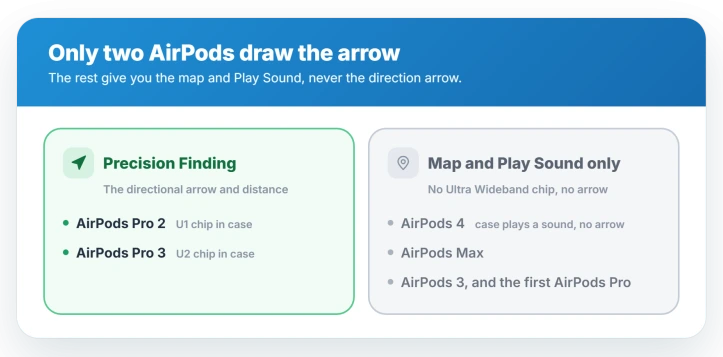
Precision Finding, the arrow and distance that guide you the last few feet, needs the Ultra Wideband chip built into the case. Only two AirPods have it: AirPods Pro 2 and AirPods Pro 3.
AirPods 4, AirPods Max, the older AirPods, and the first AirPods Pro have no such chip, so they never show an arrow. Despite what some guides claim, AirPods 4 cannot do it either.
The AirPods 4 (ANC) case can play a sound, which is a separate feature. On those models, finding stops at the map and Play Sound.
Not sure which pair you own? Open Settings, Bluetooth, tap the i next to your AirPods, then About, where the model name is listed.
You also need a recent iPhone, an iPhone 11 or later, since the phone supplies the other half of the Ultra Wideband link. The arrow is an iPhone feature, so an iPad only ever shows the map.
If instead your AirPods will not connect or keep cutting out, that is a connection problem, not a finding one.
If it never worked: re-register in Find My
When Precision Finding was never there, or Find My warns that your AirPods setup is not complete, the earbuds paired but never finished registering with Find My. Re-registering fixes it.
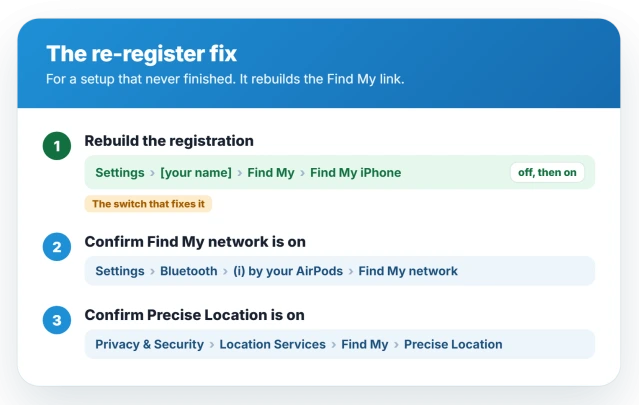
Start with the switch that rebuilds it. Open Settings, tap your name, then Find My, and turn Find My iPhone off, enter your Apple Account password when asked, wait a moment, then turn it back on.
That forces your AirPods to enroll again, and the arrow usually returns.
Two settings reinforce the fix:
- Settings, Bluetooth, the i next to your AirPods: turn Find My network on.
- Settings, Privacy and Security, Location Services, Find My: turn Precise Location on.
If it still will not set up, remove the AirPods and add them fresh.
In Find My, tap Devices, choose your AirPods, and Remove This Device, then open the case lid next to your unlocked iPhone to reconnect.
Apple covers the alert in an AirPods setup that will not finish.
If it worked then stopped: the iOS 26 bug
If Precision Finding used to work and now fails after a day or so, this is a known iOS 26 bug, not your AirPods or your setup. Reports of it are widespread, and clearing it for good will take an iOS update.
The tell is specific. The arrow either refuses to start, or it connects but shows the distance as Far no matter how close you stand, while Play Sound and the left-behind alerts keep working.
It turns up mostly on iPhone 15 and 16, the models with the newer Ultra Wideband chip.
A restart of the iPhone brings it back, though only for a while, often a day or two. Turning Bluetooth off and on, or force-quitting Find My, can do the same.
There is no permanent fix from your side yet, so keep the iPhone updated and restart when you need the arrow.
Status: on iOS 26, Precision Finding that never set up is fixed by re-registering in Find My. If it worked then quit, that is a known iPhone 15 and 16 bug a restart clears until Apple patches it.
When the arrow cannot appear
Three more situations explain a missing or short-range arrow:
- An unsupported AirPod. No setting adds the arrow to AirPods 4, Max, the older AirPods, or the first Pro. They stop at the map and Play Sound.
- AirPods too far away, out of battery, or shut in a bag. The arrow is short range and needs the AirPods powered and near you. From across town, you get the map and Play Sound, which is normal.
- AirPods Pro 3 not reaching far on an iPhone 15 or 16. The longer range of the Pro 3 case is tied to the iPhone 17. On a 15 or 16 you get the standard range, by design.
If the stereo is off or the sound keeps shifting rather than the finding, that is a different AirPods problem.
Which AirPods have Precision Finding?
Only AirPods Pro 2 and AirPods Pro 3, because their cases carry the Ultra Wideband chip that draws the direction arrow.
AirPods 4, AirPods Max, AirPods 3, and the first AirPods Pro do not have it, so Find My gives you the map and Play Sound but never the arrow.
How do I fix AirPods setup not complete in Find My?
Re-register the AirPods. Open Settings, tap your name, then Find My, and toggle Find My iPhone off and back on. Confirm Find My network is on under Settings, Bluetooth, the i next to your AirPods.
If it still will not set up, remove the AirPods in Find My under Devices, then reconnect them from the open case.
Why does Precision Finding stop working after a while on iOS 26?
It is an iOS 26 bug, reported widely and concentrated on iPhone 15 and 16. Precision Finding runs for a day or two, then the arrow stops or reads Far no matter how close you are.
A restart restores it for a while, but the real fix has to come in an iOS update.
Why does Precision Finding say Far when my AirPods are right here?
That is the signature of the iOS 26 bug. The Ultra Wideband ranging has dropped, so Find My shows a stuck Far reading even at arm's length.
Restart the iPhone to reset it, and expect to repeat that until Apple patches it.
The Short Version
- Only AirPods Pro 2 and Pro 3 get the directional arrow. AirPods 4, Max, 3, and the first Pro never do, so you get only the map and Play Sound.
- If it never worked, re-register: Settings, your name, Find My, toggle Find My iPhone off and on. Confirm Find My network is on for the AirPods under Bluetooth.
- Still stuck? In Find My, remove the AirPods and add them back, and make sure Precise Location is on for Find My.
- If it worked then quit after a day, that is an iOS 26 bug, mostly on iPhone 15 and 16. A restart brings it back for a while; a real fix needs an Apple update.
- The arrow only works up close with the AirPods powered and in range. Far away, the map and Play Sound are all you get, which is normal.
Where to Next
Nods and shakes fail separately from finding them. AirPods head gestures not working on iOS 26 lists what actually supports the feature.
- AirPods dropping the connection: AirPods cutting out on iOS 26
- The sound sliding to one side: AirPods sound shifting to one ear
- AirPods not switching between your iPhone and Mac: AirPods not switching devices

Isaac Smith is the founder and editor of PC Glance, a website that covers computers, laptops, and technology. He is a tech enthusiast and a computer geek who loves to share his insights and help his readers make smart choices when buying tech gadgets or laptops. He is always curious and updated about the latest tech trends.