
You drag across a line in a PDF and nothing highlights. Or words highlight, but Copy is grayed out. Or your paste comes out as symbols.
Those are three different files, and no single fix covers all three. I would work out which kind yours is before trying anything.
That Super User question dates from September 2009 and has 461,915 views. A twin question about garbled pastes, from May 2010, adds another 234,022.
Three PDFs that look the same
Drag your mouse across one line of the page, then watch what happens.
Nothing highlights? You have a picture of text. Scanners and phone scanning apps make PDFs like that, with no letters inside for you to copy.
If the words highlight but Copy is grayed out, the file is locked. Whoever made it switched copying off.
If Copy works but your paste is gibberish, the fonts inside the PDF have no map back to real letters. The page looks fine. The text under it is scrambled.
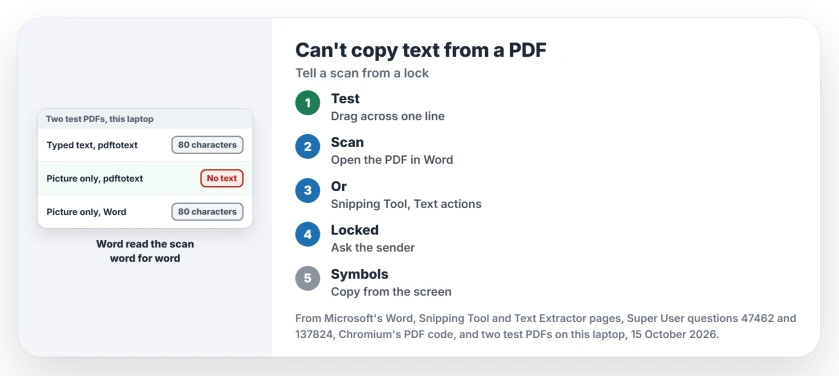
Status: two test PDFs made on this laptop on 15 October 2026, one from typed text and one from a picture of it, plus Microsoft's Word, Snipping Tool and PowerToys pages.
1. Nothing highlights? Open the PDF in Word
Word can turn a PDF into a document you can edit. Microsoft's Edit a PDF page puts it in one line: "To edit a PDF, open it in Word".
In Word, open the PDF with File, Open. Word warns that it will convert a copy. Your original file is left alone.
Ours: a PDF made here held only a picture of one invoice line, and pdftotext found no text in it at all. Word opened it in under five seconds and gave back all 80 characters, every one of them correct.
I would reach for Word first, because it hands you the whole page in one go. Microsoft adds that book chapters and copier scans "won't be formatted well in Word", so expect the words without the exact layout.
Then copy what you need.
If the task is adding a note rather than extracting words, Chrome can place typed text on the PDF and save an edited copy.
If the resulting Word text can be selected but will not take a colored mark, check its highlighter controls separately from PDF extraction.
For a text-based table, Excel can import the PDF through Power Query; inspect the extracted rows before calculating with them.
2. Or copy the words straight off your screen
Windows 11's Snipping Tool can read the text in anything you snip. Press Windows+Shift+S, drag over the part of the page you need, then open the snip from its notification.
Microsoft says to select the Text actions button "to activate the Optical Character Recognition (OCR) feature". Choose Copy all text, or highlight only the lines you want.
Ours: this laptop's Snipping Tool is version 11.2608.41.0, and its own labels include Copy all text and Copy all text detected by OCR.
Have PowerToys already? Its Text Extractor does the same job with Windows+Shift+T. Microsoft's Text Extractor page says it can "copy text from anywhere on your Windows screen, including inside images or videos".
On an iPhone, Live Text pulls words out of a photo or screenshot the same way.
3. Copy grayed out? Whoever made the PDF locked it
A PDF can carry permissions, and one of them turns copying off. A commenter on the 2009 question showed how to check it: in your PDF reader, open File, then Properties, and the Security tab tells you "whether Content Copying is allowed".
Chrome honors that switch too. Ours: in Google's own Chromium code for Chrome 155, the PDF viewer allows Copy only when the file grants the copy permission.
Old answers on that question route around the lock through Chrome's print preview. By 2016 a commenter wrote "Neither of those methods worked for me in Chrome 53", so I would skip them.
The real fix is the sender. Ask them for a copy without the restriction, or for the Word file the PDF came from. If you made the PDF yourself, export it again with copying allowed.
On a Mac, Preview can lock a bank statement you marked up behind the bank's own password.
Why does pasted text turn into symbols?
Some PDF makers store fonts with private codes for each letter. The page draws the right shapes, but a copy hands over the codes instead.
An owner on the 2010 question pinned it down. In their words, "The problem may be custom font encoding, not encryption". A later commenter agreed that "custom font encoding was the culprit for me".
Copying cannot repair that. Reading your screen can, so use step 2, which looks at the letters the page draws and never touches the broken codes.
Another owner uploaded the file to Google Docs and opened it there, which "got me 80% of the way there". Check names and numbers by eye afterwards.
The Short Version
- Drag across one line first: no highlight, a grayed-out Copy and symbols on paste are three different problems.
- A picture of text: open the PDF in Word, which read our scanned test page word for word.
- Or use Snipping Tool's Text actions, or PowerToys Text Extractor.
- Copy grayed out: the maker locked the file, so ask them for an unlocked copy.
- Symbols when you paste: the fonts are scrambled, so copy from the screen with step 2.
Where to Next
Scan, lock or scrambled fonts: which was yours? Name it in a comment, along with the app you opened the PDF in. New cases go onto this page.

Isaac Smith is the founder and editor of PC Glance, a website that covers computers, laptops, and technology. He is a tech enthusiast and a computer geek who loves to share his insights and help his readers make smart choices when buying tech gadgets or laptops. He is always curious and updated about the latest tech trends.