
You press the key under Escape for a tilde or a backtick, and your Mac types § or ± instead, while the key next to Left Shift types the symbol you wanted.
I would not remap anything yet. Your Mac has probably filed your keyboard as the European type, and resetting that takes a couple of minutes.
A Logitech keyboard owner first hit it in November 2009 and asked on Super User, where the page now has 104,144 views. Ask Different was still getting the same question in February 2025.
Your Mac thinks the keyboard is ISO
Apple says "macOS recognizes three keyboard types: ANSI, JIS (Japan), and ISO (Europe)", and an ISO keyboard has one key more, between Left Shift and Z.
When your Mac files a keyboard as ISO, two symbols move. A long-time answerer on Ask Different explained that "all Apple English layouts including US will put backtick on the extra key and § on the key under escape".
So switching your input source to U.S., British or ABC changes nothing here, as that same answerer put it in four words: "The layout doesn't matter".
Ours: no Mac was on hand for this one, so every step here comes from Apple's guide or from owners who reported back. I would follow them in this order.
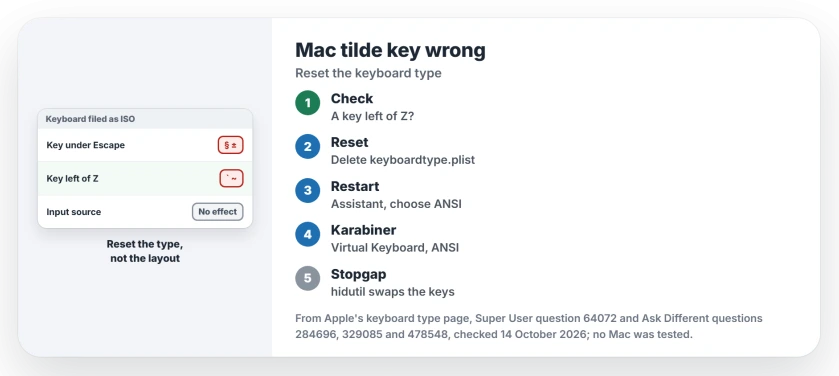
Status: Apple's keyboard type page for macOS 27 and owner fixes from 2009 to 2025, all checked 14 October 2026. No Mac was used for this page.
1. Is there a key between Left Shift and Z?
Look at your keyboard first. A UK or European board has that extra key, and then your Mac is right: the tilde lives on that key.
One owner on a European board found that "holding down Shift and pressing that button works on my end". A commenter confirmed it: "I'm using a Danish keyboard and US layout".
No extra key? Then your Mac has the type wrong. Step 2 fixes it.
2. Run Keyboard Setup Assistant again
Apple's keyboard type page says the assistant opens by itself for "a keyboard that is not immediately recognized", so you make your Mac forget the answer it already has.
Older macOS had a Change Keyboard Type button in Keyboard settings, and an owner's 2017 answer says "The correct way to fix your problem is to get your Mac to re-detect your keyboard type".
A commenter added that the other answers "are band-aids". That button is often missing on newer systems, though, and one owner reported "This option is missing on Monterey 12.4".
Owners now use a file instead. Quit Karabiner-Elements if you run it. Open Finder, choose Go, then Go to Folder, and enter /Library/Preferences.
Move com.apple.keyboardtype.plist to the Trash and enter your password. Unplug the keyboard. Restart, then plug it back in.
The assistant should open. Press the keys it asks for. Choose ANSI if your keyboard has no key next to Left Shift.
The February 2025 asker on Ask Different did exactly this, on a Dell wireless keyboard. In their words: "Thanks, this worked".
Their edit adds a detail. Quitting Karabiner and unplugging the keyboard before the restart got the assistant past a wrong guess.
An owner in 2022 went the other way, from ANSI to ISO, with the same file: "finally the ISO layout was respected, solving the problem".
3. Using Karabiner-Elements? Check its own keyboard type
Karabiner-Elements presents its own virtual keyboard to macOS, and that keyboard has a type too. After an update, one owner found the fix inside it: "You need to change the keyboard type to ANSI in the Karabiner settings".
The setting sits under Virtual Keyboard, and a commenter replied "this is the way !" to it.
Karabiner can also be the cause. One commenter wrote that "Karabiner Elements was the application for me that screwed it up". Quitting it brought the keys back.
Can you swap the two keys instead?
You can, with hidutil in Terminal, and it needs no extra app. The answer that shared it points to Apple's HID tables, where 0x35 is the grave accent and tilde key and 0x64 the extra non-US key.
sudo hidutil property --set '{"UserKeyMapping":[{"HIDKeyboardModifierMappingSrc":0x700000035,"HIDKeyboardModifierMappingDst":0x700000064},{"HIDKeyboardModifierMappingSrc":0x700000064,"HIDKeyboardModifierMappingDst":0x700000035}]}'The swap lasts until you restart. To undo it sooner, run the same command with an empty list.
sudo hidutil property --set '{"UserKeyMapping":[]}'Reports vary by macOS version. One owner wrote "Works perfectly on macOS Ventura 13.4". After Sonoma 14.3, another needed sudo: "Added sudo and it works for me".
On Sequoia, one commenter found that "even sudo does not help". I would treat the swap as a stopgap and fix the type first.
Keys not typing at all? That is a focus fault, not a type fault. And if Shift brings up a giant arrow, Sticky Keys is switched on.
The Short Version
- § under Escape means your Mac has filed your keyboard as ISO.
- A key between Left Shift and Z means it is ISO, and the tilde lives on that key.
- No extra key? Delete /Library/Preferences/com.apple.keyboardtype.plist, restart and choose ANSI.
- Karabiner-Elements has its own keyboard type under Virtual Keyboard.
- hidutil swaps the two keys until a restart, with mixed reports on recent macOS.
Where to Next
Which keyboard, and which macOS? Post both as a comment, and I can match them to one of these routes.

Isaac Smith is the founder and editor of PC Glance, a website that covers computers, laptops, and technology. He is a tech enthusiast and a computer geek who loves to share his insights and help his readers make smart choices when buying tech gadgets or laptops. He is always curious and updated about the latest tech trends.