
You start a small web server on your PC, open its address in Chrome, and get the This site can't be reached page with ERR_UNSAFE_PORT in small type. Your server is fine. Chrome refused the port before it even tried to connect.
I would move the server to another port. If you cannot, one launch switch lets Chrome through for the ports you name.
People have asked about this since September 2010. One Super User thread on the error has 504,494 views, and a second one listing the blocked ports has 151,874.
Chrome refuses a short list of ports
Chrome ships with a fixed list of ports it will not open for any web page. Google states it in its policy text: "Connections to these ports will fail".
Microsoft says why in its documentation for Edge, which runs on the same engine: "Ports are restricted to prevent Microsoft Edge from being used as a vector to exploit various network vulnerabilities".
Put simply, a web page could otherwise use your browser to talk to mail, file sharing or chat services on your network. The block stops that. Your local project just gets caught too.
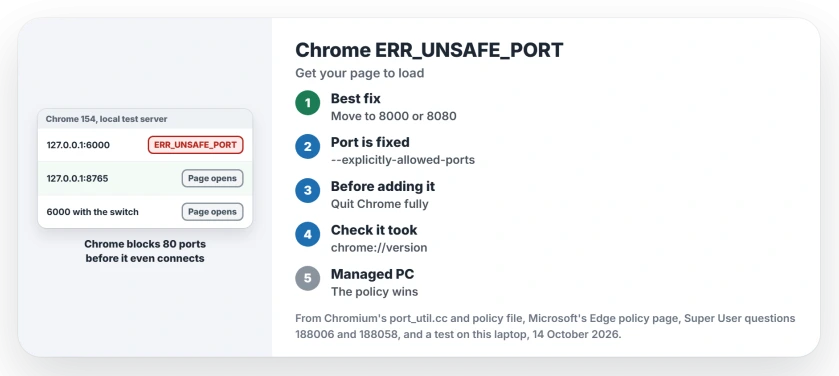
Status: checked 14 October 2026 with Chrome 154 on this laptop. Ports 6666, 6000 and 10080 still fail with ERR_UNSAFE_PORT, and the launch switch still opens them.
Ours: a tiny test server here answered on four ports at once. Chrome refused 6666, 6000 and 10080, printing net::ERR_UNSAFE_PORT in its log each time. Port 8765 opened straight away.
1. Run the server on a port Chrome allows
This is the clean fix. Google points the same way: its policy text calls the override a temporary workaround while you move a service to a standard port such as 80 or 443.
Pick a port that is not on the list, such as 8000 or 8080. Restart your server on it, then open the new address in Chrome.
One owner on Stack Overflow hit the error on port 6000 and wrote: "I changed the port to 6001 and it works fine". Another found their IIS site's port on the list, changed it, and posted that as the answer.
Tutorials can walk you into it. A Kubernetes guide that used port 6000 sent one reader to Stack Overflow with this exact error page.
2. Or allow one port with a launch switch
Sometimes you cannot change the port. A device or a work tool you rely on may only answer on 6666. Chrome then accepts a startup switch that lifts the block for the ports you list.
The accepted Super User answer adds it to the Chrome shortcut, and the asker thanked its author. Chromium's own instructions start with one step: "Exit any running-instance of Chrome".
- Close every Chrome window. Visiting chrome://quit does it in one go.
- Right-click your Chrome shortcut and choose Properties.
- Add the switch at the end of the Target line, after the closing quote mark.
"C:\Program Files\Google\Chrome\Application\chrome.exe" --explicitly-allowed-ports=6666Start Chrome from that shortcut. For several ports, separate them with commas, as in --explicitly-allowed-ports=6000,6666.
Then check your work. Open chrome://version and look for the switch in the Command Line row. If it is missing, make sure no Chrome window was still open, then try again.
Ours: with the switch added, all three blocked ports loaded our test page. Nothing else changed.
On a Mac, two answers on that thread start Chrome from Terminal or an Automator script with the switch. Chromium's page uses the same path:
/Applications/Google\ Chrome.app/Contents/MacOS/Google\ Chrome --explicitly-allowed-ports=6666I would keep the switch on a second shortcut for testing and browse normally with your first. Google warns that sites can detect which ports were reopened and use that to target attacks. So test with it, then close it.
The policy no longer reopens anything
Your IT team may reach for a Chrome policy called ExplicitlyAllowedNetworkPorts instead of the switch. It does not help any more. Google's own policy file shows it only ever accepted five ports: 554, 989, 990, 6566 and 10080.
Each came with a deadline written next to it, the last one in April 2022. Then the rule was simple: "After that date the port will be restricted regardless of this setting".
Ours: in Chromium's current source, the list of ports that may be reopened despite the block is empty. So the policy cannot rescue you.
Worse, Google's file says that once the policy is set, it overrides the launch switch too. On a managed PC, open chrome://policy and look for it before you blame the switch.
Which ports does Chrome block?
Chromium's source file net/base/port_util.cc holds the list: 80 ports, plus port 0. Common development ports such as 3000, 5000, 8000 and 8080 are not on it, so those are safe picks.
| Range | Blocked ports |
|---|---|
| 1 to 99 | 1, 7, 9, 11, 13, 15, 17, 19, 20, 21, 22, 23, 25, 37, 42, 43, 53, 69, 77, 79, 87, 95 |
| 100 to 599 | 101, 102, 103, 104, 109, 110, 111, 113, 115, 117, 119, 123, 135, 137, 139, 143, 161, 179, 389, 427, 465, 512, 513, 514, 515, 526, 530, 531, 532, 540, 548, 554, 556, 563, 587 |
| 600 to 1023 | 601, 636, 989, 990, 993, 995 |
| 1024 and up | 1719, 1720, 1723, 2049, 3659, 4045, 5060, 5061, 6000, 6566, 6665, 6666, 6667, 6668, 6669, 6697, 10080 |
The high ones bite hardest. Port 6000 belongs to X11, 6665 to 6669 and 6697 to IRC chat, 5060 and 5061 to internet phones, 6566 to network scanners, and 10080 to the Amanda backup tool.
If your server will not even start on a port, you are looking at a separate fault. Windows can hold ports for itself, which we covered in ports Windows keeps back with no app using them.
Does Microsoft Edge block the same ports?
Yes. Microsoft's ExplicitlyAllowedNetworkPorts page for Edge lists the same five expired ports. It also names the same --explicitly-allowed-ports option.
Our Edge test on this laptop would not start in its hidden test mode. So I have no Edge result of our own to give you.
Chrome has a second way of refusing your local site. It can rewrite http to https before the page loads, which we untangled in why Chrome keeps forcing HTTPS on an address.
The Short Version
- ERR_UNSAFE_PORT means the port is on Chrome's built-in block list. Your server is fine.
- Best fix: run the server on another port, such as 8000 or 8080.
- Quick fix: quit Chrome, then start it with --explicitly-allowed-ports=6666 on the shortcut.
- Check chrome://version to see the switch is active.
- The ExplicitlyAllowedNetworkPorts policy no longer reopens any port.
Where to Next
Port 6000 turned up in three of the seven reports I read for this page. Which port did your project pick? Post the number as a comment, and I can say whether it sits on Chrome's list.

Isaac Smith is the founder and editor of PC Glance, a website that covers computers, laptops, and technology. He is a tech enthusiast and a computer geek who loves to share his insights and help his readers make smart choices when buying tech gadgets or laptops. He is always curious and updated about the latest tech trends.