
Email stops arriving in your inbox. Is Outlook having issues today, or only on this computer?
I'll show you which Microsoft status page fits your account, how to read an incident, and what to try when your problem isn't listed.
Start with the account inside Outlook
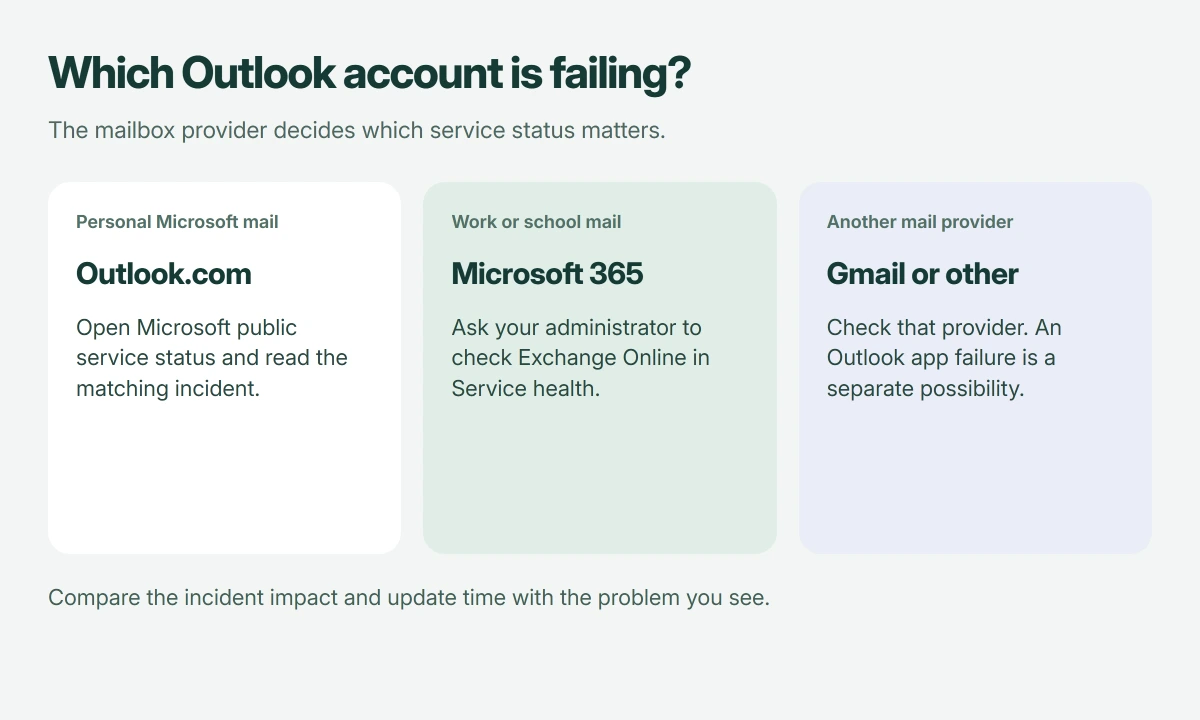
Outlook is an app as well as a mail service. Your personal Outlook.com mailbox, an employer's Microsoft 365 account, and Gmail opened inside Outlook don't all depend on the same service.
Microsoft documents separate help routes for Outlook.com and business Outlook connections, so check which account should receive the missing mail before choosing a dashboard.
Status: Microsoft's Outlook.com and Microsoft 365 status-checking routes reviewed 18 October 2026. No current outage or recovery time is asserted here.
I would note the account type first. A report about a different provider can sound familiar while having nothing to do with your inbox.
Personal Outlook.com: open Microsoft's public status page
For an Outlook.com or Hotmail mailbox, open Microsoft's service status and look for the service matching your problem. Read the incident's newest update.
Microsoft's Outlook.com issues page directs people with access problems to service status. It also lists separate product problems and workarounds.
Check the timestamp carefully. An old resolved incident isn't evidence that today's failure has the same cause, even when its headline mentions email.
If the page offers a workaround, compare its stated symptoms with yours before using it. A fix for attachments may not help a mailbox that cannot sign in at all.
Work or school mail: ask for Exchange Online health
Your organization's Microsoft 365 administrator can open admin.microsoft.com, then Health > Service health, and check Exchange Online. A regular sign-in may lack that permission.
Microsoft says to check Exchange Online when several colleagues have connection trouble in its business Outlook guidance.
Ask your help desk for the incident identifier, affected users, and newest update, giving you something specific to follow without needing administrator access yourself.
Microsoft states that its public status page can help when administrators cannot sign in, while the organization's dashboard covers incidents affecting its own services.
Read the impact before deciding to wait
In its service-health instructions, Microsoft explains that incident details identify the affected service, user impact, status, and update time. Match those details to your experience.
An incident may affect only some users. A colleague's working mailbox doesn't automatically rule it out, and one failed inbox doesn't establish a worldwide outage.
I would follow the documented workaround if it applies, then wait for the next status update. Rebuilding your Outlook profile won't repair a confirmed failure in Microsoft's service.
Check whether Microsoft actually provides a deadline. A message saying work is continuing isn't a deadline, and an estimated time can change.
Nothing listed: compare the app with webmail
Next, try opening your mailbox through webmail. Use Outlook.com for personal Microsoft mail, your organization's webmail for work, or your provider's own website for another account.
Can you read new messages there? If so, you have a temporary way to work while checking the desktop app. Treat that result as a starting point.
If delivery works and only an absence response is missing, check Automatic Replies and account support before treating it as an outage.
If only the program refuses to launch, use our Outlook launch-failure guide. If the mailbox opens but expected messages are missing, our missing-mail checks cover folders, rules, and storage.
For an unlisted business incident, your administrator can use Report an issue in Service health. Include the error and when it began, rather than repeatedly deleting the account from your PC.
The Short Version
Match the dashboard to your mailbox provider. Check the incident's impact and timestamp, then compare webmail with the app if no incident matches your problem.
Where to Next
Does webmail work while your Outlook app fails, or are both unavailable? Tell me the account type and error wording, without your email address. That distinction helps decide whether to follow an incident or repair the app.

Isaac Smith is the founder and editor of PC Glance, a website that covers computers, laptops, and technology. He is a tech enthusiast and a computer geek who loves to share his insights and help his readers make smart choices when buying tech gadgets or laptops. He is always curious and updated about the latest tech trends.