
A Galaxy S26 Ultra locked to a carrier needs that carrier's approval before it can use another network. Start with the company that originally sold the phone, even if a different company now supplies your service.
The exact message on the screen tells you what to do next. A network unlock, a SIM PIN and the phone's screen PIN protect different things. Erasing the phone won't replace a carrier's approval.
Check which lock the phone is asking about
Open the phone with your usual screen PIN, password or fingerprint. If the home screen works but another carrier's SIM brings up a network-lock message, follow the carrier steps in this guide.
A prompt that appears before the home screen and asks for your normal phone PIN is a screen lock. Use the Samsung forgotten-PIN recovery options for that problem.
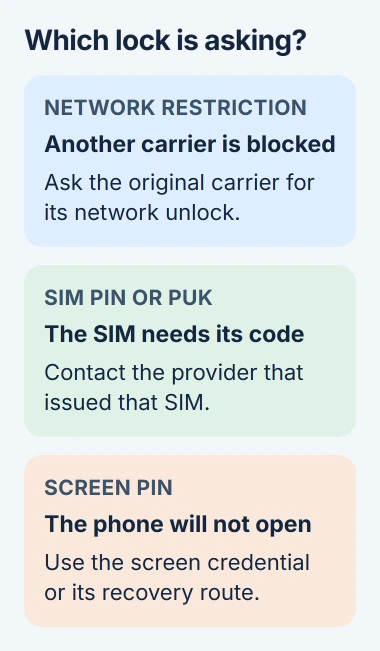
A SIM PIN or PUK request is about the SIM card. Contact the provider that issued that SIM for recovery instructions. Don't try a network-unlock code in a PUK box, or keep guessing either code.
An account-verification screen during setup is a different lock again. It asks for an account previously used on the phone. Give support the exact wording so they know which kind of lock you're seeing.
Identify the original carrier and the correct IMEI
Check your receipt, purchase account or the seller's original listing. A used phone can still be locked to its first carrier after you buy it from someone else.
On the phone, open Settings > About phone and find its IMEI information. The IMEI is the number a carrier uses to identify your phone. Share it through the carrier's official support channel.
A dual-SIM phone can show more than one IMEI. Tell the carrier whether you're changing the physical SIM or an eSIM, the SIM stored digitally in the phone, so they check the right number.
To check which carrier's software is installed, open About phone > Software information > Service provider software version. This can help support trace the phone's origin when the paperwork is missing.
The network name on your phone shows the connection you're using now, which may not be the company that controls the lock. Compare it with your purchase record so your unlock request reaches the right carrier.
Ask for the carrier's permanent network unlock
Samsung's carrier-switching instructions say the carrier sets the unlock requirements. Contact that provider and ask whether this S26 Ultra is eligible for a permanent network unlock.
Have the IMEI and proof of purchase ready. If the phone was financed, check its payment status too. If support says it isn't eligible, ask which requirement you still need to meet.
The rules depend on the carrier, account and how you bought the phone. Paying it off doesn't mean you've met every other requirement. Ask the carrier to confirm your phone is eligible before buying replacement service.
For a used phone, the previous owner may need to handle the account checks. Ask the seller to do that with their provider. Keep your purchase conversation and the carrier's response in case you need to discuss a return.
I'd get that answer before paying an outside unlocking service. It tells you whether your phone can be unlocked and which company handles it, instead of guessing from the model name.
Ask whether the carrier unlocks it remotely, through a phone menu, or with a code. The methods differ. Use the steps the carrier gives you for this request, rather than a sequence for another carrier.
Complete the method supplied for this handset
Keep your phone connected the way the carrier requests while the unlock goes through. One carrier's S26 Ultra may have an unlock menu while another doesn't. A missing menu alone doesn't mean the phone needs resetting.
If support supplies a code, read the prompt carefully and enter it only where their instructions say. Confirm they used the correct IMEI if the code is rejected, then report the complete error before making more attempts.
For an automatic unlock, ask how to check that it's finished. Sending a request isn't the same as getting approval. Keep the reference number until your phone accepts the new service.
Restart the phone when instructed. The Galaxy restart controls explain an ordinary reboot if you're unsure which side-button action opens the power menu.
A factory reset serves a different purpose. Google's reset preparation guidance explains that it removes phone data. A network restriction needs the provider's unlock process instead.
Activate the new service and check what actually works
Before changing the SIM, ask the new provider to check the S26 Ultra's IMEI for compatibility. An unlocked phone still needs hardware and service support on that network, particularly when the handset came from another country.
Follow the new provider's instructions for installing its physical SIM or downloading its eSIM. Approval from the old provider doesn't activate the new subscription. Finish both parts before judging the result.
After the restart, check whether the network-lock prompt has gone. Then make a call, send a message and load a page with Wi-Fi switched off. Seeing a carrier name in the status area alone doesn't confirm those services work.
If calls work while cellular internet fails, give the new carrier that result. Ask it to check activation and the phone's network configuration. Repeating the old carrier's unlock request won't resolve every service problem.
The phone may apply a different carrier's settings and apps after a SIM change. Check any carrier-specific features you depend on, such as voicemail, rather than assuming every feature moved with your number.
When approval hasn't taken effect
Return to the original provider if the screen still reports a network restriction after approval and restart. Give it the request number, IMEI and exact message, and ask whether the unlock has finished for your phone.
If the restriction has disappeared but the new SIM has no service, contact the new provider about activation and compatibility. If the seller can't arrange the required release, discuss the purchase with the seller.
The Short Version
To unlock an S26 Ultra for another network, start with its original provider's approval. Follow its unlock steps, activate a compatible replacement SIM or eSIM, and check calls, messages and cellular internet.
Checked November 5, 2026.

Isaac Smith is the founder and editor of PC Glance, a website that covers computers, laptops, and technology. He is a tech enthusiast and a computer geek who loves to share his insights and help his readers make smart choices when buying tech gadgets or laptops. He is always curious and updated about the latest tech trends.