
Forgot your Samsung phone's PIN or password? A factory reset sounds like the only way back in, with your photos on the line.
I'll check Samsung's previous-lock option before explaining the reset route, because a recently changed lock can give you a chance to keep your data.
Changed the lock recently? Check the previous PIN option
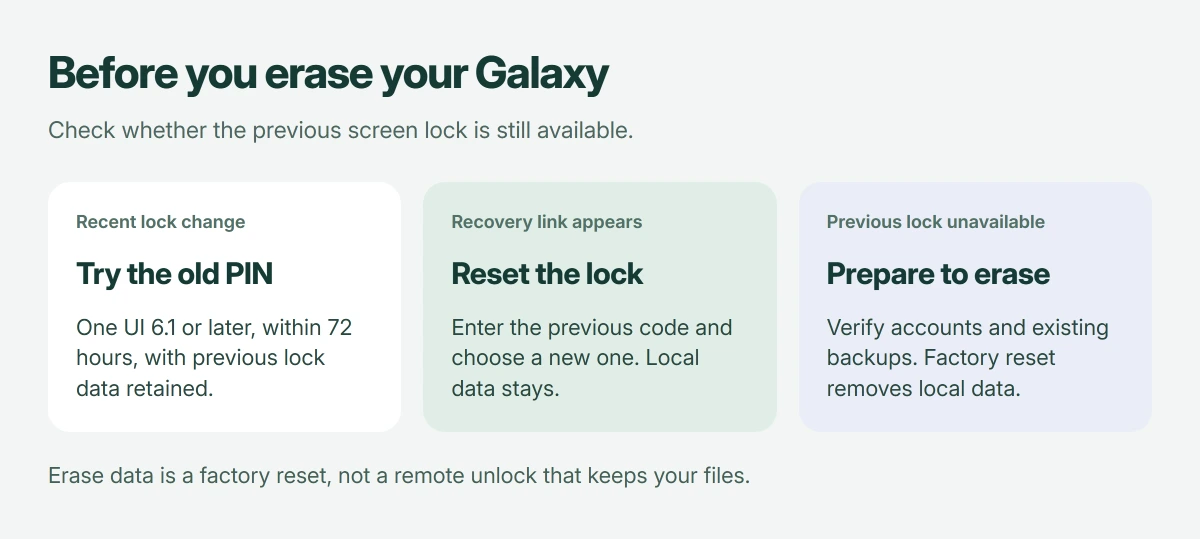
Samsung documents recovery using your previous PIN, password, or pattern on phones running One UI 6.1 or later. It works within 72 hours of changing the lock, provided you didn't delete the previous lock data.
After five unsuccessful attempts, eligible devices offer Forgot PIN?, Forgot password?, or Forgot pattern?. Samsung's previous-lock instructions explain those conditions.
Status: Samsung's previous-lock and remote-erasure guidance checked 18 October 2026, alongside Google's reset preparation. No phone was unlocked or erased during research.
Tap the recovery link, enter the previous lock, then set and confirm a new one. Your local data stays in place.
I wouldn't guess the previous code. Samsung says three incorrect previous-lock entries prevent further attempts through this feature, so random guesses can waste the recovery opportunity.
Missing the recovery link does not mean you missed a setting
The option depends on your software, timing, and retained previous lock, so a PIN changed months ago or a deleted predecessor cannot qualify for this recovery route.
Your Samsung account password is a different credential. Entering it into the phone's PIN box doesn't substitute for the forgotten screen lock.
An accessible Galaxy can switch its screen to Swipe, but that choice requires the current credential and removes access protection.
A Galaxy that opens normally but rejects another carrier needs the S26 Ultra network-unlock process through its original provider.
For a forgotten account credential, recover the Samsung sign-in separately from the phone's unlock code.
If your real problem is a frozen display that won't accept a code you know, our Galaxy restart instructions address that. Restarting doesn't recover a forgotten PIN.
When restarting doesn't restore touch, a compatible USB mouse can enter a known Samsung PIN without making the erase decision described here.
Before erasing, check the account and existing backups
A factory reset removes local data, including apps and information that haven't been backed up. Don't confirm one until you accept that loss and have checked any copies available elsewhere.
Google says to verify the Google account already used on the phone and its password in its reset preparation guide. Check that sign-in on another device first.
If you just reset that Google password, Google's guidance is to wait 24 hours before a factory reset. Resolve a failed account sign-in before erasing.
I would check existing backups now. A locked phone isn't evidence that a current backup exists, and the reset itself won't create one.
Use Samsung's remote erase only when you're ready
Samsung's locked-device guidance documents Erase data through SmartThings Find. This resets the phone; it isn't a remote unlock that preserves its contents.
On another device, open smartthingsfind.samsung.com and sign in to the Samsung account associated with your phone. Check which phone you've selected.
Choose Erase data and follow the confirmation prompts only after completing the preparation. Samsung states that an offline device receives the erase action when it next goes online.
Our Samsung device-finding guide explains the account and device-selection side. Finding a location and choosing permanent erasure are very different actions on that service.
If remote erasure is unavailable
Google documents button resets when Settings won't open, directing you to model-specific instructions. Galaxy button arrangements vary, so find your model's own recovery procedure before touching the buttons.
For a Pixel instead, the locked Android reset instructions give its Recovery controls and the account check that follows erasure.
For a phone that still opens Settings, the normal Android reset paths cover an unlocked Pixel or Galaxy without a remote command.
Samsung also directs people who need reset assistance to an authorized service center. Ask for help with the model and account requirements before proceeding; don't assume that assistance will preserve unsaved data.
After erasure, complete the required account verification and restore an available backup, remembering that a factory reset doesn't remove the need to establish ownership.
For an unlocked phone going to another owner, prepare Google account removal before erasing; that route starts in Settings.
The Short Version
Try the retained previous lock if eligible. Otherwise, prepare your accounts and backups before using Samsung's erase procedure, which removes local data rather than retrieving the forgotten code.
Where to Next
Did you change the screen lock within the last three days, and does the recovery link appear? Tell me which model you have and which controls appear. Please keep every PIN, password, and account address private.

Isaac Smith is the founder and editor of PC Glance, a website that covers computers, laptops, and technology. He is a tech enthusiast and a computer geek who loves to share his insights and help his readers make smart choices when buying tech gadgets or laptops. He is always curious and updated about the latest tech trends.