
No, PC Valorant players can't join matches with PlayStation or Xbox players. Crossplay works between PS5 and Xbox Series X|S, while PC matchmaking stays separate, even if a PC has a controller connected.
To play together, your group needs to use either PC versions or console versions. Skins and account progress can follow you between devices, but the two matchmaking groups stay separate.
Check the platform combination before changing settings
A PC player and a PS5 player can't queue together in Valorant. The same restriction applies to PC and Xbox Series X|S. Connecting different input hardware doesn't change which version of the game is running.
Riot's console crossplay support connects Xbox and PlayStation players while keeping PC separate. If an invitation fails between PC and console, changing your router won't help.
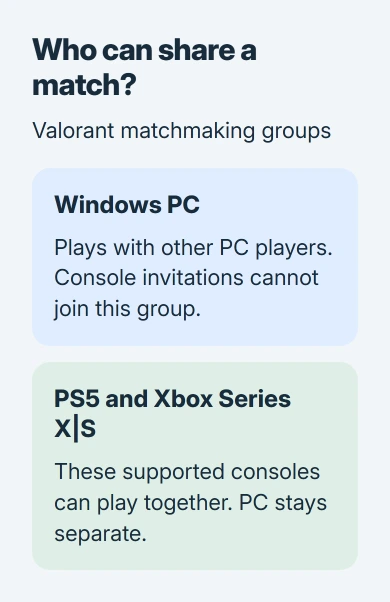
For a group split across PC and consoles, choose one of those supported groups before troubleshooting party settings. Reinstalling the game or opening network ports won't add PC-to-console crossplay.
Check the exact console too. The supported versions are for PlayStation 5 and Xbox Series X|S. An older PlayStation or Xbox isn't covered simply because it can sign in to the same platform account.
Keep crossplay separate from shared progress
Crossplay lets people on different platforms join the same match. Cross-progression lets your account content follow you when you change devices. Valorant shares that content between PC and console, while matches stay separate.
With the right Riot Account linked, your level, agents, skins, currencies, Battle Pass and mission progress follow you between versions. You can try the other platform without building a separate collection.
Seeing the same skin on your PC and PS5 shows the account connection is working. Your PC friend still can't join the console lobby, even though your collection appears on both.
I'd confirm the platform split before changing an account link. Leave the link in place when it shows your collection; check which version your friend is running.
The PS5 game page also distinguishes console-to-console play from PC matches. Read cross-platform claims with that boundary in mind, rather than assuming the term always includes every version.
Expect a separate competitive rank on console
Valorant keeps separate rank and MMR for PC and console. MMR is the hidden rating the game uses to choose your opponents. Your PC rank doesn't become your console rank when you sign in there.
On console, you can have your existing inventory and account level with different competitive progress. That's expected; it doesn't mean your account has lost its history.
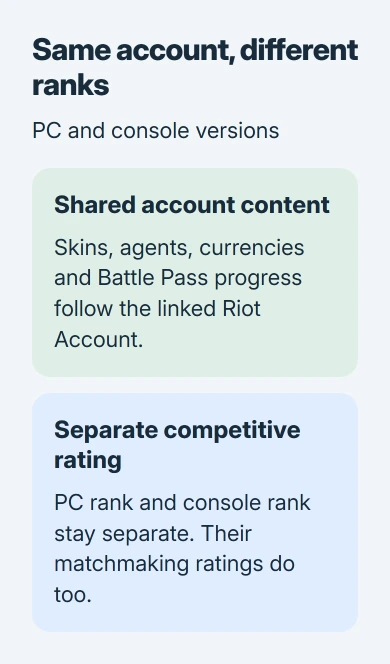
Check which version you're viewing before reporting a missing rank. Tell support both platforms and whether you're missing a cosmetic item, currency or rank. Those follow different sharing rules.
If you're moving to PC so you can join PC friends, expect to learn that version's controls and matchmaking separately. A high rank earned on console doesn't remove the normal requirements shown by the PC game.
Use a supported platform when joining your friends
To join PC friends, play the Windows version on a suitable PC. Check the current PC specifications before downloading. Having a console account doesn't tell you whether your laptop can run it.
The specifications include 64-bit Windows, memory and processor requirements. Windows 11 also needs TPM 2.0 and UEFI Secure Boot, security features of the computer. Match any installation error to those requirements.
Once you're playing on PC, use the mouse and keyboard settings for that version. If aim sensitivity changes unexpectedly, the mouse sensitivity checks cover device software and game profiles separately.
For console friends, use the PS5 or Xbox Series X|S edition. Before linking accounts, check which Riot Account contains your collection. An unfamiliar sign-in screen isn't a reason to create a fresh account.
Availability depends on your region and account eligibility. If the console store doesn't offer Valorant, ask support to check your region against its current list. A PC party setting won't change console download availability.
A controller or adapter doesn't join the two groups
Putting a controller on a Windows PC doesn't turn the Windows game into the console edition. The platform restriction still applies. Matching your friend's input device isn't an alternative crossplay setting.
Console Valorant is designed for controller play. Its anti-cheat explanation describes the decision to separate PC and console and prohibit mouse-and-keyboard use on console.
Don't use an adapter that makes a mouse and keyboard look like a controller. The console guide warns that this can get you banned. It also won't give you a supported route into PC matchmaking.
If Valorant opens on your PC but stutters, check performance. Use the game-stutter comparisons to work on uneven motion after installation; changing the platform group won't fix it.
Troubleshoot invitations only within a supported group
If two console players still can't join each other, check the error and whether their accounts allow cross-network multiplayer. Xbox's cross-network play help explains that account permission.
Allowing that permission can matter for an Xbox-to-PlayStation group. It doesn't override a game's PC restriction. For a child account, have the family organizer review any blocked multiplayer or communication permission.
If players on compatible platforms still can't form a party, report the error to Valorant Support. Include each platform, the mode you're trying and whether the invitation appears. Don't send passwords or recovery codes.
To report a console bug, open the game's Help or Support option and follow its ticket steps. Give your console gamertag or PSN ID and list the steps leading to the failure, so support can try them too.
The Short Version
PC and console Valorant matches remain separate. PS5 and Xbox Series X|S can play together. Use a compatible platform group, keep the correct Riot Account linked for shared content, and expect competitive rank to stay separate.
Checked November 5, 2026.

Isaac Smith is the founder and editor of PC Glance, a website that covers computers, laptops, and technology. He is a tech enthusiast and a computer geek who loves to share his insights and help his readers make smart choices when buying tech gadgets or laptops. He is always curious and updated about the latest tech trends.