
Your frame counter sits at 140 and the game still feels wrong. Little hitches. A hesitation when you turn. A sense that what you see is not keeping up with what your hands are doing.
Then somebody tells you your fps is fine, so it must be you. It is not you, and the number really is misleading.
So this page sorts by exactly how yours misbehaves, because the causes barely overlap.
Why a good number can still feel bad
Frames per second is an average across a whole second. It says nothing about the gaps between individual frames.
A game delivering 140 frames evenly feels perfect. Deliver the same 140 with four arriving late in a clump and it feels like a stutter, same number. That is frame pacing, and no fps counter shows it.
If you want to see it, use a tool that draws a frame time graph rather than a single number. A flat line is smooth, and spikes are what you are feeling.
Ours, and marked as ours: this matters because it changes what you go looking for. You are not hunting for more performance. You are hunting for something that interrupts, briefly and repeatedly.
It is smooth until you alt-tab back into it
This one has a confirmed fix, and you will not find it on any standard list.
Reported by an owner in November 2025, on an AMD Radeon 7800 XT with a Ryzen 5700X.
In his words: "After pressing Alt-Tab, or pressing the windows key, the game appears normally, then when i return to the game window everything just gradually slows (FPS drops) FPS metric programs dont really reflect the real frames."
And the detail that names the fault: "when unfocusing the window again, the game runs buttery smooth, just for it to drop again the framerates when focused."
He had already reinstalled his AMD drivers, disabled background programs, turned off Windows game recording, disabled fullscreen optimizations, disabled windowed game optimizations, and switched off Game Mode.
An Independent Advisor on Microsoft's boards gave him the two standard answers: turn off Optimizations for windowed games and Variable refresh rate, then turn off Hardware-accelerated GPU scheduling.
You will find both in Settings, System, Display, Graphics, Default graphics settings.
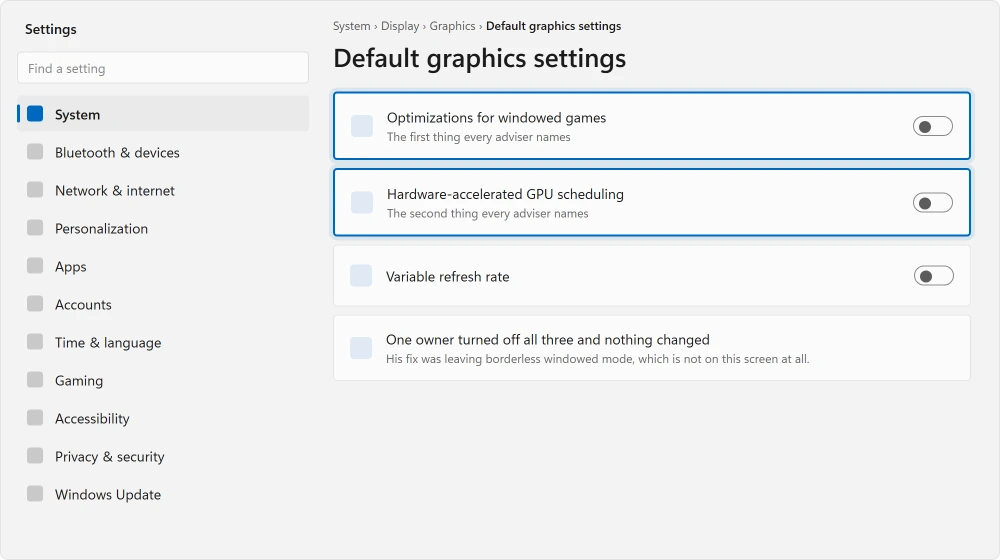
His reply the next day: "i disabled both, restarted my computer and my games still do the same thing… i can tell when it starts to drop the fps even when the metrics say its not so."
Then he found it himself, and posted it the day after that: "omg the issue was Borderless Windowed mode for my games… i just tried with Satisfactory and now my fps are buttery smooth after changing the display to Windowed only."
Ours, and marked as ours: borderless windowed is the default in most games now because alt-tabbing is instant.
That convenience is exactly what puts your game through the desktop compositor, and on some driver and Windows combinations that is where the cost lands. Change one game to exclusive fullscreen or plain windowed and test. It takes a minute.
It gets worse the longer you play
Then look at heat rather than settings.
A processor or graphics card that throttles under sustained load does not usually crash. It quietly slows down. That reaches you as stutter rather than as an obvious fault.
The test is simple: play until it is bad, quit, leave the machine off for an hour, and start again. If the first ten minutes are perfect every time, that is thermal and nothing in Windows will fix it.
A laptop too hot to sit on covers what to do about it. And this same mechanism can slow your typing, which is a keyboard lagging behind you.
A hitch every few seconds, especially in a new game
Usually shader compilation, and usually temporary.
Modern games build shaders for your hardware the first time you meet each effect. That work happens while you play. Each batch is a hitch.
It settles after an hour or two. Then it returns after a graphics driver update, because the cache gets thrown away.
Ours, and marked as ours: if a game stuttered badly for its first evening and has been fine since, you have already lived through this and it needs no fix.
Constant micro-stutter with everything measuring normal
Now the part I owe you, because this one often does not resolve at all.
Reported by an owner in June 2025, playing Valorant on a Ryzen 7 5800X, an RTX 3060, 32 GB of DDR4 and an NVMe drive with 126 GB free.
In his words: "I'm experiencing consistent but subtle stuttering and frame skips while playing games, especially Valorant. The issue is minor but happens regularly enough to be noticeable."
His list of what he had already done is long, and you may recognize most of it. BIOS updated. Graphics and Wi-Fi drivers reinstalled. 120 GB freed on the system drive.
Wired and wireless both tested, drivers cycled, usage and temperatures monitored and all normal, HPET disabled, multiple games tested, every cable reseated, clean boot performed.
An Independent Advisor replied with nine further avenues. The Windows compositor, G-Sync and V-Sync synchronization, timer resolution, CPU parking.
Then DPC latency testing, NVIDIA Reflex conflicts, overlays, multi-monitor variable refresh rate, and a repair install.
Nobody confirmed anything. The thread ends with "let me know how it goes" and no reply.
I am printing that because it is the real shape of this fault. Micro-stutter on a healthy machine with normal temperatures is genuinely hard, and anyone promising you a single setting has not read the threads.
The overlays nobody counts
Worth its own mention because it is common and invisible.
Discord, Steam, GeForce Experience, the Xbox Game Bar, your mouse software, your recording software. Each one draws over your game. Each one is a chance for a hitch.
Turn them all off at once. Not one at a time. All of them. If the stutter goes, add them back one by one until it returns.
Ours, and marked as ours: people test overlays one at a time, find no single culprit, and conclude overlays are not the problem. Two or three together can cost what none of them costs alone.
What is worth changing, ranked honestly
Test exclusive fullscreen against borderless windowed. One minute of your time, and I would start here because it is the only confirmed fix on this page.
Turning off Hardware-accelerated GPU scheduling in Default graphics settings is adviser guidance, widely repeated, and it failed for the owner above.
Turning off Optimizations for windowed games sits on the same screen with the same status. Screen tearing covers what that setting actually does and where it applies.
Disable fullscreen optimizations per game by right-clicking your game's executable and using the Compatibility tab.
Only the first of those was confirmed by anybody. The rest are adviser guidance, and I would rather label them than dress them up.
Status: written 22 August 2026. One owner confirmed that switching out of borderless windowed mode fixed his frame drops, after the two standard graphics settings failed for him.
Why does my game stutter when FPS is high?
Because frames per second is an average across a whole second and says nothing about the gaps between frames.
Frames arriving unevenly feel like stutter while reporting a healthy number. Use a frame time graph rather than an fps counter to see it.
Why do my frames drop after alt-tabbing?
One owner traced exactly that to borderless windowed mode, which routes the game through the desktop compositor.
Switching to plain windowed or exclusive fullscreen fixed it for him, after disabling windowed game optimizations and GPU scheduling had not.
Does hardware-accelerated GPU scheduling cause stuttering?
It is the most repeated suggestion and worth your one restart. But it is adviser guidance rather than a confirmed fix, and it failed for the one owner who reported back after trying it.
Why does a new game stutter for the first hour?
Shader compilation. The game builds shaders for your exact hardware as it meets each effect, and each batch is a hitch. It settles after an hour or two, and returns after a graphics driver update because the cache is discarded.
The Short Version
- An fps counter shows an average and hides uneven frame delivery, which is what stutter is.
- Smooth until you alt-tab back points at borderless windowed mode, confirmed by one owner.
- Worse the longer you play is heat, and an hour off proves it in one test.
- A hitch every few seconds in a new game is shader compilation and settles by itself.
- Turn off every overlay at once. Two together can cost what neither costs alone.
- Micro-stutter with normal temperatures on healthy hardware often does not resolve.
Where to Next
If the frame rate is fine and you are still losing fights, the delay is on the network rather than the graphics card. Two hops on my own connection reported total loss while nothing was wrong.
Change one game out of borderless windowed and play it for ten minutes. That is the only fix on this page anybody confirmed, it costs nothing, and it is not on any standard list.
If your picture is tearing across the middle rather than hitching, screen tearing is that one.
If the screen blanks entirely, a screen that keeps going black has a fix three owners confirmed.
If a different display mode or a specific overlay turned out to be yours, post it below with your graphics card and I will read it.
If the character moves on its own while you are standing still, that is not frame rate. Stick drift has a free repair worth checking first.
Not sure which part of the machine is doing the drawing? A short explanation of what a GPU actually does makes the rest of this easier.
And if you wanted to capture the stutter to show somebody, Windows has two recorders built in already.
On this fault the combination matters more than any single setting, so I would rather collect real ones than guess.

Isaac Smith is the founder and editor of PC Glance, a website that covers computers, laptops, and technology. He is a tech enthusiast and a computer geek who loves to share his insights and help his readers make smart choices when buying tech gadgets or laptops. He is always curious and updated about the latest tech trends.