
Windows 11 25H2 issues often have fixes in later updates. Match your symptom to the installed KB update before rolling back: several recent faults are resolved, while the USB audio repair still covers only part of that problem.
Check the version and update history first, then use the matching section. A Remote Desktop error, a black screen after sign-in and an app closing during audio playback don't call for the same repair.
1. Install offered fixes and record your build
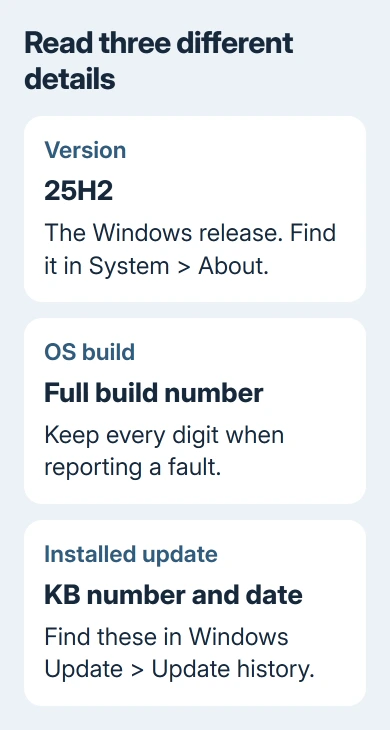
Open Settings > System > About and read Windows specifications. Write down Version and OS build. Confirm that the version is 25H2 before following a release-specific repair.
Next open Settings > Windows Update > Update history. Note the most recent quality update's KB number and installation date. A KB number identifies an update package; 25H2 identifies the broader Windows version.
Return to Windows Update, select Check for updates, install the updates offered to this PC and complete the requested restart. Reopen the app or connection that failed before deciding whether anything else needs changing.
Microsoft says which faults are resolved on its 25H2 release-health page. Read the dated entry to check which devices it affects and whether it's fixed.
If Windows Update itself won't finish, use the stuck-update repairs. You'll need to get the update installed before its fix can help.
I'd try the offered fixes before removing updates. It avoids undoing a package when a newer one already addresses the exact fault you're seeing.
2. Fix Remote Desktop error 0xC000000D
This known issue affects non-administrator users connecting to a remote Windows device with Administrator protection enabled. It doesn't affect every Remote Desktop connection on 25H2.
The connection may fail with 0xC000000D and a message about an invalid token. The problem started with the September 22, 2026 preview, KB5124010, or a later update that includes the same change.
The resolution is KB5127936, released October 28, 2026, or a later update. Have IT update the affected remote host. Check the host's update history even when the connecting laptop is current.
After the host finishes restarting, retry using the same ordinary account. Check that you can connect without the token error. If a different error appears, write it down so you can get help with that problem separately.
For an organization unable to update immediately, its administrator can review the temporary Administrator protection policy workaround in the issue entry. Leave that security change to IT; the fixed update removes the need for it.
3. Repair a black desktop in an affected virtual session
This sign-in problem mainly affects Azure Virtual Desktop hosts using FSLogix, software that manages user profiles in those environments. A personal laptop with a black screen isn't automatically affected by that same fault.
After the August 27, 2026 preview, KB5120998, or subsequent updates, some sessions can reach a black screen without loading the desktop automatically. Application event logs may also show Explorer crashes.
The repair arrived in KB5127648 on October 13, 2026, and later updates. Ask the virtual-desktop administrator to check the host's installed build and apply the appropriate current update.
Give them the sign-in time, whether other users are affected and whether the same profile fails repeatedly. The sign-in time and pattern of affected users help IT recognize this known problem with user profiles.
For a home PC that turns black before sign-in, start with the black-screen startup checks. Checking the display and startup is a different job from fixing a user profile in a remote session.
4. Fix apps that close during AC-3 playback
Another listed issue can make applications close when they need Windows to decode AC-3, also called Dolby Digital audio. An app may fail to launch, or it may open normally and close when playback starts.
The affected change arrived with KB5124010 on September 22, 2026, and later packages. Older applications are more likely to be affected. Many modern apps use their own audio components and won't have this particular problem.
Install KB5127648 from October 13, 2026, or a later update. Then reopen the same application and try the same media or action that previously made it close.
If it still closes after the fixed update is installed, update that application and report its version and the affected file type to its developer. A media player or game can still crash for reasons unrelated to AC-3.
5. Treat the USB audio fix as partial
Some USB Audio Class 1.0 devices can stop producing sound after KB5124008, the September 8, 2026 security update. Symptoms include no output, unusable volume controls or Code 10 in Device Manager.
The September 14 out-of-band update, KB5129195, and later updates fix the problem with 8-channel or 3D audio mode. The issue remains marked Mitigated, rather than fully resolved, for the other listed symptoms.
Install current updates, then compare stereo output with the multichannel mode that failed. Some affected customers restored sound using two channels. That workaround doesn't repair every device showing Code 10.
For persistent failures, give the audio-device maker the exact model, Windows build and Device Manager error. Business administrators needing an immediate workaround for the remaining symptoms should contact Microsoft Support for Business.
6. Separate domain sign-in trouble from a home account
The domain-trust issue affects certain managed PCs whose machine accounts use Credential Guard, a Windows security feature. A failed domain-trust message fits this case; an ordinary forgotten password doesn't.
The resolution is KB5124010, released September 22, 2026, and later updates. Send your administrator the update history and full sign-in message so they can apply the fix or the documented managed workaround.
Don't disconnect a work computer from its domain to experiment. IT needs to repair the settings that identify the computer to your organization while keeping your access working.
When updates don't solve your problem
For a fault that began with the version upgrade itself, Settings > System > Recovery > Go back may be available. The rollback instructions say the usual window is 10 days.
Back up important files first. Going back retains your personal files. Software and drivers installed since upgrading are removed, and later settings changes are undone. Removing a monthly quality update is a separate recovery choice.
If rollback isn't available, open Get Help and give support your build, KB number, exact symptom and what happened after the current update. Managed-PC users should send that information to IT before attempting recovery.
The Short Version
Confirm 25H2 and the installed KB, apply offered updates, then match the remaining symptom to its issue entry. Several faults are resolved; the USB Audio Class 1.0 repair is still partial.
Checked November 9, 2026.

Isaac Smith is the founder and editor of PC Glance, a website that covers computers, laptops, and technology. He is a tech enthusiast and a computer geek who loves to share his insights and help his readers make smart choices when buying tech gadgets or laptops. He is always curious and updated about the latest tech trends.