
The AirPods Pro 3 really can read your heart rate, but only while a workout is running. Not while you simply wear them, and not only when music is playing, but during a workout you start in the Fitness app.
Miss that one step and you get three dashes or nothing at all. Almost every "it does not work" case is a condition the feature quietly needs, not a broken sensor.
Start a workout, not the music
The single most common reason for no reading is that no workout is running.
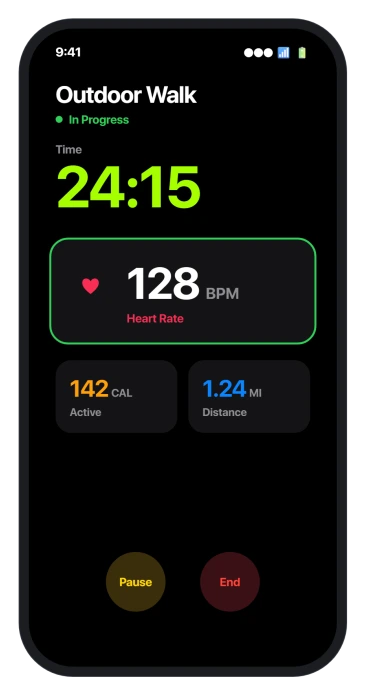
In-ear heart rate switches on when you start a workout in the Fitness app, Fitness+, or a supported third-party app, and it stops when you end it.
Outside a workout, the only place a live number appears is the Health app with the screen on.
There is a stubborn myth that music has to be playing through the AirPods for this to work. It does not.
Apple even lets you send the audio to another device while the heart-rate reading keeps running on your iPhone. What looks like an audio requirement is just the workout requirement.
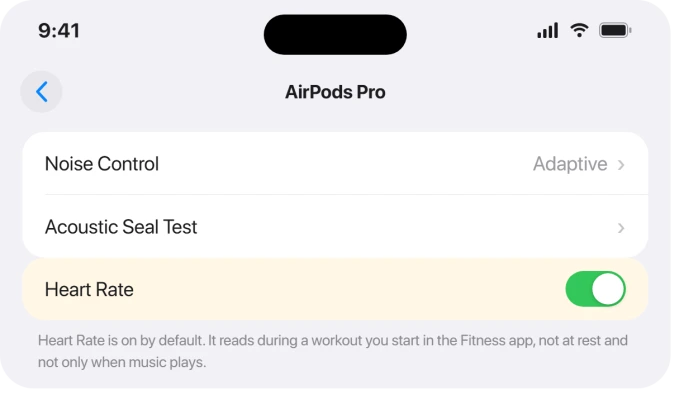
The feature is on by default, so you do not switch it on to use it. If you want to confirm, open Settings, tap your AirPods at the top, and scroll to Heart Rate.
During a workout the number shows on the workout screen, and any time you can find it under Health > Heart > Heart Rate.
If the reading is dashes, it is fit, not a fault
When the number shows as dashes or looks dimmed, the sensor is getting a poor reading off your skin. That is almost always fit, and it is fixable.
- Get the ear-tip size right. The tip that seals best for sound is not always the one that reads heart rate best, so run the Acoustic Seal Test in Settings > your AirPods and try a size up or down. A snug, even seal is what the sensor needs.
- Seat them properly and keep the sensors clean. Push each AirPod in for firm skin contact, and wipe the sensors dry. Earwax, moisture, and lotion all get in the way.
- Warm up first in the cold. Cold ears have low blood flow, which starves an optical sensor of signal, so an outdoor run in winter can read dashes until you warm up.
- Mind metal. Ear piercings or metal jewelry near the sensor can interfere with the reading.
None of this is a hardware defect. A genuinely faulty Pro 3 tends to show up as hissing or weak noise cancelling, not as a missing heart rate.
If you also wear an Apple Watch, the Watch wins
Wear an Apple Watch and the AirPods Pro 3 at the same time and iOS decides which sensor to trust, automatically picking the highest-confidence source moment to moment.
You cannot choose it by hand, and in practice the Watch usually wins, so the AirPods reading mostly shows up when the Watch is off your wrist.
That is working as designed, not a fault. If you specifically want the AirPods to be the source, take the Watch off.
To see which one a reading came from, open Health > Heart Rate, where a Bluetooth icon marks an AirPods reading and a watch icon marks the Apple Watch.
If the Watch itself is the one reading blank, that is a separate problem covered in Apple Watch heart rate not reading on watchOS 26.
It does not do resting or all-day heart rate
A lot of the disappointment here is an expectation the AirPods were never built to meet.
Unlike an Apple Watch, they do not track resting heart rate, they do not run in the background, and they do not log a reading while you sit at your desk or sleep.
They read during a workout, or on demand in the Health app with the screen awake, and that is the whole scope. If continuous, all-day heart rate is what you are after, that is the Apple Watch's job, not the AirPods'.
Third-party workout apps need permission
If you track workouts in an app other than Fitness and it shows no heart rate, the app is probably missing permission.
The first time you use heart rate in a third-party app it asks to read heart-rate data and to read and write workouts, and if that was declined the readings never arrive.
Grant it under Settings > Privacy & Security > Health, and check Motion & Fitness too, then start a fresh workout in the app.
The quick requirements checklist
Run through these and one of them is almost always the miss:
- AirPods Pro 3, since no earlier AirPods have the sensor.
- An iPhone on iOS 26, with the AirPods on current firmware, which updates itself when they are cased, charging, and near an iPhone on Wi-Fi.
- Heart Rate left on in Settings, where it is on by default.
- A firm, correctly sized ear seal.
- An active workout started, or the Health screen open. No workout, no live reading.
What will not fix it
- Waiting for a resting number. All-day and resting heart rate are not supported, so no amount of fiddling produces them.
- Playing music to wake it up. Sound is not what starts the sensor. A workout is.
- Blaming the sensor for a cold-ear or loose-tip reading. The same conditions block any optical heart-rate sensor, including the one on a Watch. Fix the seal and warmth first.
- Expecting a reading while an Apple Watch is on. The Watch takes over as the source by design.
Do AirPods Pro 3 need music playing to track heart rate?
No. Heart rate reads whenever a workout is running, with or without audio, and you can even route the audio to another device while it keeps measuring.
What people take for an audio requirement is really the need to start a workout in the Fitness app or a supported third-party app.
Why does my AirPods Pro 3 heart rate show dashes?
Dashes mean a poor reading off your skin, which is a fit or physiology issue rather than a broken sensor.
Try a different ear-tip size and run the Acoustic Seal Test, seat the AirPods firmly, clean the sensors, warm up if it is cold, and move metal jewelry away from your ear.
Which is used for heart rate when I wear both an Apple Watch and AirPods Pro 3?
iOS chooses automatically, using the highest-confidence source at each moment, and you cannot pick it yourself.
In practice the Apple Watch usually becomes the source, so if you want the AirPods to read, take the Watch off.
The Health app shows a Bluetooth or watch icon so you can tell which one logged a reading.
The Short Version
- AirPods Pro 3 read heart rate only during a started workout or on demand in Health, never at rest or in the background.
- Music does not need to be playing. That is a myth. A workout does.
- Dashes mean fit. Try another ear-tip size and the fit test, seat them firmly, clean the sensors, and warm up in the cold.
- Wear an Apple Watch too and it usually becomes the source automatically. Take it off to force the AirPods.
- Confirm Heart Rate is on under Settings > your AirPods, you are on iOS 26, and a third-party app has Health permission.
Where to Next
- The Apple Watch reading blank instead: Apple Watch heart rate not reading on watchOS 26
- Hiss or weak noise cancelling on the same buds: AirPods Pro 3 hissing or weak ANC
- More iOS 26 fixes: iOS 26 problems and fixes
- Back to the start: pcglance home

Isaac Smith is the founder and editor of PC Glance, a website that covers computers, laptops, and technology. He is a tech enthusiast and a computer geek who loves to share his insights and help his readers make smart choices when buying tech gadgets or laptops. He is always curious and updated about the latest tech trends.