
You went to switch on the watchOS 26 high-blood-pressure alerts, and your Apple Watch either offers no such option or says hypertension notifications are not available for your region.
You are in a supported country on a recent watch, so it makes no sense.
Sometimes that message is right, and something in the fine print genuinely rules you out. Sometimes it is simply wrong, a glitch some people hit on an eligible account, one a short ritual often clears.
Frustrating either way, so let me sort it out with you, most common reason first.
First, check the fine print the message is quoting
Before assuming a bug, rule out the real gates, because most blocked setups fail one of them. The feature needs all of the following.
- A recent watch. Apple Watch Series 9 or later, or Ultra 2 or later. That is five models: Series 9, 10, and 11, plus Ultra 2 and Ultra 3. Every Apple Watch SE is left out, as is Series 8 and older, and no update changes that.
- A supported country. Apple switched it on in over 150 countries at launch and keeps adding more, so a genuine not-available is common where it has not cleared yet. Check Apple's current list for yours.
- iPhone 11 or later, on the latest iOS, paired to the watch.
- Age 22 or older, which you confirm during setup.
- No prior hypertension diagnosis, and not pregnant. The feature is built for people who have never been told they have high blood pressure, and setup asks you to confirm this. Answering yes switches it off by design.
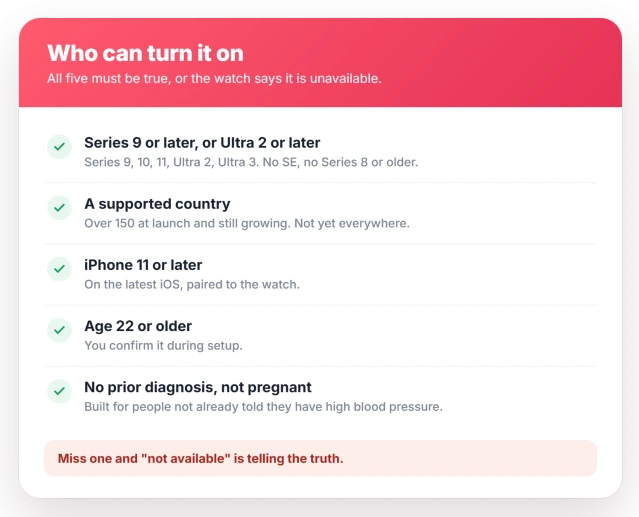
Miss any one of these and the message is accurate. There is no workaround beyond waiting for your country to be added.
Nothing shows up because it works quietly for a month
This is behind most it-is-not-working reports, even when setup went fine. Hypertension notifications are passive. There is no measure-now button, and no blood-pressure number, ever.
The watch studies how your blood vessels respond to each heartbeat over rolling 30-day stretches, then pings you only if a pattern appears.
A freshly switched-on feature will show nothing for up to a month, which is normal, not broken.
Wear the watch through the day, keep it snug, and give it a full cycle before treating it as broken.
When the region message is simply wrong
Clear every gate and still see not available for your region, or find the Hypertension row missing from the Health Checklist, and you have hit a widely reported glitch.
Some iCloud accounts do not get the feature switched on even where they should.
The fix that keeps working for people is oddly indirect. On the watch, take one ECG reading, then take one Blood Oxygen reading, then restart both the watch and the iPhone.
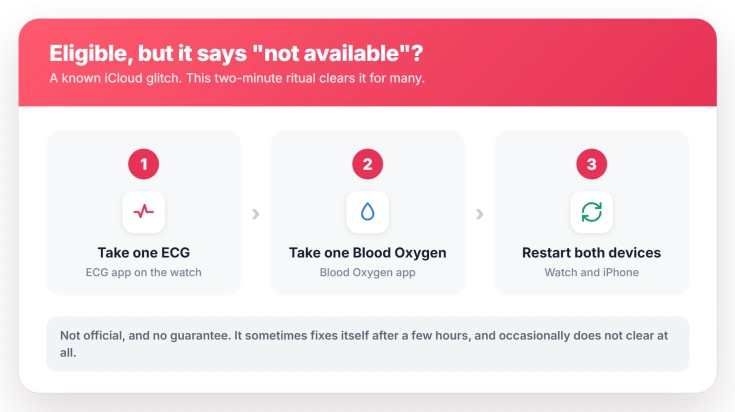
The likely reason it works is that those two apps lean on the same regional health permissions as hypertension, so using them can nudge your account to re-sync and bring the missing option back.
Apple has not confirmed any of this.
It sometimes sorts itself out after a few hours, and it occasionally does not clear at all. But it is a two-minute thing to try before anything drastic.
Run the setup in Health, not on the watch
Plenty of people wait for a switch on the watch that never comes. Setup lives on the iPhone, in a list many never open.
Open the Health app, tap your profile picture in the top corner, then Health Checklist. Tap Hypertension Notifications, choose Set Up, confirm your age and diagnosis history, and step through to the end.
Apple's own walkthrough is Receive hypertension notifications on Apple Watch.
Switch on Wrist Detection, and set a passcode
The feature will not run without Wrist Detection, and Wrist Detection will not turn on unless the watch has a passcode. A watch with no passcode quietly blocks the whole thing.
In the Watch app on the iPhone, tap My Watch, then Passcode. Set a passcode there if you have not already, then turn on Wrist Detection on the same screen. Leave your heart-rate sensing on as well.
Status: a watchOS 26 feature for Series 9 or Ultra 2 and later. The false region error on eligible accounts has no official fix, only the unofficial ECG-and-restart workaround.
What it will not do
A few expectations set people up to think it is broken when it is not.
- Give you a blood-pressure number. It never shows a systolic or diastolic figure. It flags a pattern and tells you to check with a real cuff.
- Read on demand. There is no button to force a check. Taking readings matters only as the account fix, not as a measurement.
- Act as an all-clear. By Apple's own testing it catches under half of cases, so no alert does not mean your blood pressure is fine.
- Behave like ECG, Vitals, or heart-rate alerts. It is separate from the Vitals app, which shows overnight metrics but never blood pressure, and from heart rate readings and their alerts.
- Respond to a factory reset. Wiping the watch will not conjure the feature onto an SE, an unsupported country, or an account the glitch has not released.
Which Apple Watch models support hypertension notifications?
Support starts at Apple Watch Series 9 and Ultra 2, likely because of the newer heart sensor they introduced.
That makes the list Series 9, 10, 11, and Ultra 2 and 3, and leaves out every Apple Watch SE along with Series 8 and older.
You also need an iPhone 11 or later on the latest iOS.
Why does my Apple Watch say hypertension notifications are not available for my region?
Either your country genuinely is not supported yet, since Apple is still adding regions, or you have hit an iCloud glitch that shows the same message on an eligible device.
If you qualify on every other count, take one ECG and one Blood Oxygen reading, then restart both devices, and check again.
How long until Apple Watch shows a hypertension notification?
It can be weeks. The feature works passively over 30-day windows and only alerts you when it detects a pattern, so seeing nothing right after setup is expected. There is no way to trigger a reading on demand.
Does Apple Watch measure my blood pressure?
No. It never gives you a blood-pressure number. It watches for signs of high blood pressure over time and, if it finds them, suggests you confirm with a cuff. For an actual reading you still need a real monitor.
The Short Version
- Rule out the real gates first: Series 9 or Ultra 2 or later with no SE, a supported country, age 22 plus, an iPhone 11 or later, and no prior hypertension diagnosis.
- It is passive over 30 days with no on-demand test, so seeing nothing for weeks after setup is normal, not a fault.
- Eligible but it says not available for your region, or the row is missing? Take one ECG and one Blood Oxygen reading, then restart both devices. It sometimes clears on its own too.
- Set it up in the iPhone Health app under Health Checklist, not on the watch, and keep Wrist Detection on with a passcode set.
- It never shows a blood-pressure number and catches under half of cases, so no alert is not an all-clear.
Where to Next
- The Vitals app showing no overnight data: Apple Watch Vitals blood oxygen has no data
- Heart rate not updating at all: Apple Watch heart rate not reading
- Alerts that never arrive: Apple Watch not getting notifications

Isaac Smith is the founder and editor of PC Glance, a website that covers computers, laptops, and technology. He is a tech enthusiast and a computer geek who loves to share his insights and help his readers make smart choices when buying tech gadgets or laptops. He is always curious and updated about the latest tech trends.