
Your iPad asks permission every single time you paste, and it has turned a two second job into an argument you have twenty times a day.
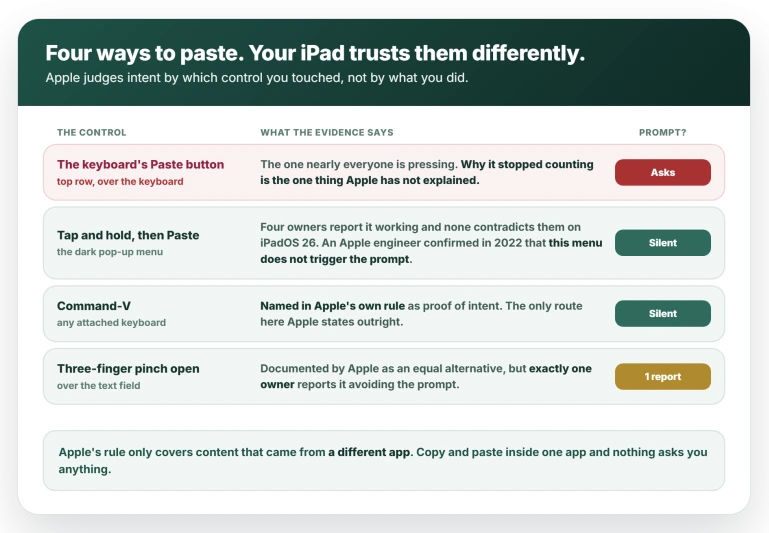
Two buttons say Paste on the same iPad, and only one of them sets off the box. That is the part nobody explains.
Let me show you which is which, and then how to stop the asking altogether.
Tap and hold instead of the keyboard button
Four owners report this working and none reports it failing on iPadOS 26, so it is the best-supported route here.
Only five of roughly thirty reporters ever say which button they pressed, so the rest are silent rather than agreeing.
One caution on the count: the owner who did most of the testing posts under near-identical names on three different sites. He is one person, and this article counts him once.
- Tap once where you want the text, so the insertion point is there and nothing is selected.
- Tap and hold the same spot until the dark menu appears.
- Choose Paste.
If the field already has text in it, holding brings up a magnifier and a Select menu instead. Tap an empty part of the field first, or tap once and then hold without moving.
To confirm it: paste twice, from two different apps. If neither asks, that is your answer and you can stop reading.
If you have a keyboard, press Command-V
This is the only route Apple states outright rather than one pieced together from reports. Apple's rule names two things that prove you meant it, and Command-V is one of them by name.
So on a Magic Keyboard, a Smart Keyboard Folio or any Bluetooth keyboard, press Command-V and the prompt should not appear. Same confirmation: two pastes from two different apps.
If your keyboard is misbehaving in other ways, that is a separate iPad fault.
The three-finger pinch
Apple's iPad guide documents a gesture as an equal alternative to tapping Paste: put three fingertips on the screen over the text field and spread them apart.
Exactly one owner reports the gesture avoiding the prompt, which is why it comes third here. It also has a confusing failure mode.
If nothing at all happens, the iPad did not pick up the gesture, so try again more slowly. If text appears and you still get the box, the gesture worked and this is not your fix.
Turn the Paste button off
Before you do this, know what it costs.
The strip that holds the Paste button also holds undo, redo and the formatting buttons, so switching it off removes those everywhere on the iPad, not only where you were being interrupted.
No iPadOS 26 report mentions trying this either, so it remains untested.
If that trade suits you, go to Settings, General, Keyboards, and turn Shortcuts off.
Apple documents this switch, though only inside its Keynote guide, which is why it is so rarely found:
> "If you don't see the shortcut bar, go to Settings > General > Keyboards, then turn Shortcuts on."
To confirm it: open Notes and tap into a note. The strip over the keyboard should be gone.
Why the setting is missing for Safari and Notes
The advice everywhere is Settings, Apps, then the app, then Paste from Other Apps, set to Allow. Check it, because for a lot of apps it genuinely works.
One posting of that tip has 210 Helpful votes behind it.
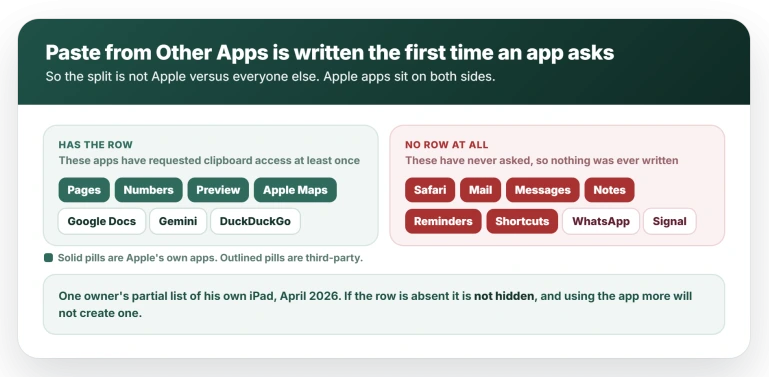
The reason it is missing when it is missing has nothing to do with who made the app. That row is written the first time an app asks for clipboard access, and it is never there before then.
MacRumors reported exactly that when the setting arrived in 2022, and an owner demonstrated it in 2024: he pasted into an app that had no row, allowed the prompt, went back to Settings, and the row had appeared.
So the split is between apps that have asked and apps that have not.
One owner listing some of his own iPad found the row present for Pages, Numbers, Preview, Apple Maps, Google Docs, Gemini and DuckDuckGo, and absent for "Safari, Reddit, Mail, Messages, Notes, Reminders, WhatsApp, Shortcuts, or Signal and most others".
Four of the apps that have it are Apple's own, so this is not third-party versus Apple.
That matters for what you should do next. Unlike a setting that is switched off, this row is not waiting anywhere to be found, and Safari and Mail will not produce one by being used more.
One caveat to carry: every source for the row being written on demand predates iPadOS 26, and Apple has never documented the setting at all.
What Apple actually documents
The prompt is working as designed, and it is not new. It arrived around iOS 16, and the busiest discussion about it is three years old with more than 45,000 views, though that one is about iPhones.
What changed with iPadOS 26 is how often it fires.
Two owners put the before and after plainly: one said iOS 18 "used to ask occasionally or when using a new app for the first time", and another that the pop-up "only appears once" on 18 but appears every time after updating.
Apple's developer documentation for the clipboard carries the rule in a box marked Important:
> "Starting in iOS 14, the system notifies the user when an app gets general pasteboard content that originates in a different app without user intent. The system determines user intent based on user interactions, such as tapping a system-provided control or pressing Command-V."
Two useful things fall out of that sentence. The prompt only concerns content that came from a different app, so copying and pasting inside one app does not raise it at all.
And an Apple engineer confirmed in 2022 that choosing Paste from the pop-up menu does not trigger it, which is why the tap-and-hold route works.
What remains unexplained is narrow and specific: why the iPad's shortcut-bar Paste button is no longer treated as one of those system-provided controls.
Apple has not said, and that single link is inference rather than documentation.
iPadOS 27 is in beta and adds a one-tap paste suggestion over the keyboard. Apple's coverage describes it on iPhone, and it looks additive, so treat it as another way to paste rather than a fix for this.
Two prompts that are not this one
It names a device, not an app. If the box names another device, that is Universal Clipboard, a different route into the same permission.
Apple's requirements are Wi-Fi, Bluetooth and Handoff on, one Apple Account across both, and the devices within 30 feet.
It is not the main cause here, though. The owner who tested most thoroughly reproduced the prompts on an iPad set up as new and signed into no account at all, and again on a 2018 iPad Pro.
If your trouble is the wider Continuity set, that is Sidecar refusing to connect or Continuity Camera dropping off territory.
It says Paste Not Allowed. On a work or school iPad an administrator can switch on a managed pasteboard restriction, and Apple names the Apple apps it covers as Calendar, Files, Mail and Notes.
You can tell them apart instantly: that one shows your organization's name and blocks the paste outright, where the consumer box offers "Allow paste" and "Don't allow paste".
It is not universal
A Level 2 owner on an M5 iPad Pro running 26.1 pasted a paragraph from a website into Notes, a recipe into Notes, and a paragraph from Safari into Notes, and reported "there was absolutely not a problem".
He does not say how he pasted in any of the three, so his result fits the keyboard-button explanation as easily as it argues against it.
One report also runs the other way.
On iPadOS 18, in August 2025, an owner posted the mirror image of this article's advice: for him the keyboard icon was the quiet route and the pop-up menu was what prompted.
That is a different version of iPadOS, and it is the only such report, but it is there.
The prompt also appears in places that are not apps. The same owner who did the reproduction work gets it pasting into Spotlight search and for Screenshots, and a separate owner gets it on photo captions.
What does not help
- Updating iPadOS. It has survived every release so far. Paste is not mentioned in any of the 13 iPadOS 26 release notes, and nobody has reported back on 26.6 either way.
- Signing out of iCloud, or turning Handoff off. The box looks like a Continuity prompt, so people try this. The owner who reproduced it on an iPad signed into no account shows it is not the cause.
- Restarting, or erasing the iPad. Same owner, same test, reproduced immediately on a clean setup.
- Reporting it to Apple. One bug report has been open since September 2025 with no reply.
Status: still prompting on 26.5, confirmed May 2026. No report either way on iPadOS 26.6 (27 Jul 2026). Paste appears in none of the 13 release notes. Recheck when iPadOS 27 ships.
Why does my iPad ask to allow paste every time?
Because your iPad judges intent by which control you touched.
Apple's rule is that the box appears when clipboard content crosses from another app "without user intent", and that tapping a system-provided control or pressing Command-V is what proves intent.
Tap and hold where you want the text and choose Paste from the menu, or press Command-V on a keyboard. Four owners report the prompt stopping, and none reports it continuing on iPadOS 26.
Why is there no Paste from Other Apps setting for Safari or Notes?
Because that row is written the first time an app asks for clipboard access, so apps that have never asked never get one. It is not hidden and it cannot be summoned.
The same list includes Apple apps on both sides, with Pages, Numbers, Preview and Apple Maps showing the row and Safari, Mail, Notes and Reminders not.
Is the Allow Paste prompt a bug or a security feature?
Both arguments are live. One owner argues it is deliberate, because the keyboard button could in principle paste into a different app than the one you are looking at, where a gesture cannot.
The owner who tested it most argues it is a bug, because it fires even for Spotlight search. Apple has not commented either way in ten months.
The Short Version
- Apple's rule: the box appears when clipboard content crosses from another app "without user intent", and tapping a system control or pressing Command-V is what counts as intent.
- Tap and hold, then choose Paste, instead of the keyboard's Paste button. Four owners confirm it, none contradicts it on iPadOS 26.
- Command-V on any keyboard is the one route Apple names outright.
- Copying and pasting inside a single app never raises the prompt at all.
- The three-finger pinch open is documented by Apple but only one owner reports it working.
- Settings, General, Keyboards, Shortcuts off deletes the button, and undo, redo and formatting with it. Untested against this.
- Paste from Other Apps is written the first time an app asks, so Safari, Mail, Notes and Reminders never show it, while Pages, Numbers and Apple Maps do.
- If the box names a device, that is Universal Clipboard. If it says Paste Not Allowed with your employer's name, that is a managed restriction.
- The prompt dates to around iOS 16. iPadOS 26 changed how often it fires.
Where to Next
Two Paste buttons, one of them asks and one of them does not, and knowing which is which is most of the cure.
Apple's rule is about clipboard content crossing from another app without you asking for it, so the fix is to ask for it in the way iPadOS recognises.
Another iPadOS 26 change that hides something you expect to see: the menu bar not showing at all.
If you have set the permission and it still asks every single time in one particular app, name the app below and I will see whether it is a known one.

Isaac Smith is the founder and editor of PC Glance, a website that covers computers, laptops, and technology. He is a tech enthusiast and a computer geek who loves to share his insights and help his readers make smart choices when buying tech gadgets or laptops. He is always curious and updated about the latest tech trends.
Hi, this is a terrific article, and thank you for it.
I have an iPad 9th Gen, with iOS 26.6, just updated.
I have used ChatGPT, and it doesn’t use direct language, but clearly the “Allow paste from…” is now a permanent feature. A couple of updates ago, the Allow Paste option was there for Safari and Mail, and I changed it to Allow. Even using the Paste button makes no difference now.
In a perfect example of ‘nannying’, it has been removed completely in subsequent updates. Truly infuriating – this with other factors has severely damaged the company’s reputation in my view.