
You press and hold an app icon waiting for it to wobble and nothing happens. You hold it longer. Still nothing. By now you are wondering whether the Home Screen has locked itself.
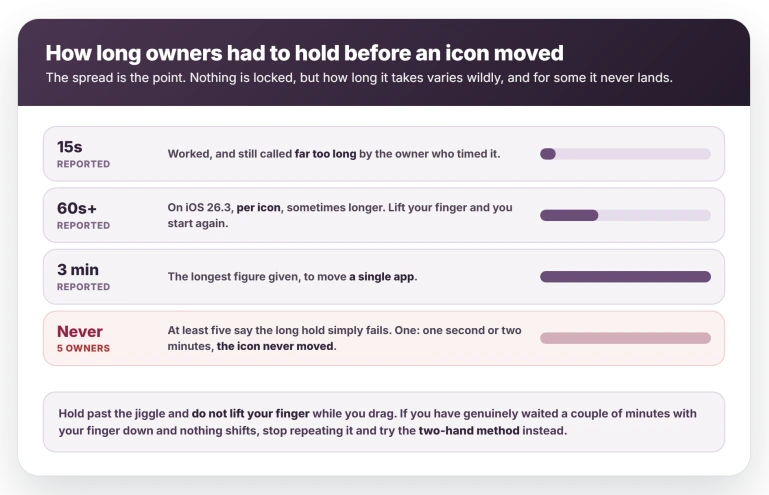
It has not locked, it has stalled, and owners report holding on for anything from fifteen seconds to three minutes before it gives in.
Let me show you what genuinely shifts it, because holding harder is not it.
The two-hand method
The only workaround in that discussion anyone confirmed back, which is why it leads. An owner on iOS 26.0.1 found the hold survives if the other hand does the travelling.
- Hold the app down until everything starts jiggling, and keep holding.
- With your other hand, swipe to the page or folder you want.
- Hold a moment longer after the page settles, then lift.
Two other owners came back to say it worked, one noting it was far quicker than the long hold. If the icon snaps back the instant you lift, the drag never took and you lifted too early.
If it stays put, the method worked and should keep working.
Hold it far longer than feels reasonable
If you only have one hand free, this is the most reported way through.
Press the icon, wait for the jiggle, and then keep holding without lifting your finger while you drag.
One owner on iOS 26.3 put it at "up to 60+ seconds (sometimes longer) each time" and warned that lifting at any point means starting over. Another needed about 15 seconds.
A third reports up to three minutes for a single app.
The original poster found the same thing four days after opening the discussion: holding "a long time" moved the icon, and holding it against a folder "forever" finally dropped it in.
No report describes any on-screen sign that it is working, so there is nothing to watch for. Hold still until the icon lifts, drag without releasing, and judge it purely by whether the icon stays where you put it.
It does not always work. At least five owners report the long hold failing outright.
One put it as bluntly as it can be put: it made no difference whether he pressed for one second or two minutes, the icon never moved.
The Dock relay
One owner worked this out on 1 January 2026, and a week later another folded it into her own step-by-step, crediting the thread for it. So it is one finding passed along, and no follow-up says it worked for them.
Move one of the four Dock icons onto a Home Screen page that has room, drag the app you want into that empty slot, then take it back out of the Dock to the page or folder you want and restore the original icon.
Place it precisely at each stage, or it vanishes and reappears where it came from.
Every one of those moves is still a drag, and neither owner claims the Dock bypasses the hold. What it changes is how far the icon travels while you hold it.
The Screen Time restriction does not exist
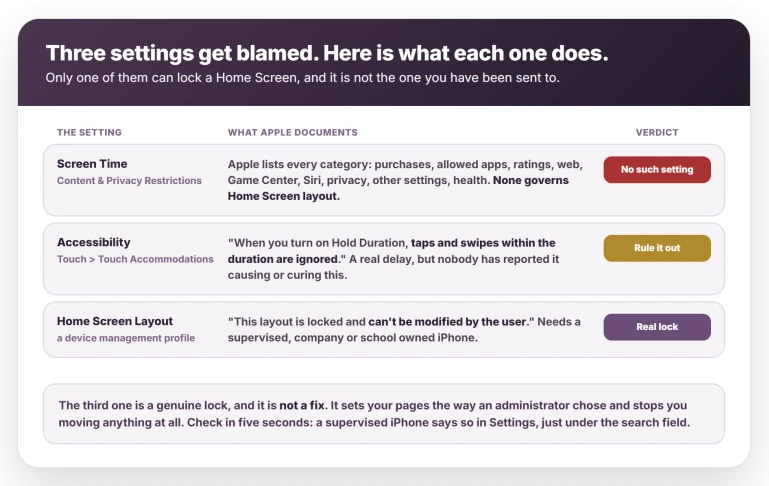
Apple's parental controls page lists every category inside Content & Privacy Restrictions: App Store purchases, allowed built-in apps, content ratings, web content, Game Center, Intelligence and Siri, privacy settings, changes to other settings, and health and safety.
There is no Home Screen layout restriction among them.
The nearest thing does something different. Allowed Apps & Features hides an app.
It does not pin one: "If you turn off an app or feature, the app or feature won't be deleted, it's just temporarily hidden from the Home Screen."
Those toggles do govern installing and deleting apps, so apps that stall on Waiting is the fault they genuinely bear on.
If you switched Screen Time off to test this, switch it back on. It was never the cause, and leaving it off costs you the limits you set.
An app intentionally placed in Hidden has a different route: unhide the authenticated app before trying to arrange its Home Screen icon.
An accessibility setting that could do this, and probably is not yours
Go to Settings, Accessibility, Touch, and look at Touch Accommodations. If it is off, you are done here.
If it is on, Apple's own guide says what that means:
> "When you turn on Hold Duration, taps and swipes within the duration are ignored."
If it is on and you did not switch it on deliberately, turn it off, go back to the Home Screen and try a normal press and drag. If the icon moves at once, that was your answer.
No report anywhere ties these settings to this fault, so check and move on.
Be careful what you switch off. Apple introduces that screen for people "with difficulties with hand tremors, dexterity, or fine motor control".
If Touch Accommodations is on because you need it, leave it on and turn on Swipe Gestures instead, choosing how much movement starts a swipe.
That keeps the accommodation while letting the drag register, though it will not shorten the press that starts jiggle mode.
One control on that Touch screen is directly about time. Haptic Touch sets how long a press must last before iOS treats it as a hold.
If yours is on Slow, set it to Fast and retry the drag: it is the only setting here that shortens that press.
Our guide to Haptic Touch and the touch duration covers the options, the test image and what else on that screen can swallow a hold.
If some icons have turned into a grey target instead, the target icons page has the switch that brought the logos back for owners.
Resetting the layout works, and it comes back
Several owners have reset the Home Screen layout and reported things loosening up afterwards. It is also the most expensive thing here, and Apple's written description of it is thin.
The path is Settings, General, Transfer or Reset iPhone, Reset, Reset Home Screen Layout.
Apple's description of that option is one sentence: "Returns the built-in apps to their original layout on the Home Screen."
What owners describe is larger. Every folder is destroyed. One went from 3 Home Screens to more than 12, all loose icons. One who reset put the rebuild at "a couple months or longer".
Another, who has not reset, shows the stakes: 140 folders across 11 pages holding 1,530 apps. Photograph your pages first.
The on-device confirmation does warn about folders, one owner reports, though the written page never mentions them.
Before you rebuild a single folder, try a drag. If an icon moves on a normal press, the reset did it. Then rebuild a few at a time and retest as you go, because it does not hold.
One owner reset and the problem returned within two months, surviving a wipe and a restore both from backup and as new.
Another tracked the related redraw symptom instead: with folders gone his icons stopped redrawing, and when he rebuilt the folders it resumed.
Why folders seem to be involved
That sequence is the nearest thing to a test anywhere in these reports, and several owners independently reached the same suspicion: this scales with how much your Home Screen has to draw.
One put it as fewer folders and fewer items meaning you may never see it. Another cut a page to five apps and one folder and found it noticeably faster, calling his own explanation a theory.
Others point at Liquid Glass rendering as the load.
None of it is established and it has never been measured. It does point somewhere practical though: if you are rearranging anyway, fewer and shallower folders is what people report living better with.
One related theory collapsed.
An owner proposed that each icon redraw grew System Data by a gigabyte or so, and the only other person to test it checked two devices and found no relationship.
Is this a bug, or has moving apps always been slow?
A Level 10 volunteer with a Community+ badge gives two different answers. Through April he reports four devices, two iPhones and two iPads, on 26.3 up to 26.4.1, with no issue at all.
By July his position has moved: shown a 30-second hold, he replies that this "is exactly how it works" and that moving apps "is a slow deliberate process", "no different in iOS 18, 17, 16".
If he is right, the wait is the phone working as designed and nothing here will change it.
He does not say how his own Home Screens are arranged, which is the one variable the reports keep pointing at.
Around 37 people in that discussion describe the fault in their own words, on hardware as new as an iPhone 17 Pro Max.
One reports a milder version before iOS 26, affecting only Apple's own apps, and another reports the full fault on 18.6.2.
You can at least check your own phone. Put two apps on a fresh Home Screen page and drag one there.
If it moves on a normal press while your foldered page still takes thirty seconds, this is not how your iPhone has always behaved.
If your iPhone is managed by work or school
There is a genuine lock, included only so you can identify it.
Apple's device management documentation describes a Home Screen Layout payload an organization can install, and says plainly: "This layout is locked and can't be modified by the user."
That is not a fix, it is the opposite. It sets your pages, folders and Dock the way an administrator chose and stops you changing anything.
It also requires a supervised device, which in practice means the organization owns the phone.
Open Settings and look just under the search field. A supervised iPhone says so there, naming the company or school. If that line is absent, none of this applies to you.
What does not help
- Wiping and restoring. One owner restored from a backup, then set up as new, and the fault came back within two months either way.
- Restarting, or a force restart. The person who opened the discussion had done both before posting.
- Buying newer hardware. Owners report it on iPhone 17 and 17 Pro Max.
- Screen Time. No Content & Privacy category covers Home Screen layout.
Status: still broken as of iOS 26.6, and contested. Two owners say 26.5 improved it, one says 26.5 started it, and no release note from 26 to 26.6 mentions rearranging or folders.
Why won't my apps move on my iPhone Home Screen?
Because the drag takes far longer to register on iOS 26 than it used to.
Press the icon, wait past the jiggle, and keep holding while you move it, which owners describe taking 15 seconds to three minutes.
For some people no duration works at all; those readers should hold with one hand and swipe to the page with the other.
Why won't my iPhone let me put apps into folders?
The same delay applies, and it is longer at the drop than the pickup. One owner described holding an icon against a folder "forever" before it went in.
Hold it over the folder until the folder opens, wait, and only then lift.
Is a Screen Time restriction stopping me from rearranging apps?
No. Apple's parental controls cover purchases, allowed apps, content ratings, web, Game Center, Intelligence and Siri, privacy and a few other settings. None governs Home Screen layout.
The only genuine layout lock is a device management profile, which needs a supervised iPhone owned by a company or school.
The Short Version
- It looks like a lock. It is a stall: hold 15 seconds to three minutes without lifting your finger. At least five owners say no duration works.
- The two-hand method is the only workaround anyone confirmed back: hold with one hand, swipe with the other, then lift.
- Settings, Accessibility, Touch holds a setting Apple says makes the phone ignore swipes. If you need it, turn on Swipe Gestures rather than switching it off.
- No Screen Time restriction governs Home Screen layout. Apple's own list does not contain one.
- Reset Home Screen Layout works, destroys every folder, and comes back within weeks. Retest as you rebuild.
- Reports cluster on heavily foldered Home Screens. Unproven, but fewer and shallower folders is what people live better with.
- A Level 10 volunteer saw none of it on four devices, and by July argued the slowness is normal and always was.
Where to Next
It looks like a lock and it is really a stall, which is why holding harder achieves nothing.
Keep your finger down longer than feels sensible, and do not lift and retry, because lifting starts the wait again.
A different message that stops people mid-task: iPhone telling you to move the device closer, which is about transfers rather than the home screen.
If yours never gives in, even after a few minutes, tell me which iPhone you are on and how full its storage is, because both seem to matter.

Isaac Smith is the founder and editor of PC Glance, a website that covers computers, laptops, and technology. He is a tech enthusiast and a computer geek who loves to share his insights and help his readers make smart choices when buying tech gadgets or laptops. He is always curious and updated about the latest tech trends.