
You unlock your iPhone and some app icons have turned into a grey target, a bullseye where the logo should be. You can no longer tell those apps apart at a glance.
Updating the apps and restarting did not help the owners in the thread. Switching the Home Screen icons to Dark and back did. I checked each step in Apple's iPhone user guide.
A bullseye where the logo was
The first owner saw it on an iPhone 15 in June, on iOS 26.5, and restarts changed nothing. In August another owner found it had struck overnight: "This has happened overnight to me."
That second owner added: "A lot of apps with the target logo now". A Level 10 volunteer listed things to rule out, such as apps that were offloaded or withdrawn from the App Store.
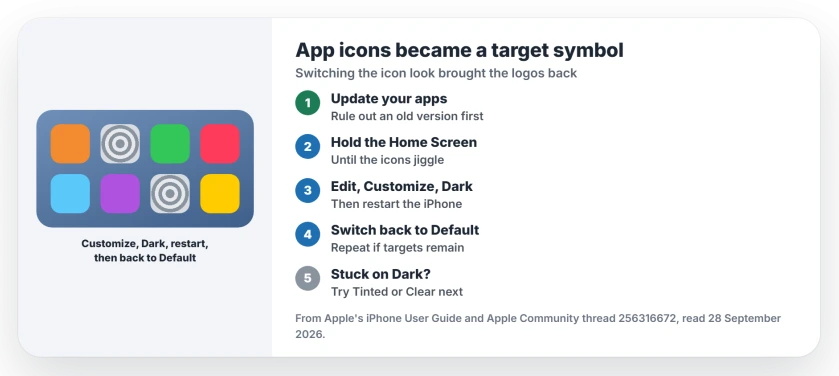
Status: iOS 26.5 and later, checked 28 September 2026. Switching the Home Screen icons to Dark, then back to Default, brought the logos back for two owners. One of them had to stay on Dark.
1. Update the apps first
Start where the first owner did: open the App Store and update every app that has a new version waiting for you. That alone did not bring the logos back for them, but it rules out an old app.
2. Switch the icon look to Dark and back
Apple documents the steps in its Home Screen guide. You start by holding a finger on an empty part of the Home Screen until your icons jiggle.
Then tap Edit at the top left, and you will see Customize; choose it, then Dark. Apple describes it simply: "Choose a dark appearance: Tap Dark." Restart the iPhone, then switch the icons back to Default.
The first owner repeated it until every icon was back. Their honest summary: "Not at all scientific I'm afraid and I don't know what actually fixed it but it did resolve itself."
3. If the logos only stay on Dark
A later owner had the same result, with one catch. It worked, but "A bit annoying that I now have to keep my Home Screen in 'dark' mode (not my preference!)".
If Default brings the targets back for you, I would try Tinted or Clear next. That suggestion is ours; no owner in the thread reports trying those looks yet.
4. Rule out an offloaded app
If one icon behaves differently from the rest, check whether the app was offloaded to save space. Apple's App Store settings describe Offload Unused Apps as a way to "Automatically remove unused apps".
An offloaded app can be downloaded again from its icon, which is a different fault from the target symbol. That distinction is ours.
Other Home Screen problems
If your apps refuse to move on the Home Screen, the moving apps page covers that iOS 26 fault. And if Dark Mode keeps turning itself on, the Dark Mode page goes through the six switches that do it.
Why did my iPhone app icons turn into a target?
No cause has been confirmed. Owners report it on iOS 26.5, some overnight, and switching the icon look to Dark and back brought the logos back for two of them.
How do I change the app icon look on iPhone?
Hold a finger on an empty spot of the Home Screen, tap Edit, then Customize. Choose Default, Dark, Clear or Tinted.
Does updating the apps fix it?
Not on its own for the first owner. They updated everything first, then switched the icon look, and that is when it cleared.
Will I have to keep Dark icons?
Maybe. The first owner got back to Default after repeating the steps, but a later owner found the logos only stayed with Dark.
The Short Version
- Some icons turned into a grey target.
- Update the apps first.
- Home Screen, Edit, Customize, Dark.
- Restart, then switch back to Default.
- Repeat if some targets stay.
- It may only stick with Dark.
Where to Next
Go to your Home Screen now, switch the icons to Dark, restart, and switch back. Check which icons came back.
If your icons look fine but the app switcher stutters with Tinted or Clear, the switcher stutter page traces that to the icon style.
If the targets survive all of that, post your iPhone model and iOS version as a comment, and I will add any fix that turns up.

Isaac Smith is the founder and editor of PC Glance, a website that covers computers, laptops, and technology. He is a tech enthusiast and a computer geek who loves to share his insights and help his readers make smart choices when buying tech gadgets or laptops. He is always curious and updated about the latest tech trends.