
Your iPhone keeps restarting on its own and it is hard not to fear the worst. Two questions get you most of the way to an answer.
Is it actually restarting, or is it the interface reloading? And does the phone leave a log naming what died?
Both take a couple of minutes, and I would do them before you back anything up in a panic.
Respring or restart, and how to tell in two seconds
A respring is the interface crashing and reloading. A restart is the whole phone rebooting. They look almost identical and they mean different things.
Two tells separate them, both from owners describing what they watched.
One on a MacRumors thread noticed their music did not stop when it happened, and that the phone did not demand a passcode afterwards, which a real restart does.
So: music keeps playing and no passcode prompt means a respring, and the thing that crashed is SpringBoard, the interface itself. Apple logo plus a passcode demand means a genuine reboot.
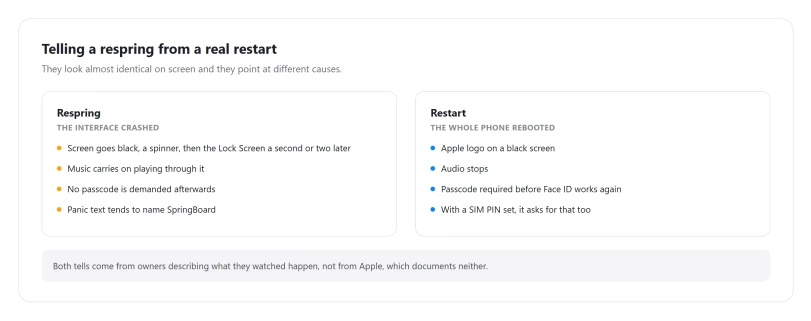
If it happens overnight and you would never know, one owner found a cheap detector: with a SIM PIN set, the phone asks for it in the morning after a reboot. No prompt, no reboot.
Read the panic entry before you touch anything
Settings > Privacy & Security > Analytics & Improvements > Analytics Data. Scroll for filenames beginning panic or panic-full.
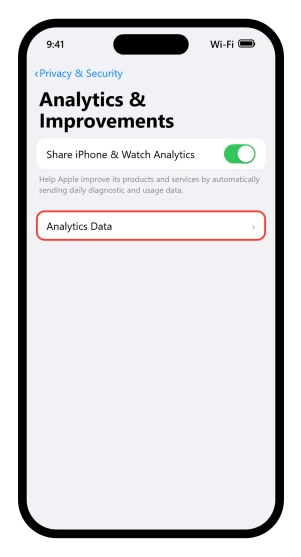
Apple documents the sharing switch on that screen and does not document this list anywhere for ordinary readers. We read its analytics page and its iPhone privacy page end to end to check.
What you get is limited. One person on that MacRumors thread, reading logs for others, described a list of filenames as the equivalent of a car's engine light rather than a diagnosis.
Two people in that same thread opened the files and could not make sense of them.
Still, three things in there are readable and useful.
- How often. One owner counted more than fifty restarts in a month by the entries alone.
- What died. Panic text naming SpringBoard points at the interface rather than the whole system.
- A watchdog code. Apple documents
0x8badf00din its developer material as a watchdog termination, meaning something stopped responding and was killed.
Apple publishes no map from panic text to a specific part, and neither will this page.
What the entries can tell you is whether the name in them is an app, SpringBoard, or something you do not recognize. The third case is the one to take to a technician rather than to another reset.
Three things you might find, and where each one sends you
The entries name an app or SpringBoard. That is the software branch. Work down this page in order.
The entries name something you do not recognize, or there are dozens of entries. That is the hardware branch. Skip to the battery section, because little in between will change it.
There are no entries, or you cannot make sense of them. Common, and not a clean bill of health either way.
Go by pattern instead: restarts only off the charger point at power, restarts on one network point at that network. You still have the count, and that is what a technician wants.
If the phone restarts before you can get into Settings at all, none of this is reachable.
Plug it into power and leave it, and use Recovery Assistant, covered in the next section, which is the only step here that needs no tapping.
If a recovery screen appears on its own
Apple has a feature built for this exact case, and it is its own first move.
From Apple's Recovery Assistant page: "If your device has an issue while starting up or experiences crashes, your device may start Recovery Assistant. Recovery Assistant downloads a software package to resolve startup issues."
It needs Wi-Fi, and Apple notes that captive networks and networks needing 802.1X will not work. If it appears, let it run.
You can also start it deliberately.
Connect the phone to power, then press and quickly release volume up, press and quickly release volume down, then press and hold the side button until the connect to computer screen appears.
Do not let go at the Apple logo. That is the one sequence Apple documents for every iPhone able to run iOS 26.
Apple asks whether to send diagnostics and is straight about the cost: that data "could contain sensitive or personal information, such as your name, device serial number, or file names", and sharing it is optional.
What Apple actually tells you to do
Apple has a page for this exact symptom, document 108367, and its whole remedy is three moves.
Update iOS and your apps.
Then: "If the issue continues after updating your software and apps, check your hardware." Then, if the battery is fine: "If your battery doesn't need service, but your device continues to frequently restart or turn off, you might need service."
That is it. No erasing, no restore, no reset, no storage advice. Apple's answer is update, check the hardware, get service.
The fixes people actually confirmed
These are the only fixes anybody reported as working, with the number of people behind each. The numbers are small, so they are stated rather than hidden behind a ranking.
Update every app, not just iOS. This is the one that matches Apple's own first step.
One owner on an iPhone 14 reported the restarts stopping each time they updated apps between reboots, until eventually everything was current and it continued.
So it works until it does not, which tells you it buys time rather than curing the cause.
Leave the Wi-Fi network. Two separate people on the same thread, both on iPhone 17 models in September 2025, traced constant reboots to one network.
One said it began as soon as they joined their home Wi-Fi and stopped when they made the phone forget it; their internet provider later replaced the router and it ended for good.
The other saw it on a library network that drops idle clients, twenty-eight times in four hours.
Suspect the battery, especially a replaced one. Several people reporting constant reboots had a battery replaced outside Apple, including third-party and warranty replacements, with one showing Battery Health at zero.
Apple's own battery page supports the mechanism: it says unexpected shutdowns are likelier with a low charge, a higher chemical age or cold, and that in extreme cases they make a device unreliable or unusable.
Clean the charging port. One owner cleared the port and the restarts stopped. Apple documents the same step for charging faults, so it is free to try.
A DFU restore, but only for one case, and it erases the phone. A DFU restore wipes everything and reinstalls iOS from a computer.
Before starting one, confirm a backup exists in iCloud or on that computer. If there is no backup and the phone holds something you cannot lose, take it to Apple rather than pressing Restore.
The case it helps is narrow. In one Apple Developer Forums thread from June 2025 about phones left rebooting after a failed install, six people said a DFU restore brought the phone back.
That is a phone that broke during an update, not one that reboots in ordinary use.
Work down those in order and stop at the first one that holds. I would give each a couple of days before deciding it did not work.
What people tried that did not work
This section matters more than the last one, because these are the steps people reach for first.
Erasing the phone and setting it up as new does not fix random resprings. We found no report of it working and several of it failing. One person wiped back to factory and it continued.
Another did soft reset, hard reset and a full DFU restore on a new iPhone 17 Pro Max and the resprings persisted.
A third ran multiple clean DFU restores, set up as new every time, restored no backup, and said the problem survived all of it.
That last detail is the useful one. A fault that survives a clean restore with no data on the phone is not being caused by your data.
Reinserting the SIM and resetting network settings turn up constantly as advice. We found no report of either working, which is an absence of evidence rather than a disproof.
Rolling back to an older iOS is not available. Apple does not publish a downgrade path, and once a newer version ships the older one stops being accepted.
Apple's own view of resetting is more cautious than the advice around it. On its Reset All Settings page it says the step "is rarely necessary".
Before you erase anything
Two costs to know before you start.
Restoring your backup might hand the fault straight back, and that caution is ours. Apple's restore page is a list of steps and says nothing either way, and we found no report of it happening.
Treat it as a precaution rather than a finding. It is cheap insurance: set up as new, confirm it is stable, then bring your data back.
If you do erase, set up as new first, confirm it is stable, and only then bring your data back.
Reset All Settings costs more than it sounds. Apple lists what goes: Wi-Fi passwords and networks, Bluetooth pairings, Apple Pay cards, Face ID and Touch ID settings, Home Screen layout and wallpaper, keyboard dictionary, VPN configurations, notification and privacy settings, and trusted computers.
What survives is your data: photos, messages, apps, files.
If storage is the thing you are actually chasing, our guide to an iPhone that says storage is full while iCloud has room covers that separately.
When it is the battery or the hardware
Battery Health lives at Settings > Battery > Battery Health on iPhone 15 and later, and at Settings, Battery, Battery Health & Charging on iPhone 11 through 14.
Apple publishes the messages that screen can show, including that a battery's health is significantly degraded and can be replaced to restore full performance, and a warning that it cannot verify a genuine Apple battery, which it says can make the readings inaccurate.
One boundary to save you hunting: Apple documents the older performance management messages about an unexpected shutdown only for iPhone 6 through iPhone XR, none of which run iOS 26.
So if you are looking for one of those on an iOS 26 phone you are unlikely to find it. That reading is ours, drawn from Apple's model lists rather than a sentence Apple writes.
Two patterns point at power rather than software.
One is a phone that runs fine plugged in and restarts once unplugged, which matches Apple's low-charge mechanism, and several owners described it.
The other is cold, which Apple documents separately as a reason a device switches itself off.
On a new iPhone 18 Pro Max with iOS 27, restarts that leave rst wdog in the log are their own case. Owners had Apple run diagnostics on those, and some phones were replaced.
If it also gets hot, our guide to an overheating iPhone on iOS 26 covers the thermal side, and if it will not come back on at all, an iPhone that will not turn on covers Apple's one-hour charging procedure.
Which release, honestly
We read every iOS 26 release note from 26.0 to 26.6 in full. Not one mentions a restart, a reboot, a crash, a freeze or stability.
What the reports themselves show is a curve. Reboots tied to Wi-Fi on iPhone 17 models around 26.0 in September 2025.
A cluster of resprings on iPhone 17 Pro models through 26.1 and 26.2 over December 2025 and January 2026, which is the largest group of first-hand accounts we found. Scattered reports at 26.3.
Then it thins out. The MacRumors release threads for 26.5, 26.5.2 and 26.6 carry no restart reports at all, and one owner on 26.6 said the lag and freezing they had seen on 26.5.2 was gone.
So a restart on 26.6 today is probably not part of a wave. Probably, because that is an absence of reports in the threads we read rather than proof of anything.
Either way the panic entry and the battery are the better place to look, because neither depends on which version you are on.
Status: reports run from iOS 26.0 to 26.3, and we found none in the 26.5 or 26.6 threads we read. Apple has never named this in a release note, and its own document for the symptom offers three steps: update, check the hardware, get service.
Why does my iPhone keep restarting by itself on iOS 26?
Check first whether it is a real restart or a respring. If music keeps playing and no passcode is demanded, the interface crashed rather than the phone rebooting. Then read Settings, Privacy and Security, Analytics and Improvements, Analytics Data for entries beginning panic.
Is my iPhone restarting a hardware problem?
Often, yes. Apple's own advice after updating is to check the battery and then seek service. A fault that survives erasing the phone and setting it up as new, with no backup restored, is very unlikely to be your data or your apps.
Will erasing my iPhone stop the restarts?
We found no report of it working for random restarts and several of it failing, including people who ran multiple clean restores with no data on the phone. Apple itself calls even Reset All Settings rarely necessary, and its restore page never warns that a backup can carry the fault back.
What is a respring on iPhone?
The interface crashing and reloading rather than the phone rebooting. The screen goes black, a spinner appears for a second or two, and you land back on the Lock Screen. Music continuing and the absence of a passcode prompt are the two giveaways.
Did an iOS 26 update cause this?
Apple has never said so. No release note from iOS 26.0 to 26.6 mentions restarts or stability. Reports cluster around 26.0 to 26.2 and thin out after that, with none in the 26.6 release discussions we read.
The Short Version
- Work out whether it is a respring or a restart first. Music playing and no passcode means a respring.
- Read Analytics Data for panic entries before doing anything drastic. It tells you how often, and sometimes what died.
- Recovery Assistant is Apple's own first move, and it runs itself if the phone struggles to start.
- Apple's documented answer is three steps: update, check the hardware, get service.
- Updating every app matches Apple's first step, and one owner reported it holding the restarts off each time until everything was current.
- One network can do it. Two owners traced constant reboots to a single Wi-Fi network.
- A replaced battery turns up repeatedly in accounts of constant rebooting.
- Erasing the phone is not confirmed to fix random restarts, and restoring a backup can bring the fault back.
- A phone that only looks frozen is a different case, and our page on a screen stuck after a call covers the sensor behind it.
Where to Next
Work out which kind you have before you do anything else. A respring and a restart look similar and mean very different things.
Then read the panic log, because that is the phone telling you what died, and most people never know it is there.
If your log names something you do not recognise, paste the name in the comments and I will tell you what it points at.

Isaac Smith is the founder and editor of PC Glance, a website that covers computers, laptops, and technology. He is a tech enthusiast and a computer geek who loves to share his insights and help his readers make smart choices when buying tech gadgets or laptops. He is always curious and updated about the latest tech trends.