
You followed a guide, went looking for Battery Health, and either the menu is not called what you were told or half the numbers everyone else talks about are missing. Cycle count, in particular, is nowhere.
That is annoying when you were only trying to work out whether your battery is tired, and I can tell you in one line what your phone is meant to show.
Most of this comes down to which iPhone you have, so start there.
1. The menu has two different names
Check this before you conclude anything is broken, because a guide written for the wrong phone sends you hunting for a row that does not exist on yours.
Apple, on understanding your battery usage and health: "On iPhone 14 or earlier: Tap Battery Health & Charging. On iPhone 15 or later: Tap Battery Health."
Two names, split at the iPhone 15, and both live under Settings, then Battery.
So if you were told to tap Battery Health and your phone shows Battery Health & Charging, you are on an iPhone 14 or earlier and nothing is wrong. Tap the longer one.
On an iPad, the menu only exists on recent models, and the iPad Battery Health page has Apple's list.
2. Cycle count is iPhone 15 and later only
This is the one that sends people in circles, and it is a hardware line rather than a bug.
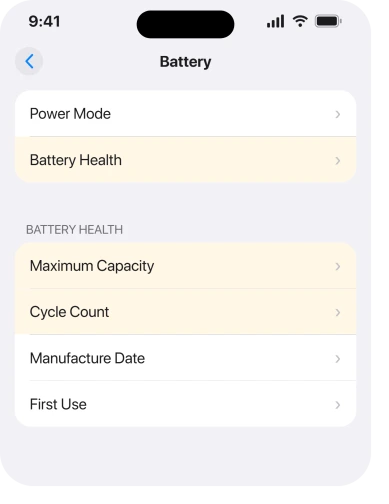
Apple: "On iPhone 15 models or later, you can also see details like battery health, cycle count, manufacture date, and first use date."
On iPhone 15 models or later. So on an iPhone 14, 13, 12 or 11, cycle count is not missing at all. It was never there.
Every video showing a tidy list of cycle count, manufacture date and first use date was filmed on an iPhone 15 or newer. If yours shows Maximum Capacity and nothing else, that is your model behaving exactly as designed.
There is no setting that adds those rows, and no update will.
3. A new or newly restored phone has nothing to report yet
Quick to rule out, and it explains a blank screen on a phone that is working perfectly.
Battery health is calculated from charge cycles. A phone that has barely completed any has little to work from. Apple: "Battery life and charge cycles vary with use and settings."
So on a phone you unboxed last week, or one you have just erased and set up, give it a fortnight of ordinary charging before you read anything into the numbers.
The same applies after a battery replacement. The counter starts again.
4. The recalibration message, and it is narrower than people think
Name it, because it comes up constantly in searches. Almost nobody it is offered to is affected.
Apple ran a recalibration of battery health reporting, and while it runs you see a message in the Battery Health screen instead of a settled figure. Apple: "The displayed maximum capacity percentage won't change during recalibration."
Read who it applies to: Apple's page is titled for iOS 14.5 or later, and its own summary says it covers iPhone 11, iPhone 11 Pro and iPhone 11 Pro Max. It is not a general explanation for a modern phone.
If you have an iPhone 11 and you see that message, it is expected and Apple says the process "might take a few weeks". If you have anything newer, this is not your answer and you can move on.
5. It says Unknown or asks for service
Different message, different article, so know which one you are looking at.
If the screen carries a label rather than a missing number, you are in a separate situation covered by our page on a battery that says Unknown.
That one goes through each label and which of them actually means anything.
The short version of the distinction: a missing row is about your model. A label is about your battery or its history.
6. The number is there and it is falling
Last, because this is the real question underneath most of the searching.
A dropping percentage is not a fault. On a community thread from an owner worried about an iPhone 15 going from 100 to 96 percent over 217 cycles, a senior member gave the rule of thumb plainly:
"Your battery is perfectly fine. Your iPhone battery health is expected to drop about 1% a month or 25 charge cycles."
Another member on the same thread put the design target at roughly a thousand cycles before an iPhone 15 reaches 80 percent, and both told the owner they were doing better than average.
Those are community rules of thumb rather than Apple figures, and I am printing them as that.
What Apple does publish is the practical line: at 80 percent or below, a replacement is the answer, and no setting will change the number.
On an iPhone 17, the one-year battery page lists what launch day owners read after a year, with their cycle counts.
If the drain rather than the number is what is bothering you, our page on what drains an iPhone battery is the more useful read.
What does not help
- Restarting. The rows you are missing are model limits, not glitches.
- Updating iOS. No update adds cycle count to an iPhone 14 or earlier.
- Reset All Settings. It wipes Wi-Fi passwords and permissions and changes nothing here.
- Third-party battery apps. They read the same values your phone exposes, so they cannot show a row your model does not have.
- Draining to zero and charging to full. An old habit from other battery chemistries, and it does not force a reading.
Status: iOS 26.6, checked 17 August 2026. Apple documents the two menu names and that cycle count and manufacture date are iPhone 15 or later. The degradation rates are community rules of thumb.
Why is Battery Health not showing on my iPhone?
Usually because you are looking for the wrong menu name.
Apple says iPhone 14 or earlier shows Battery Health & Charging and iPhone 15 or later shows Battery Health, both under Settings, Battery. Cycle count only exists on iPhone 15 and later.
Why can I not see cycle count on my iPhone?
Because your phone is an iPhone 14 or earlier. Apple states that cycle count, manufacture date and first use date are shown on iPhone 15 models or later, so on older phones those rows were never present and no update adds them.
Is my iPhone battery health dropping too fast?
Community guidance on Apple's forum puts normal at roughly one percent a month or every 25 charge cycles, with an iPhone 15 engineered for about a thousand cycles before 80 percent.
Those are rules of thumb, not Apple figures. At 80 percent or below, replacement is the answer.
The Short Version
- iPhone 14 or earlier shows Battery Health & Charging. iPhone 15 or later shows Battery Health.
- Cycle count, manufacture date and first use date are iPhone 15 or later only.
- A new, restored or freshly re-batteried phone has too few cycles to report anything useful.
- The recalibration message applies to iPhone 11, 11 Pro and 11 Pro Max, not to modern phones.
- A label such as Unknown is a different situation from a missing row.
- Roughly one percent a month is the community rule of thumb, and 80 percent is the replacement mark.
Where to Next
The thing that makes this confusing is that nothing on screen tells you what your model is supposed to show. A row that does not exist looks identical to a row that failed to load.
Check the menu name first. It tells you which side of the iPhone 15 line you are on, and that answers most of the rest by itself.
And if what you see instead is a warning about a genuine Apple battery, that message has six causes.
Where the Health app has stopped counting rather than reporting battery, six checks cover the step count.
Where medication reminders stopped arriving, that has its own six checks.
If your menu name matches your model, Maximum Capacity is still blank and the phone is not brand new, tell me which iPhone it is and what the screen shows instead, because a label and a blank mean two very different things.

Isaac Smith is the founder and editor of PC Glance, a website that covers computers, laptops, and technology. He is a tech enthusiast and a computer geek who loves to share his insights and help his readers make smart choices when buying tech gadgets or laptops. He is always curious and updated about the latest tech trends.