
You open Voice Memos for a recording you need, and the list is short. Or empty. If it was an interview, a lecture, or somebody's voice you cannot get back, I get how much that matters. I will not waste your time.
So this page is ordered by where the recording might still physically be, not by what to fiddle with.
Work down it. The first three cost nothing.
1. Recently Deleted, inside the app
Start here. It is where most recoveries happen, and plenty of owners have never opened it.
Voice Memos keeps its own deleted folder. Nothing to do with the Photos one. Nothing to do with Files.
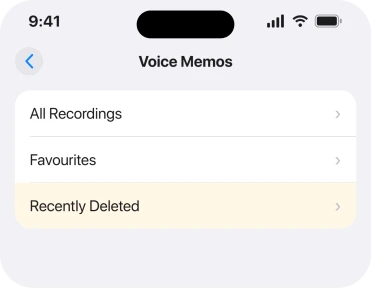
Apple's route, from the Voice Memos page of the iPhone User Guide: open Voice Memos, tap Recently Deleted, then tap the recording.
Then the line nobody repeats. "If you don't see the Recently Deleted folder, tap at the top left."
That back arrow is what people miss. On a phone the folder list hides behind it.
Then tap Recover. To take the lot at once, tap Edit at the top of the list, then Recover All.
2. Check how long your phone keeps deleted recordings
Do this second, because it explains the commonest disappointment on rung 1.
Every page you will read says deleted recordings are kept for 30 days.
That is the default. It is not fixed.
Apple's own sentence:
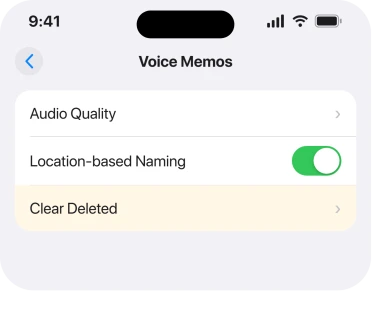
"Deleted recordings move to the Recently Deleted folder, where they're kept for 30 days by default. To change how long deleted recordings are kept, go to Settings > Apps > Voice Memos > Clear Deleted, then select an option."
Go and look at that setting now.
If it clears immediately, or after a day, a recording you deleted last week never sat in Recently Deleted at all.
That is not iCloud. It is a setting somebody chose, possibly years ago, possibly by accident.
3. If the app itself is what vanished, it is in a folder
Short one. It catches people who think the recordings went when only the icon moved.
Apple states it at the start of every single Voice Memos instruction: "Go to the Voice Memos app (in the Utilities folder) on your iPhone."
Utilities. Not the first Home Screen page.
Swipe down from the middle of the Home Screen and type voice. Search surfaces it whether it sits in a folder, in App Library, or on a page you switched off.
If search finds nothing at all, that is a different problem, and our page on why an iPhone keeps deleting apps walks through what removes a built-in app.
4. Check the iCloud switch, then check it on every device
Now the sync side, which accounts for the bigger losses.
Apple's route is Settings, tap your name, tap iCloud, tap See All, then scroll down and turn on Voice Memos.
It matters more than it sounds. On a thread where somebody lost everything after an update, a Level 10 member's first move was that exact toggle, then the iCloud storage figure.
The person reporting it had 300KB backed up. For a library of recordings that is nothing.
A tiny backup size is the tell. The recordings were never leaving the phone, whatever the switch appeared to say.
If your iCloud is full, that is its own problem and our page on iCloud storage covers what to do without buying more.
5. Did the Apple Account on this phone change?
Narrower. When it applies, it explains the whole thing at once.
A Level 10 member with over 440,000 points spelled it out on that same thread. If your Voice Memos sync to iCloud and the Apple ID on the device changes, the recordings tied to the original account go with it.
They are not deleted. They are attached to an account this phone is no longer signed into.
So the recovery is not in Voice Memos at all. Sign back into the original Apple Account, let it sync, then look again.
This catches second-hand phones, work handovers, and anybody who set a new device up under a different account than they meant to. If you inherited this iPhone from somebody, start here rather than at rung one.
6. Toggle iCloud sync off, which brought them back for one owner
This is the one confirmed recovery in the threads I read, and it is deliberately counterintuitive.
On a thread where a two-year library vanished from an iPhone and a Mac at the same time, another person in the same position reported: "After switching iCloud accounts again and turning iCloud sync off, the voice memos re-appeared."
The order matters in their account. Account first, sync off second.
Apple documents nothing like this, so the reading below is ours rather than vendor-documented. With sync on, the phone shows you the library iCloud believes in. Turn sync off and it falls back to what is stored locally.
On that owner's device, the local copies were still sitting there.
Do it in that direction only. Turning sync off does not delete anything from the phone. Turning it on when the cloud copy is emptier than the local one is how people lose the rest.
7. When they are gone from Recently Deleted too
Last. I am not going to pretend this ends well every time.
The two largest threads on this both close without a fix.
One owner on an iPhone 13 Pro Max lost everything after an update. Recently Deleted was empty. They had not changed Apple ID, and no answer on the thread worked. It carries 15 Me Too.
The other, on an iPhone Xs, describes memos from two years vanishing off the phone and the Mac together, gone from Recently Deleted on both.
"all my memos from these last 2 years disappeared", and 40 people marked that they had the same thing.
Three things are still open if that is you.
An older iCloud or computer backup restored to the phone may predate the loss. Restoring replaces everything else on the device, so weigh that properly.
Recordings you exported to Files, or shared in Messages, are separate copies and are untouched.
And a report through the Feedback Assistant is what Level 10 members keep telling people to file.
What does not help
- Looking in the Files app. Voice Memos does not store recordings there unless you exported one yourself.
- Reinstalling the app. The recordings are not held inside the app bundle, so removing it does not restore anything.
- Restarting the phone. Nothing in the threads reports a recording returning after a restart.
- Assuming Recently Deleted always holds 30 days of history. Check the Clear Deleted setting first.
- Turning iCloud sync on to get them back. If the cloud library is the emptier one, that is the direction that costs you the local copies.
Status: iOS 26.6.1, checked 18 August 2026. Apple documents the folders, retention and the iCloud switch. The sync-off recovery is one owner's report. The biggest threads end with no fix.
Why did all my voice memos disappear from my iPhone?
The commonest recoverable causes are the Recently Deleted folder being overlooked, a Clear Deleted setting shorter than 30 days, or the Apple Account on the phone having changed.
Losses after an iOS update are reported regularly with no published cause.
How do I recover deleted voice memos on iPhone?
Open Voice Memos, tap the back arrow at the top left to show the folder list, tap Recently Deleted, select the recording and tap Recover. Tap Edit then Recover All to bring everything back at once.
How long does iPhone keep deleted voice memos?
Thirty days by default, but the period is adjustable at Settings, Apps, Voice Memos, Clear Deleted. If somebody set it shorter, the recording was never in Recently Deleted to begin with.
Does turning off iCloud bring voice memos back?
For one owner it did, after they had also switched Apple Accounts back. Apple documents nothing like it and it is not guaranteed, but turning sync off does not delete anything held on the phone.
The Short Version
- Recently Deleted lives inside Voice Memos, behind the back arrow at the top left.
- The 30-day retention is a default you can change, and it may already have been changed.
- The app itself sits in the Utilities folder, which is why it looks missing.
- A 300KB iCloud backup for a library of recordings means nothing was ever syncing.
- Changing the Apple ID on a phone takes iCloud-synced recordings with it.
- One owner recovered a lost library by switching accounts back and turning iCloud sync off.
- The two biggest threads on this end with no fix, and pretending otherwise would not help you.
Where to Next
The hard part of this one is that Voice Memos keeps three separate copies of the truth. What is on the phone, what is in Recently Deleted, and what iCloud thinks the library should be.
They can disagree, and the app shows you only the answer it has settled on.
That is why the order on this page matters. Look in the local places first, while everything is still exactly as it was. Change no sync setting until you know what you are still holding.
Got one back? Say which rung did it, because that is the sort of thing the next person searching this needs. And if you are stuck at rung seven, what happened just before they went?
And if navigation shows the route but never speaks it, that has its own seven fixes.
Where Voice Control switches itself on rather than recordings going missing, six fixes cover it.
Updates and account changes keep turning up in these reports, and I would like to know which one yours was.

Isaac Smith is the founder and editor of PC Glance, a website that covers computers, laptops, and technology. He is a tech enthusiast and a computer geek who loves to share his insights and help his readers make smart choices when buying tech gadgets or laptops. He is always curious and updated about the latest tech trends.