
It is half past eight, you are watching something, and the screen dims into that dark Sleep face on its own. Notifications stop arriving.
You did not set a bedtime for half past eight, and I know how maddening a phone that decides your evening is over feels.
You have probably been looking in Settings, Focus, Sleep. The switch that does this is not there.
It sits in the Health app, and the time it fires is not your bedtime either. Start with that.
1. Wind Down starts your Sleep Focus, not bedtime
Start here. It is the whole answer more often than not, and Apple states it in one line nothing else repeats.
From Apple's sleep schedule page:
"You can also schedule a wind down period to begin from 15 minutes to 3 hours before your bedtime. Your Sleep Focus begins at the start of your wind down time."
Read that again. Up to three hours before the bedtime you set.
So a midnight bedtime with a three hour wind down turns Sleep Focus on at nine in the evening. Nothing is broken. The phone is doing exactly what the schedule says, and the schedule is not showing you the time that actually matters.
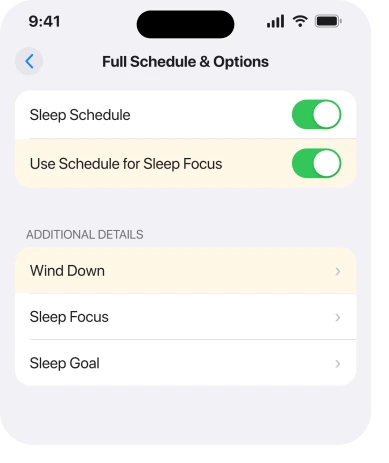
Check yours in the Health app, tap Sleep, then Full Schedule & Options, and look at the wind down setting rather than the bedtime.
2. Turn off the switch that links the schedule to the Focus
If the schedule itself is fine and you just want the Focus to stop firing, this is the one control that does it.
Apple's route: go to the Health app, tap Sleep, scroll to Your Schedule, tap Full Schedule & Options, then turn off Use Schedule for Sleep Focus.
What that leaves you with is the useful part, and Apple spells it out: "When this setting is off, your sleep schedules remain in effect, but your Sleep Focus doesn't automatically turn on."
So your alarm still goes off. Your sleep tracking still records. Only the automatic Focus stops.
That is almost always what people actually wanted, and it is why deleting the whole schedule is the wrong first move.
If your alarm is the thing misbehaving rather than the Focus, our page on a silent alarm is the right read instead.
3. Turning it off in Control Center never sticks
Read this before you spend another week doing it.
You swipe down, tap Sleep, it goes off, and by the next evening it is back. Apple documents that, so the phone is fine.
Apple: "Your Sleep Focus turns on or off again at your next scheduled bedtime or wake up time."
Control Center is a temporary override, by design. It was never going to hold. If you want it to stop for good, you need rung 2.
4. Another device is switching it on for you
Narrower, and it explains the case where you have checked everything on the phone.
Focus settings travel. Apple: "To share your Sleep Focus settings with your other devices, make sure you have Share Across Devices turned on. Go to the Settings app, tap Focus, then tap Share Across Devices."
Read that in reverse. With it on, an Apple Watch or an iPad deciding it is bedtime puts your iPhone into Sleep Focus too.
Turn Share Across Devices off at Settings, Focus, and see whether the evening changes. If it does, the schedule you need to fix lives on the other device.
5. A Focus attached to your Lock Screen
This one catches people who never set a schedule at all.
A Focus can be tied to a Lock Screen wallpaper. Change to that wallpaper, deliberately or by swiping while the phone is in your pocket, and the Focus turns on with it.
Touch and hold the Lock Screen, swipe through your options, and look for one carrying a Focus label underneath. Tap Customize to unlink it.
If your wallpaper has also been changing on its own, that is the same mechanism seen from the other side, and our page on the wallpaper changing itself goes through it.
6. Delete the Focus, which is where one owner ended up
Last, because it is the heaviest option and because somebody actually had to use it.
On a community thread from 13 August, an owner on an iPhone 15 Pro Max running iOS 26 wrote: "The sleep focus is driving me crazy for days…keeps going on by itself!"
Another member gave them rung 2, the Health app switch. A third listed the three separate ways a Focus can activate: automatic, smart, and scheduled.
None of it held. Two days later the owner came back having deleted the Sleep Focus outright: "Problem solved."
The route is Settings, Focus, tap Sleep, scroll down, then Delete Focus. You lose the bedtime filtering, and your alarm and sleep tracking survive because those live in Health.
Do rungs 1 to 5 first. But if you have done them and it still fires, deleting it is a real answer and somebody has already proved it works.
What does not help
- Looking in Settings, Focus for the schedule. The schedule lives in the Health app.
- Switching it off in Control Center. It returns at the next scheduled time by design.
- Deleting the sleep schedule to stop the Focus. Rung 2 separates them without losing your alarm.
- Restarting the phone. Nothing on the thread reports a restart changing the timing.
- Assuming it fires at your bedtime. Wind down can start it up to three hours earlier.
Status: iOS 26.6.1, checked 18 August 2026. Every route on this page is Apple's own wording. The deletion outcome is one owner's, and no reply on that thread confirmed the gentler fixes.
Why does my iPhone Sleep Focus turn on by itself?
Because your wind down period starts it, and wind down can begin up to three hours before your bedtime. Check the wind down setting in Health, Sleep, Full Schedule & Options rather than the bedtime itself.
How do I stop Sleep Focus without deleting my alarm?
Turn off Use Schedule for Sleep Focus in Health, Sleep, Full Schedule & Options. Apple states your sleep schedules stay in effect, so your alarm and tracking continue while the Focus stops firing.
Why does Sleep Focus come back after I turn it off?
Apple designed the Control Center switch as a temporary override. It turns back on at your next scheduled bedtime or wake up time, so it will always return until you change the schedule.
Where is the Sleep Focus schedule on iPhone?
In the Health app, not in Settings. Open Health, tap Sleep, scroll to Your Schedule and tap Full Schedule & Options. Settings, Focus, Sleep only controls what the Focus does once it is on.
The Short Version
- Wind down starts Sleep Focus, and it can begin up to three hours before bedtime.
- The schedule lives in the Health app, which is why searching Settings for it fails.
- Use Schedule for Sleep Focus is the one switch that stops it without losing your alarm.
- Control Center only overrides it until the next scheduled time.
- Share Across Devices lets a Watch or an iPad turn it on for you.
- One owner tried everything and only deleting the Focus outright fixed it.
Where to Next
The reason this feels like a fault is that two different apps own two halves of one feature. Health decides when Sleep Focus happens. Settings decides what it does. Neither screen mentions the other.
Once you know that, the fix is usually thirty seconds in an app you never associated with the problem.
Have a look at your wind down number tonight before you change anything else.
And if what is left behind is a red badge on Messages with nothing unread in it, that clears a different way.
Where the Focus that will not behave is Driving rather than Sleep, that one fails in its own way.
If it turns out to be two or three hours and you had no idea, come and say so, because I suspect that single setting explains most of the people searching for this.

Isaac Smith is the founder and editor of PC Glance, a website that covers computers, laptops, and technology. He is a tech enthusiast and a computer geek who loves to share his insights and help his readers make smart choices when buying tech gadgets or laptops. He is always curious and updated about the latest tech trends.