
Your response to the invitation cannot be sent lands on your screen the moment you tap Accept, and tapping again brings it straight back, sometimes several times a day.
I get how much of a nuisance that is when somebody is waiting on your answer.
One thing to understand before the fixes. Accepting an invitation is not a calendar action, it is a message being sent back to the organiser, and it is that send which is failing.
1. Look in your Mail Outbox first
Ten seconds, and a Level 10 member's opening question on the biggest thread about this.
Open Mail and tap Mailboxes. If an Outbox appears at all, something is stuck in it. A queue that cannot clear will block your calendar reply as well.
Delete or resend whatever is sitting there. If there is no Outbox at all, you have ruled it out and can move on.
Our page on email stuck in the iPhone Outbox covers how to clear one that will not shift.
2. Force Calendar closed, then restart the phone
Cheap, and in that order. I would do this before touching any setting, because it clears the cases where the app has simply lost its connection.
Swipe up from the bottom and pause. Swipe the Calendar card away. Open it again and try the invitation.
If it still fails, restart the phone properly and try once more. One clean attempt after a restart tells you more than ten taps before one.
3. Switch Calendars off and on for that account
Owners report this more than any other fix on the subject. There is nothing to lose by trying it.
Go to Settings, Apps, Calendar, then Calendar Accounts. Tap the account your invitation came into. Turn Calendars off. Wait ten seconds. Turn it back on.
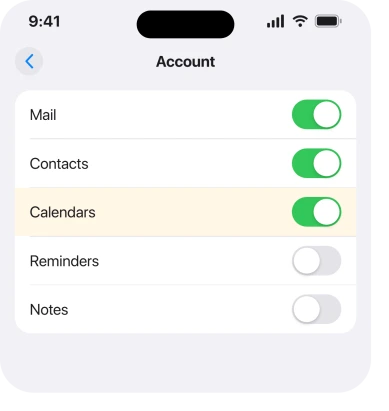
Apple documents that route in Change your Calendar settings on iPhone, where accounts such as "iCloud, Google, Microsoft Exchange, and Yahoo" are added and managed in exactly that screen.
An owner on the main thread described doing the account disable and enable with a restart in the middle, and several other people replied to confirm it worked for them too.
4. Untick every calendar inside the app, then tick them again
Narrower, and it is aimed squarely at work accounts.
Open Calendar and tap Calendars at the bottom. Untick all of them, wait a few seconds, then tick them again and pull the list down to refresh.
The owner who reported this said their trouble was on a Microsoft Exchange account, which is where most of these reports come from.
If your calendars are hidden while you do this, nothing is deleted. The switches control what is shown, not what exists.
5. Check the account can still send mail at all
This rung follows from what the error actually is. Apple does not document the message at all, so nobody else prints this check either.
Your reply goes out through the account that owns the calendar. If that account's password has changed, or its token has expired, the reply has nowhere to go. A tightened work policy does the same.
Open Mail, pick that account and send yourself a test message. If the mail fails too, stop working on Calendar. The account is the problem, and an iPhone that says Cannot Get Mail is the page to read next.
If it is a work Exchange or Outlook account asking repeatedly for a password, that pattern has its own causes and an iPhone stuck asking for your Outlook password covers them.
6. Remove the work account and add it back
Bigger, and it is the step one owner used to finish the job when everything above had failed.
They removed the Calendar app, deleted the Exchange account, then reset and set it all up again. Their words afterwards: "Now fixed. Delighted."
Go to Settings, Apps, Calendar, Calendar Accounts, tap the account and Delete Account, then add it again and sign in.
Know what leaves with it. Removing an account takes its Calendar, Contacts, Mail and Notes off the phone until the account is back, and anything you created in an On My iPhone calendar is not in that account at all.
Check Settings, Apps, Calendar, Default Calendar before you tap.
7. When the invitation itself is the problem
Last, and it is the case where nothing on your phone will help.
An invitation forwarded by a colleague rather than sent by the organiser often cannot be answered. You are not on the original attendee list. The same goes for an event cancelled or rescheduled since it arrived.
Some organisations also block replies from outside their own system entirely, in which case your acceptance was never going to reach anybody.
So reply by email instead and ask the organiser to add you directly. I know that is not satisfying. It is still better than another hour of toggling.
Status: iOS 26.6.1, checked 19 August 2026. Three owner-confirmed fixes come from one thread carrying 2,928 Me Too, and they predate iOS 26. Apple has published nothing about this error message.
What does "your response to the invitation cannot be sent" mean?
It means your iPhone could not deliver your acceptance or decline back to the organiser. The reply travels through the mail account attached to that calendar, so the failure is usually in the account or its connection rather than in Calendar itself.
Why does the message keep appearing over and over?
Because the reply is queued and retried. Until it goes out, or you clear the account by switching Calendars off and on, the phone keeps trying and keeps telling you it failed.
Does the organiser see my reply if I get this error?
Assume they do not. The error means the send failed, so your name will still show as awaiting a reply on their side. Send them a quick email if the meeting matters.
Why does this only happen on my work calendar?
Most reports come from Microsoft Exchange accounts, which handle invitation replies differently from iCloud. A work account also carries password rules and security policies that can quietly stop a reply going out.
The Short Version
- Accepting an invitation is a send, not a calendar action.
- Check for anything stuck in your Mail Outbox before anything else.
- Switching the account's Calendars off and on is the most reported fix.
- Untick and retick every calendar in the app, which owners used on Exchange.
- Send yourself a test email from that account to prove it can still send.
- Removing and re-adding the work account is confirmed but takes contacts with it.
- A forwarded invitation often cannot be answered at all.
Where to Next
The error is written as though your calendar has failed, which sends people to the wrong place. Nothing is wrong with the event, the app or the day you tapped on. A message could not leave your phone.
So test the account rather than the calendar. That one move separates a five-second toggle from an hour of resetting things that were never involved.
If yours turned out to be a forwarded invitation rather than a settings problem, tell me in the comments. That case is easy to miss and worth naming higher up this page if more than one person hits it.
If your calendar has stopped updating entirely rather than failing on replies, an iPhone saying Unable to Update Calendars is the page for that.

Isaac Smith is the founder and editor of PC Glance, a website that covers computers, laptops, and technology. He is a tech enthusiast and a computer geek who loves to share his insights and help his readers make smart choices when buying tech gadgets or laptops. He is always curious and updated about the latest tech trends.