
You switch Bluetooth off in Control Center, and by the next morning the icon is blue again. Nothing you did brought it back.
That is unsettling on a phone you thought you controlled, and I can tell you exactly what is happening because Apple documents all of it.
Good news first. Your iPhone is not ignoring you and it has not been got at. The button you pressed does something different from what it looks like it does.
1. Turn it off in Settings, and it stays off
Start with the fix. Most people came for this and not for the explanation.
Apple, in Use Bluetooth and Wi-Fi in Control Center, on completely disabling it: "Open the Settings app, tap Bluetooth, and turn off Bluetooth."
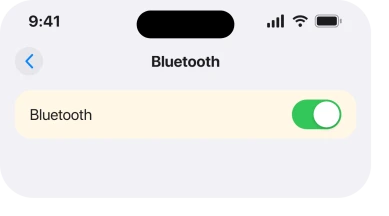
That switch holds. It does not expire overnight. It does not come back when you walk somewhere new. Nothing in Control Center will undo it.
Read rung 5 before you leave it off, because it costs you more than you would expect.
2. The Control Center button was never an off switch
Apple states plainly what the button actually does, and the wording is the whole answer.
Apple, same page: "When you toggle the Wi-Fi or Bluetooth buttons in Control Center, your device immediately disconnects from Wi-Fi and Bluetooth accessories."
Disconnects. Not turns off. The radio stays powered and the phone stays reachable. It simply drops the things it was talking to.
That is why the icon dims rather than going dark. It is also why your car or your headphones stop working while everything else carries on.
3. Four things bring it back, and one of them is a clock
This is the part that makes it feel haunted, and it is documented in a plain list.
Apple, same page: "If you turn off Bluetooth, you won't be able to connect your iOS or iPadOS device to your Bluetooth accessories until: You turn on Bluetooth in Control Center. Connect to a Bluetooth accessory in the Settings app under Bluetooth, or tap the AirPlay icon or and select a bluetooth accessory. It's 5 AM local time. You restart your device."
So the disconnection has a deadline. 5 AM local time, every day. That is why yours is always back by morning.
A restart ends it too. That explains the other common report. People switch it off, reboot for something unrelated, and find it back on.
Our page on an iPhone keyboard that will not appear uses the same rule for a different symptom, because a Bluetooth keyboard reconnecting at 5 AM steals the on-screen one.
4. Plenty still works while the button is dimmed
Worth knowing before you decide the button is useless. It is not.
Apple lists what carries on regardless: "AirDrop, AirPlay, Apple Pencil, Apple Watch, Continuity features, like Handoff and Instant Hotspot, Instant Hotspot, Location Services, Unlock with Apple Watch".
The Bluetooth section names its own exceptions as well: "Exceptions include Apple Watch, Instant Hotspot, Apple Pencil listed in Accessories, or Continuity features, like Handoff, in AirPlay & Handoff."
Read that as designed rather than broken. The button is meant to get your phone out of a car or a speaker. It was never meant to cut you off from your watch.
5. What turning it fully off actually costs you
The rung nobody warns you about. It is why I would not leave your Bluetooth off as a habit.
With Bluetooth off in Settings, your AirPods, car, speakers and keyboard will not connect. Your Apple Watch loses its main link to the phone. AirDrop stops being useful. So does Handoff.
And two things people do not expect. Find My leans on Bluetooth to locate a device that has no network, and a car key or house key in Wallet needs the radio on to work at all.
Apple puts its own recommendation in one sentence: "For the best experience on your iOS or iPadOS device, try to keep Wi-Fi and Bluetooth turned on."
If your reason for switching it off is battery, that is worth testing rather than assuming, and what actually drains an iPhone battery on iOS 26 sets out where the power really goes.
6. When it is genuinely not this
Narrowest, and it is the case where none of the above applies.
If the switch in Settings, Bluetooth will not stay off, that is different from Control Center expiring.
Airplane Mode has its own memory here, and Apple notes it: "Airplane Mode might also turn off Wi-Fi and Bluetooth, unless you turned them on while in Airplane Mode."
Also check whether something is turning it on for you rather than the phone doing it. A Shortcuts automation. A CarPlay connection. A Focus with a car trigger. Any of those will switch the radio on without asking.
Pixel phones have a close cousin of this: tapping the Wi-Fi tile only disconnects, and one setting turns Wi-Fi back on near saved networks. The Pixel Wi-Fi page shows both switches.
Owners report the design answer rather than a fault on every thread I read, so a switch that truly will not hold is the unusual case and worth an Apple Support appointment rather than more toggling.
Status: iOS 26.6.1, checked 19 August 2026. Apple's page was updated 23 April 2026 and every rule here is quoted from it. Four senior members call this intended behaviour.
Why does my iPhone Bluetooth keep turning itself on?
Because the Control Center button disconnects your accessories rather than turning the radio off, and Apple documents that the disconnection ends at 5 AM local time, when you restart, when you connect something in Settings, or when you tap an accessory in AirPlay.
How do I turn Bluetooth off permanently on an iPhone?
Settings, then Bluetooth, then turn the switch off. That one holds until you turn it back on. The Control Center button will not do it, no matter how many times you tap it.
Does leaving Bluetooth on drain the battery?
Apple recommends leaving both Bluetooth and Wi-Fi on for the best experience, and the radio idles at very low power. Anything actively streaming to headphones or a car uses far more than the radio sitting idle does.
Is it a security problem that Bluetooth stays on?
The radio being available is not the same as your phone accepting connections from strangers. Pairing needs approval on your side. If you want it genuinely off for a while, use the Settings switch rather than Control Center.
The Short Version
- Settings, Bluetooth is the only switch that holds.
- The Control Center button disconnects accessories and leaves the radio on.
- Apple documents four things that end the disconnection, including 5 AM local time.
- AirDrop, AirPlay, Apple Watch and Handoff keep working while the button is dimmed.
- Turning it fully off costs you Find My reliability and any key in Wallet.
- Apple's own advice is to leave Bluetooth and Wi-Fi on.
- A Settings switch that will not hold is a different problem and is rare.
Where to Next
Almost every complaint about this turns out to be a naming problem rather than a phone problem.
A button that looks like an off switch is a disconnect button with a timer on it, and Apple explains that in a support page most people never see.
Once you know the rule you can pick deliberately. Control Center to get out of a car for an hour. Settings when you actually want the radio down.
If you have found something that switches Bluetooth on that is not in Apple's list of four, tell me what it was. An automation or an accessory doing it would be genuinely new and I would add it here with credit.
If the real trouble is that Bluetooth is on and still will not pair with anything, that is the opposite fault, and iPhone Bluetooth not connecting is the page for it.

Isaac Smith is the founder and editor of PC Glance, a website that covers computers, laptops, and technology. He is a tech enthusiast and a computer geek who loves to share his insights and help his readers make smart choices when buying tech gadgets or laptops. He is always curious and updated about the latest tech trends.